IPhone 12 Pro lens flare

Is anyone else experiencing a bright reflection when shooting towards a light source. On both the 1x and 2x I am getting a bright reflection that appears in the photo. (iPhone 12 pro was not listed in the device options below)

iPhone 11 Pro

Posted on Oct 24, 2020 5:55 AM

Reply
Question marked as Top-ranking reply

Posted on Oct 27, 2020 10:45 PM

I have contacted Apple and they are replacing my iPhone 12 Pro after I sent them sample photos of the ghosting/reflections in the images. A $300 point and shoot digital camera produces lens flare, as does a $10,000 professional DSLR kit--but neither will produce the ghosting/reflecting I and others are seeing with photos taken with these faulty Apple lenses. The problem Apple has with the iPhone lens is NOT lens flare, it's ghosting/reflecting.


I did a camera test with my iPhone X and I had nice lens flares--as was to be expected--but again I didn't see any ghosting/reflections like I am seeing with the 12 Pro. If the replacement phone has the same issue, I'm going to get a refund. There is nothing "Pro" about using a camera that doesn't work as advertised.


[Edited by Moderator]

991 replies

Mar 31, 2021 3:54 PM in response to starstuff1313

Since they are reflections, they will move in a perhaps non-intuitive way as your relationship to the light source changes.


Yes, it becomes more obvious as cameras get better.


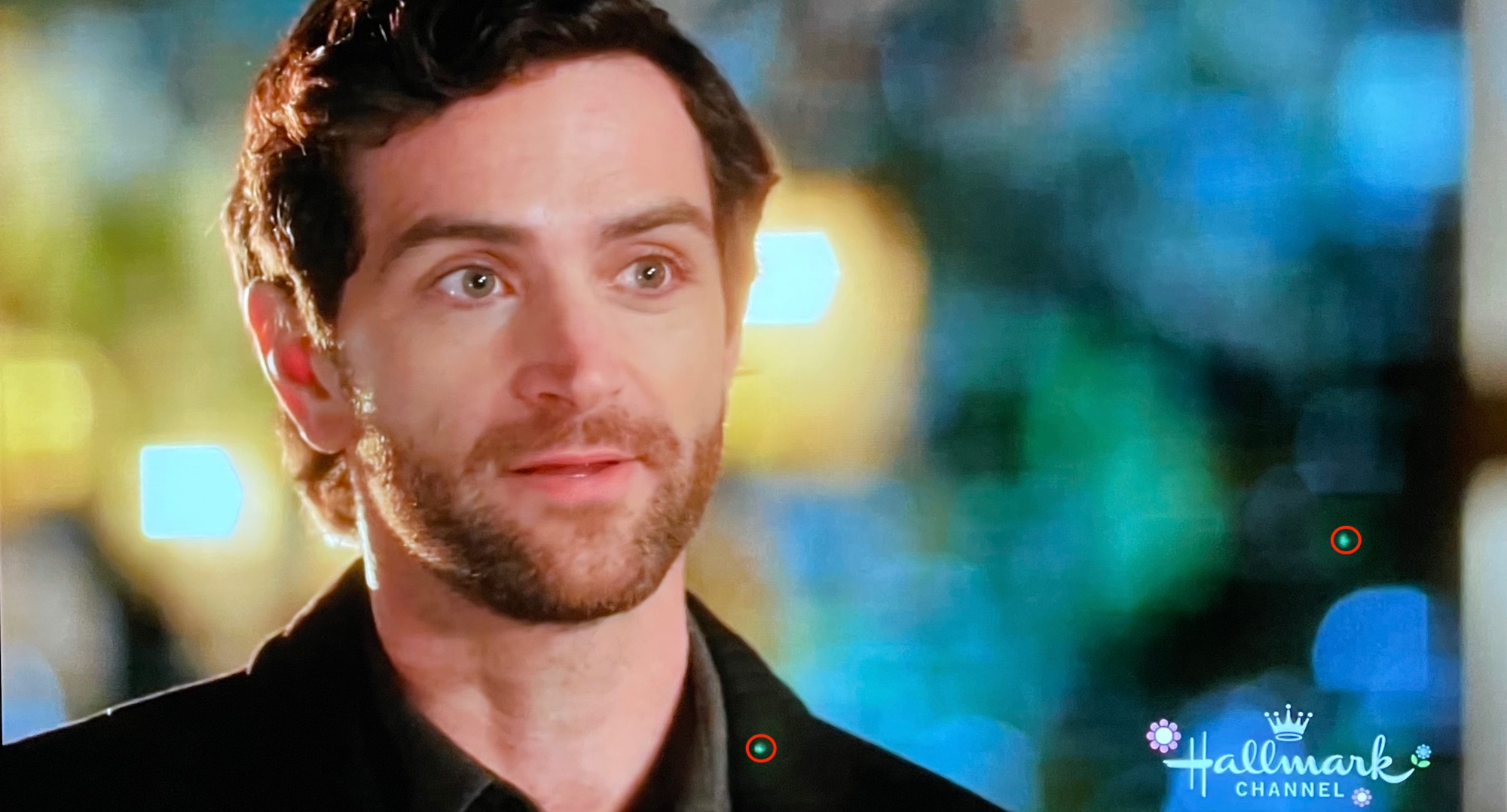
I posted this photo several posts back; it's a still from a Hallmark Channel movie shot with a cinema digital camera and lens that costs well over $40,000:


However, you typically will not see flare from the old 640x480 camera on an old cell phone from 1995 because the lenses are garbage.


In between, the flare may be there but it won't be as obvious as it is from a better camera.

May 26, 2021 9:28 AM in response to Lear70

The lenses on newer phones are more advanced and are somewhat more prone to flare.


Its also trivial to find many examples of XS photos showing flare.


Regardless, it’s completely normal for all premium smartphones.


Thats why “every phone in the store” will do the same thing - you can’t fix normal.


If you go to a different store, you will find the same on Google and Samsung phones along with mirrorless and DSLR cameras, depending upon the lens in question.


Here’s a great article on the subject from a

photography site:


https://photographylife.com/what-is-ghosting-and-flare

Dec 4, 2021 11:55 AM in response to AmberChaudhary

There is nothing to justify. Lens flare is normal and no cell phone camera, or for that matter any camera sold on the planet is immune to lens flare. This is a very large thread, but do yourself a favor and read through many of the posts, which explain why and some tips on how you, the photographer can minimize and in some cases eliminate lens flare with better camera positioning. To think however, this is an Apple problem or one which can be fixed, is simply untrue.

Oct 28, 2020 4:01 PM in response to Hyperblue

Hyperblue wrote:

I got my replacement 12 Pro and the ghosting/mirroring is still there. I contacted Apple and they have apologized. I’m sending everything back via FedEx and am receiving a full refund. I am now back to using my iPhone X. Very disappointing.


As stated, it's normal and expected and your iPhone X will do it too, but ultimately you made the decision that's right for you, and that's why Apple has their 14 day return policy.

Oct 29, 2020 7:47 PM in response to lobsterghost1

You forgot one thing... you had to crop about 1/4 up so your chair closest to the camera is now cutoff. People can live with it but if the shot requires the person to move the frame around a lot, it could potentially miss important things in the shot. My XS did not exhibit nearly as much of these artifacts as the 12 pro did. It is what it is, and a limitation of the small phone and lenses which I understand. However, you'd think Apple would try and minimize this stuff. Try going to a bright, neon city at night. Take some shots and video. You'll see tons of reflections (mostly with video). The night stuff is what made me return it since I do a good amount at night.

Oct 30, 2020 6:26 AM in response to gfbio

Aperture shouldn't have an effect on the amount of flare or artifacts. If anything, it would just make them more visible and brighter. The lens coatings (or lack of) and reflective qualities are what is showing them in the first place.


As me and lobsterghost1 where pointing out, this thing with the phones is normal unfortunately. Just not ideal and you have to work around it. I have a feeling Apple will address this as any kind of video with lights in the shot at night proves to be the most disappointing. With photos, its easier to reframe the shot.


You could also take out artifacts like green dots in post production but then again, we aren't talking your regular consumer.

Nov 1, 2020 5:04 PM in response to Frarampa

Then return it, you're obviously not happy with what it does and never will be.


What you see is not a defect, it is normal for all smartphone cameras.


Why fight it?


It's not as obvious, but see here?


That's from a Nikon discussion of the topic.


Here's some ghosting from a Canon DSLR with a 35mm lens that costs more than a 512 GB iPhone 12 Pro Max:


Here's one from a Panasonic DSLR:


Nov 2, 2020 8:34 PM in response to domlee2010

Had you SIMPLY angled the camera differently, you'd have eliminated the flare greatly. My iPhone 11 Pro Max would have taken the same photo. And our iPhone 11 would have as well. Before you tapped the shutter release, the flare would have been plainly obvious. You got what you were able to plainly see live. Angling the camera relative to the lights would have changed the outcome.


But, you don't have to believe me or anyone else telling you this is normal. You have 14 days to return your phone if you're not happy with it.


Nov 12, 2020 4:04 PM in response to _leefy

If you want a solution to this problem, what part of "don't buy one" or "buy something else" is unhelpful? Especially when most buyers discovering this are in the 14 day window in which they can obtain a full refund?


It isn't something wrong with your phone, it isn't a defect in the design, its a limitation of current optics and physics.


The bottom line is if a product is unacceptable to you, you will either have to live with it or buy something else; the same is true for every purchase we ever make.

Nov 12, 2020 5:57 PM in response to _leefy

Because as people who have frankly devoted many, many hours, weeks, months and years to helping other users with their issues here, it's important to us that new people who may be coming to this thread know that this is just the way these phones perform, and if you're within that all-important 14 day window and you absolutely can't stand it, your life will be far less chaotic if you return your phone for a refund and get something that won't continually stress you out.


What bothers me is when terms like "defective" are used to denote behavior that is perfectly normal for the product, and those are the terms I've used all along.


You may dislike what it does, but it's perfectly normal for it to be occurring.

Nov 13, 2020 4:58 PM in response to Shukor

Shukor wrote:

I’m so glad to have read this. I have been having this issue since iPhone X. At first I thought I had scratched the lens cover to due to poor handling so I just resigned. Then I got my 12 pro yesterday together with a friend. It was she who pointed out the same problem, which lead me to this thread, sigh. So you think it’s a manufacturing defect which can warrant a replacement?

It is NOT a manufacturing defect. Apple won't replace the phone for doing what optics in cameras do naturally.

Nov 29, 2020 10:16 AM in response to upatamby

There is absolutely NO POINT in exchanging your phone for another iPhone which will do the exact same thing. Apple my offer you a pity replacement to make you feel better, but the flares will be the same on your next phone.


You can call us "stalkers or proclaimed experts" all you want. It won't change the reality at all, no matter what you think.


Either learn better photographic techniques, or if you can't, live with flares or if you can't do that, get your money back.


I'll keep positing this link where this YouTuber talks about the green dots and what to do about them --> How to Fix The Green Dots


This thread has been closed by the system or the community team. You may vote for any posts you find helpful, or search the Community for additional answers.

IPhone 12 Pro lens flare

Welcome to Apple Support Community
A forum where Apple customers help each other with their products. Get started with your Apple Account.

