You wrote -
I have just updated my 2016 macbook pro 13" to the latest Catallina 10.15.7 and after the update it automatically sync my desktop to the icloud (?) or my home mac desktop.
The iCloud Drive and desktops and documents box is checked so all documents you used to keep literally on desktop screen merged in iCloud.com https://support.apple.com/en-us/HT206985
https://support.apple.com/en-in/guide/mac-help/mchle5a61431/10.14/mac/10.14
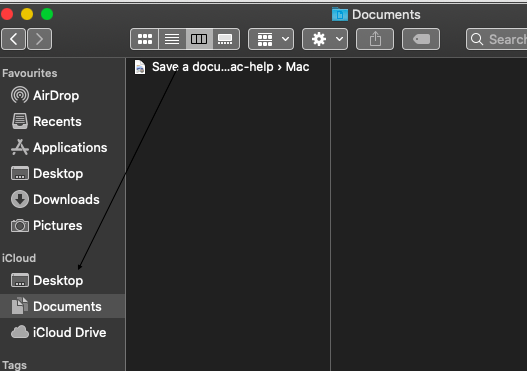
In the latest version in finder > if side bar section is hidden click on show if iCloud box in finder preferences is unchecked , click on side bar and check the box of iCloud Drive https://support.apple.com/en-in/guide/mac-help/mchlp2803/10.14/mac/10.14
You can view documents in finder > iCloud section > either in iCloud Drive > documents > your personal documents see this article https://support.apple.com/guide/mac-help/finder-mchlp2605/mac or if you dragged and dropped them to the desktop .
Also for your another query - I have looked up a few method on line and it all requires to have access to icloud on the system preference but my laptop doesn't seem to have that ?
Open system preferences > click on Apple ID icon > in the side bar click on iCloud here iCloud drive box is checked , click on option button in front of it the desktops and documents box is checked ( applicable in Mac OS catalina 10.15.7 ) .
From system preferences window these are only syncing buttons for applications to be configured with iCloud.com https://support.apple.com/en-in/guide/icloud/mmb1de40d9/icloud , you can't view the documents from here .

