iPhone 12 not receiving group texts

Since upgrading from my iPhone X to IPhone 12 Pro I’ve noticed in a group text (SMS) that I’m randomly missing texts. My husband is in the group too so I can see I’m missing multiple texts at random. Anyone else having this issue?


[Re-Titled by Moderator]

Posted on Oct 30, 2020 10:14 AM

Reply
Question marked as Top-ranking reply

Posted on Nov 10, 2020 6:21 PM

I’ve been having issues ever since getting my new phone. I transferred the data from iPhone X to the 12 Pro. When you switch phones apparently the phone number did not settle and needs to be “reconnected”. T-Mobile support had me:


1. From the Home screen, tap Settings > Cellular (iPhone)

2. Tap Network Selection.

3. Slide the Automatic slider to the off position to start scanning for networks.

4. Select desired carrier (T-Mobile)


  1. Restart phone
  2. Settings > Messages > Turn on Send as SMS
  3. Click Sent & Receive
  4. Make sure the Number and Apple ID are listed and correct
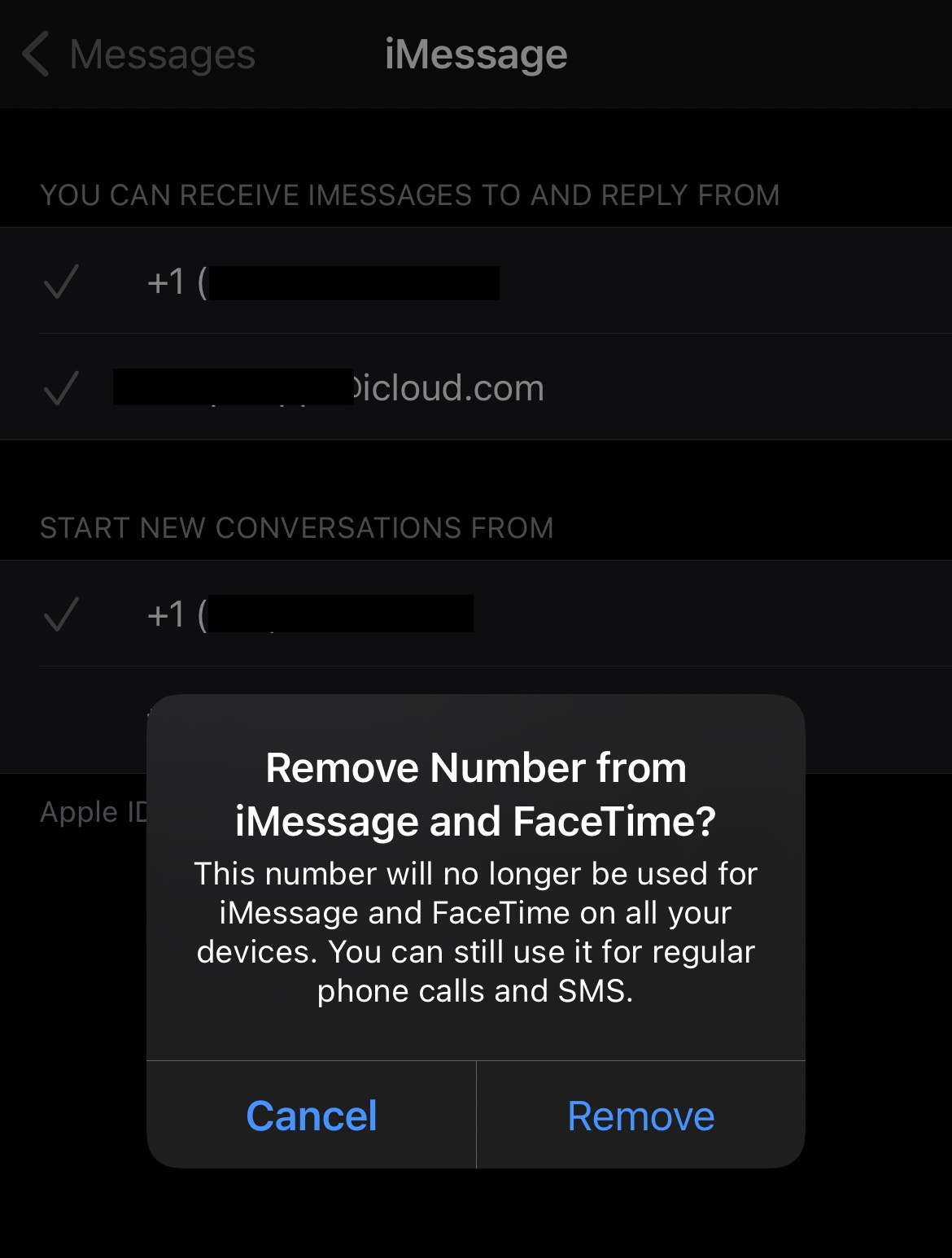
  5. Remove the check on your phone number by tapping it. And select Remove.
  6. Now that it’s unchecked, tap to apply it again. This reconnects your phone.
  7. Done.
  8. So far so good
  9. Screenshot of Step 5
1,083 replies

Nov 13, 2020 10:50 AM in response to fitz34

Verizon admitted to me today that it’s a known issue and said Apple is working on it. I agree it seems to happen when it’s a mix of iPhone and non iPhone users in the group but it’s not limited to which user’s texts get dropped.

It was happening with iOS 14.1. I upgraded to 14.2 last night and it’s still happening today

Nov 13, 2020 1:22 PM in response to Cardey

So I had the same issue where I was not getting a text message from a certain contact but I was receiving it on my older phone (pixel 2 XL). Was pulling some hairs out and then i noticed there was a settings pull down on the pixel messages app that was still getting messages sent to the phone. I disabled messaging and that fixed the problem for me.

Nov 15, 2020 7:46 AM in response to Cardey

Two day old 12 Pro Max here on 14.2, set up as new with no restores from the old phone or anything.


Group messages in general are really screwed up, it’s not just ones with SMS users. I have several that are iMessage users only and I’m missing messages in the app even though I sometimes see them come in as a notification banner. It like it never “prints” inside the actual conversation in the app. Also having issues with these groups disappearing from the pinned list at the top randomly or splitting into two sets of messages both with the same group name.


Hope this gets fixed soon, it’s super buggy and I kinda can’t believe this stuff wasn’t caught in testing.

Nov 16, 2020 3:03 PM in response to Cardey

I have had this issue since Jump Street. 12 Pro. Verizon. Done literally everything here 3 times over to no avail. Elevated tech support from both apple and Verizon. No luck.


I hate to risk karma by saying this, but what DID help and has held for 5 days at this point is installing the 14.3 developer beta. Yes, I know there is nothing in the change log about fixing this issue. But there must be something about the new iOS software and the phone hardware combo that seems to work now. Your experience is likely to be different so no promises. Just saying that so far so good for me working on the better part of a week. Hopefully the wide release of 14.3 will offer some relief to the rest of you.

Nov 17, 2020 3:19 PM in response to Cardey

This is not a carrier issue; it’s an iPhone 12 problem. I set up my iPhone 12 Pro two days ago as an upgrade from a 6s running iOS 14.1, and had my first missed message today. The telling fact is that the message came in just fine on my Apple Watch 4 running in tethered mode. The watch does not have a cellular subscription and was not on a network at the time. That means that my phone received the message from the carrier, transferred it to the watch, but did not display it in messages.


For reference, I’m on Verizon. I hope Apple gets this fixed soon.

Dec 26, 2020 8:28 AM in response to sarah427

Did you try removing your phone number from your google account? I had the same problem - then I removed my number from my gmail accounts even Remove it from

the account recovery portion of gmail on your new phone. *dont freak out* you can add it back again from your new device. It literally fixed everything for me, and I keep saying that in here and nobody is listening to meeee.

try it, I bet it works.

merry Christmas!

Jan 5, 2021 12:16 PM in response to marcella265

I have tried unfollowing this thread 4 times and they just keep adding me back! Apple will do nothing about this, it seems. My issue was primarily iMessage related and I think I resolved it by turning off iMessage, power cycling the phone, and then turning iMessage back on. Some messages I was missing started to populate after a few minutes. Others had success, however random it may seem, by removing their Gmail info from their account. At the end of the day, all I really want is to stop getting e-mails about this godforsaken thread :(.

This thread has been closed by the system or the community team. You may vote for any posts you find helpful, or search the Community for additional answers.

iPhone 12 not receiving group texts

Welcome to Apple Support Community
A forum where Apple customers help each other with their products. Get started with your Apple Account.