Voicemail notification popups issue

Hi there,

for quite some time I have an issue with a voicemail notification keeps popping up even though I don’t have a voicemail from my carrier provider. I tried resetting the network settings and remove and insert the SIM card again but with no luck resolving this issue.

It is really annoying because it pops up every few seconds. I did noticed it happens especially in a low cellular reception areas or when moving between areas.

Does anyone has an idea how to resolve it?

iPhone XR

Posted on Nov 8, 2020 9:09 AM

Reply
Question marked as Top-ranking reply

Posted on Nov 13, 2020 2:10 PM

Hi alpy21,


Thank you for contacting Apple Support Communities. Based on what you stated, it seems you are receiving notification for voicemails you do not have.

Since it changes with the cellular connection, you can try updating the carrier setting on the iPhone.


Update your carrier settings on your iPhone or iPad


Cheers.

3 replies

Nov 14, 2020 12:38 PM in response to alpy21

Hey alpy21,


Thanks for the update. One thing would be to make sure you have the latest version of iOS installed. Even though there are some steps that you've already tried, we would recommend you follow every step and let us know if the issue persists. If it does, you may need to contact the carrier.


Have you recently changed carriers?

Are you using a VPN?


  1. "Make sure that you have the latest version of iOS.
  2. Check for a carrier-bundle update: Go to Settings > General > About. If an update is available, a message will ask you to update.
  3. To check your cellular network connection, try to call someone. 
  4. Make sure that you set up your voicemail. To check, dial your own phone number from your iPhone and leave yourself a message.
  5. Call your iPhone from another phone and try to leave yourself a voicemail.
  6. Go to the keypad and press and hold on the 1, or press the Call Voicemail button. This dials voicemail. Check if you have any missed messages.
  7. On the Voicemail screen, tap Greeting. Then change your greeting to either custom or default. 
  8. If you have more than one cellular plan on your iPhone, try switching to the other plan. Call the first number and try to leave a message.
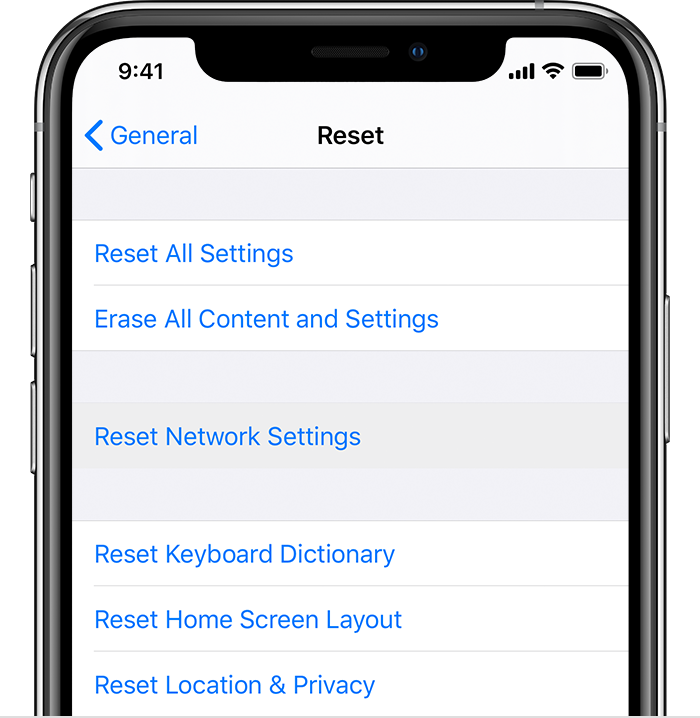
  9. Go to Settings > General > Reset and tap Reset Network Settings.

  10. If you still need help, contact your carrier."


Set up Visual Voicemail on your iPhone


Have a good one.

This thread has been closed by the system or the community team. You may vote for any posts you find helpful, or search the Community for additional answers.

Voicemail notification popups issue

Welcome to Apple Support Community
A forum where Apple customers help each other with their products. Get started with your Apple Account.