I do not understand icloud & it is driving me nuts

My understanding of icloud is it is backup on an apple server which sounds fine. Except it is a cost I have no interest in and therefore do not want to have anything to do with it. But apple won't leave me alone and won't allow me to have nothing to do with it.


How do I organise things to get rid of this total pain in the neck ?

Posted on Nov 25, 2020 12:10 PM

Reply
Question marked as Top-ranking reply

Posted on Nov 26, 2020 4:05 AM

As you wrote - Except it is a cost

You might be using higher storage iCloud storage plan and paying for it , downgrade the storage plan and bring it to free 5GB https://support.apple.com/en-in/HT207594

you can turn off iCloud features https://support.apple.com/en-in/guide/icloud/mmb1de40d9/icloud

Or completely sign out Apple ID https://support.apple.com/en-in/guide/mac-help/mh36825/10.14/mac/10.14

As you said - But apple won't leave me alone and won't allow me to have nothing to do with it.

Make sure the Mac is not synced with iPhone / iPad .

13 replies
Question marked as Top-ranking reply

Nov 26, 2020 4:05 AM in response to ziggyzig

As you wrote - Except it is a cost

You might be using higher storage iCloud storage plan and paying for it , downgrade the storage plan and bring it to free 5GB https://support.apple.com/en-in/HT207594

you can turn off iCloud features https://support.apple.com/en-in/guide/icloud/mmb1de40d9/icloud

Or completely sign out Apple ID https://support.apple.com/en-in/guide/mac-help/mh36825/10.14/mac/10.14

As you said - But apple won't leave me alone and won't allow me to have nothing to do with it.

Make sure the Mac is not synced with iPhone / iPad .

Nov 28, 2020 9:03 AM in response to ziggyzig

To be fair, it's not just that software in general is bad (it is), but more specifically a failing in two places:


1) overly generalized assumptions about what's often called the "user story". For example, "Steve has an iMac and an iPhone. He'd like a service to seamlessly synchronize his pictures between the two devices. Taking pictures is one of the three primary things Steve does with his devices, so this is a high priority". This leaves out the story of other users, like, "Ziggy has an iMac, no other devices, has no need for this service and finds it disruptive getting notifications about it all the time".


2) Poor documentation. This often follows from a software design ideology that assumes one's software is so intuitive that documentation is unnecessary. Which can stem from (1), the assumption that all users have the same story. This is particularly problematic when the effect of a user action can have significant and hard to reverse effects, when the effects are not well documented in advance, and when the software's behavior is a break from what users are used to.


Apple makes software that's often great in a lot of ways, but they do tend to habitually fall into both of these traps.


Nov 25, 2020 12:45 PM in response to KiltedTim

I have no other devices, only an imac desktop. But moronic apple software babbling rubbish about icloud I want nothing to do with keeps on interfering with me.


I have spent hours trying to make head or tail of the illiterate & incomprehensible 'explanations' about parts of the software, but like all software, it seems to written by halfwits who are incapable of communicating anything in an understandable manner.

Nov 25, 2020 3:24 PM in response to Compositor

I couldn't agree more. If more people wrote with passion about issues then Apple would listen and maybe make the Mac the platform it was intended to be, easy to use and understand, the average user not being a "tech head" but just wanting to just use the computer without unnecessary hassle. iCloud is flawed… "rant" over.

Passion?


Almost a billion users seem to understand iCloud quite nicely based on current documentation.


A genuine offer of help by a volunteer, explaining how a screenshot can be uploaded here was met with derision.


Not passion.


Nov 26, 2020 2:09 PM in response to tygb

Thanks, your post was helpful. But unfortunately I was still left battling with the incomprehensible very poor quality instructions form the software writers. Everyone I've ever talked to about software agrees software in general is really, really bad, lacks common sense and logic and has truly lousy instructions.


And the icloud software instructions & explanations are so bad I'ms still left unsure about what exactly is going on and whether I'm better off signed in or out of icloud & so on. It's all truly appalling. Which is why I want nothing to do with it.


If, on the other hand the software was better an I'm guessing I would like to have some stuff backed up in the icloud, but as it stands I find an utter waste of time and I make sure my desktop imac is always backed up & as I don't have an iphone to back up or any other device it's useless to me.

Nov 25, 2020 12:15 PM in response to ziggyzig

ziggyzig wrote:

My understanding of icloud is it is backup on an apple server which sounds fine.

That is incorrect.


It is cloud based storage. It can be used to synchronize things like contacts, calendars, notes, etc. between multiple devices.


It can only be used as a backup for iOS based devices (iPhones and iPads).


It also facilitates features such as "Find My" which can be used to track, locate, or remotely lock or erase Apple devices signed into that account.

Nov 25, 2020 12:29 PM in response to ziggyzig

I agree. I see iCloud messages only when I upgrade macos.


What device? What version of macOS.


When are you getting these messages? What is the exact wording of the message?


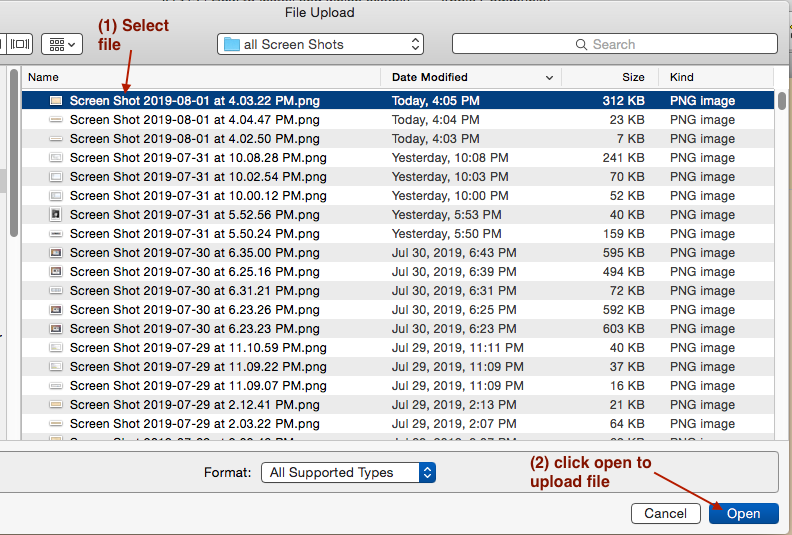
How to show us a screen image. Avoid personal identification.


(1) On the Mac you do:


    command + shift + 3 Will take entire screen.

You hear a click


    command + shift + 4 Lets you decide what to

take. Mouse pointer changes. Move mouse to upper left corner of

desire image. Hold down left mouse key where to start image. Drag

mouse to lower left of where you want to stop image. Release

mouse.


You will get a file starting with Screen Shot ... .png on the

desktop. example:


Screen Shot 2016-09-20 at 2.27.47 PM


(2) To upload the image in ASC, click on image icon.



You see the open file dialog.


Select the image.


 <p>On Windows it's more complicated.  Here is an

outline of one way.  There are others. <br>

  -- get a screen capture app.<br>


  -- press prtsc key<br>


      results go to copy

buffer<br>


      get some photo app<br>


      open photo app<br>


      paste picture<br>


      save picture as jpeg or png to

desktop.<br> <br>

Nov 26, 2020 3:55 AM in response to LACAllen

Passion, yes, and where is your evidence of "a billion users" understanding iCloud, and my comment had no reference to "screen shots", pay attention. In paying attention you will be aware that iCloud is causing issues, but your head is in the "cloud" pardon to pun, and are unwilling to help frustrated users and seeing honest questions and comments as a "a rant". If, as I understand your position is one of being helpful, please be so and don't just have a "knee jerk" reaction to frustrated users. Surely you are bigger than that.

This thread has been closed by the system or the community team. You may vote for any posts you find helpful, or search the Community for additional answers.

I do not understand icloud & it is driving me nuts

Welcome to Apple Support Community
A forum where Apple customers help each other with their products. Get started with your Apple Account.


