Problem In update

Hello!

I have an iphone 7 plus recently i updated it to ios 14.2 from 13.7 but now its become a major problem in its camera no patroit mode blury zoom camera not working properly and if i open a camera my battery getting down so early please help me. Thanks

iPhone 7 Plus, iOS 14

Posted on Nov 29, 2020 2:12 AM

Reply
5 replies

Nov 29, 2020 2:22 AM in response to kashif268

kashif268 wrote:

blury zoom camera not working properly

Adjust the camera’s focus and exposure

Before you take a photo, the iPhone camera automatically sets the focus and exposure, and face detection balances the exposure across many faces. If you want to manually adjust the focus and exposure, do the following:

  1. Tap the screen to show the automatic focus area and exposure setting.
  2. Tap where you want to move the focus area.
  3. Next to the focus area, drag  up or down to adjust the exposure.
  4. To lock your manual focus and exposure settings for upcoming shots, touch and hold the focus area until you see AE/AF Lock; tap the screen to unlock settings.


If your Photos and Videos are stored in iCloud and you share it before downloading the original then it may appear blurry but it is not.


Your photos and videos are stored on your device in their original, high-resolution version. This means that they use a lot of space on your iPhone, iPad, and iPod touch. With iCloud Photos, you can make more space available on your device and have your entire collection, everywhere you go.

Get started with iCloud Photos:

  1. Tap Settings > [your name] > iCloud > Photos.
  2. Turn on iCloud Photos.
  3. Select Optimize iPhone Storage to save space on your device.
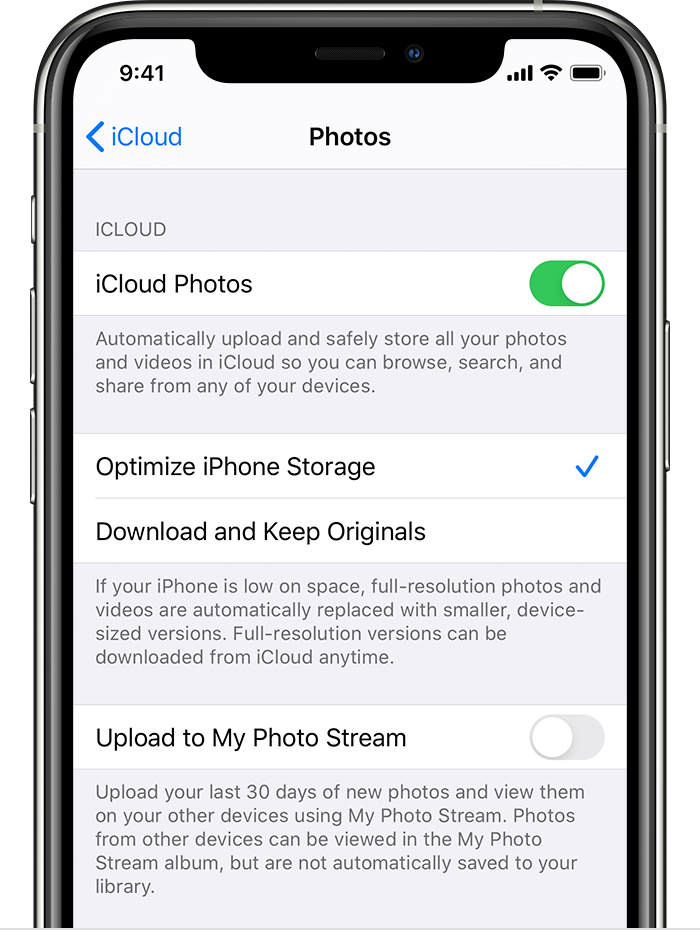
With Optimize Storage, smaller, space-saving photos and videos are kept on your device while all of your original, full-resolution versions are stored in iCloud. And as long as you have enough space in iCloud, you can store as many photos and videos as you want.


Nov 29, 2020 2:21 AM in response to kashif268

kashif268 wrote:

my battery getting down so early

Protect & Prolong life of your iPhone's Battery:

  1. About the battery usage on your iPhone, iPad, and iPod touch ...
  2. Batteries - Maximising Performance - Apple (IN)
  3. iPhone Battery and Performance


Try some of these options too.

  1. Avoid Screen Mirroring
  2. Put on Low Power Mode
  3. Put Auto Lock On (1 min):- with low power mode it will be 30 Sec
  4. Put Auto Answer Off
  5. Disable Push notifications for apps you do not use often
  6. Keep your iPhone Face down to prevent notifications to light up screen
  7. Enable Auto Brightness:- Settings > General > Accessibility > Display Accommodations > Auto-Brightness [Enable]
  8. Manually lower brightness from Control Center
  9. If you Want to watch continuous Video. Stream it on TV or a Monitor
  10. Don't force close apps; Apps which are not on frontend screen are paused by the system to save energy. Apps require more energy to re-launch. Apps which are open in the background use large memory is a myth and quitting them is counterproductive
  11. Location services to be allowed only while using the app
  12. Set your iPhone to fetch email and calendar data from internet less frequently
  13. Turning off Background App Refresh 
  14. Charge before it drops below 20-30%
  15. Try connecting to trusted Wifi where ever available in stead of Cellular
  16. Enable Airplane mode in areas with bad cellular and wifi coverage. Your phone keeps trying for reconnection with the missing / weak network. This uses lot of energy
  17. Switch off Wifi & Bluetooth while in Roaming or Not in Range
  18. Enable "Wifi Assist" : Settings > Cellular or Settings > Mobile Data > Wi-Fi Assist [Enable]
  19. Periodically Check your Battery Health (Settings > Battery > Battery Health)


This thread has been closed by the system or the community team. You may vote for any posts you find helpful, or search the Community for additional answers.

Problem In update

Welcome to Apple Support Community
A forum where Apple customers help each other with their products. Get started with your Apple Account.