Add label to one value in a chart

Hey,


I cannot figure out how to label one specific value (point) in a scatter plot graph (chart).

When I click on one blue point, all points become selected.

When I choose to label value, all points get a label. Because they are so close to each other, you can't even read the labels in the end.


I want to edit just one specific value. Add a label, change that one point to a different colour.

How can I edit one point in a scatter chart?


MacBook

Posted on Dec 4, 2020 6:51 AM

Reply
6 replies

Dec 5, 2020 1:45 AM in response to Badunit

Hi **,


Three possible differences in our sample tables:


I transferred the 2 into column D by dragging the Fill control, then deleting the value in column C.. All other cells in column D (except the header cell) are empty.


The text in the three bars at the top of the Series inspector window—mine describes the current state ( Hilight one dot in a scatter c…) and an instruction (seen only when the pointer is on the bar) regarding other settings;

yours appear to have been set to name the columns (and cell) from which the values and name are to be taken.


My example was constructed in Numbers 3.6.2.

(Yes,as SG notes, it may be a version thing)


Dec 4, 2020 1:16 PM in response to ethew

Chart colours are assigned to a 'series' of values recorded in a single column of the table feeding the chart.


Add a new column to the right of the one holding that data. Use Cut (command-X) and Paste (command-V) to move the value you want plotted in a different colour to that column, leaving the cell in the same row of the original column empty. Enter the (text) label you want for the single value in the header row of the new column.


Select the chart, which will now be missing the dot to be highlighted and labeled.

With the chart selected, click the header cell on the column containing the single value to add that column to the chart.

Select the dot, hen use the Series section of the Chart Inspector to set that series (of 1 value) to have the attributes you want.
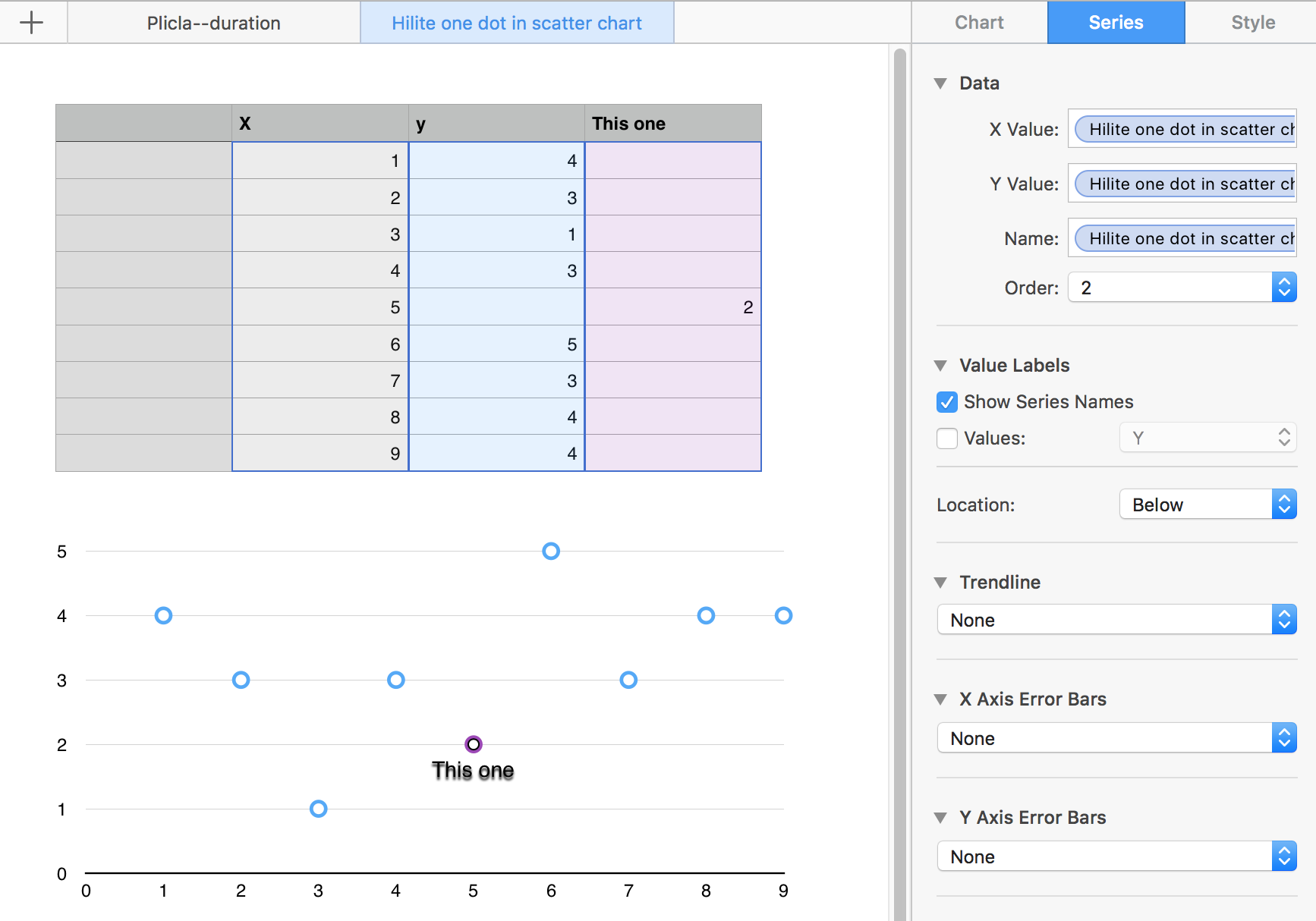
To select a different colour for the highlighted dot, click on the dot, then use the Style section of the inspector to set a new colour (and possibly choose a different shape for the data point).


Regards,

Barry


PS: The top three entries in the inspector were placed there by Numbers. I haven't investigated further, but you might explore and find that the 'extra column' holding the single point to be highlighted might not be necessary.

B.

Dec 4, 2020 2:32 PM in response to Barry

Barry,


I was trying this earlier today but ran into a problem. I expected the result you got but I ended up with labels one the non-existent points for the first and last row in addition to the one I wanted. It wants to put labels on those two non-existent points as if they were zero. I had to create a XY pair (not sharing X values) of just the one data point to avoid what is in my screenshot below. Did I miss something?


Numbers version 10.3.5 on OS 10.15.7


Dec 5, 2020 6:39 AM in response to Barry

Looks like another new bug to me. It always puts a label for the first row and last row. I changed my X data so the min and max were not in the first and last rows and it still puts the labels on the first and last rows.


The only way I have found to do a single label (or several labels) is to not include any blank rows above or below the label(s). So it needs a column for X and Y (vs sharing the X values) so the range for the series can be tightened up. Oddly, though, and maybe it has always been this way, if you do not share X values it uses the header over the X values for the series label, not the one over Y. Of course you can change it manually that but it seems odd that it switches.


This thread has been closed by the system or the community team. You may vote for any posts you find helpful, or search the Community for additional answers.

Add label to one value in a chart

Welcome to Apple Support Community
A forum where Apple customers help each other with their products. Get started with your Apple Account.


