Two-Factor Authentication

I have two-factor authentication enabled. Today I thought I had lost my mobile so I went to use the Find My iPhone service for the first time on a Laptop I have for work. Unfortunately the Find My iPhone required a 6 digit number which appeared on my mobile phone which I did not have! What is a practical work around for this? Any suggestions welcome. I have read that we cannot disable the two-factor authentication which is unfortunate. Thanks!


iPhone XR

Posted on Dec 17, 2020 3:44 AM

Reply
3 replies

Dec 17, 2020 5:08 AM in response to Rhubarb_is_yummy

What if I can't access a trusted device or didn't receive a verification code?

If you're signing in and don’t have a trusted device handy that can display verification codes, you can have a code sent to your trusted phone number via text message or an automated phone call instead. Click Didn't Get a Code on the sign in screen and choose to send a code to your trusted phone number. You can also get a code directly from Settings on a trusted device. Learn how to get a verification code.

If you use iOS 11.3 or later on your iPhone, you might not need to enter a verification code. In some cases, your trusted phone number can be automatically verified in the background on your iPhone. It’s one less thing to do, and your account is still protected with two-factor authentication.


If you lost / can't reach the trusted device or phone number associated with your Apple ID

As long as you still have your Recovery Key and remember your Apple ID password, you can sign in and add a new trusted device or phone number to your account. You can also remove any devices you may have lost, sold, or given away.

  1. Go to your Apple ID account page and enter your Apple ID and password.
  2. On the Verify Your Identity screen, select "Can’t access your trusted devices?"
  3. In the pop-up window, enter your Recovery Key.
  4. Go to the Security section and click Edit.

Remove the device you no longer wish to use to verify your identity. If you have additional devices with Find My iPhone enabled, you can verify them as trusted devices. You can also add additional trusted phone numbers.


Dec 17, 2020 5:11 AM in response to Rhubarb_is_yummy

If you can't unlock your Apple ID

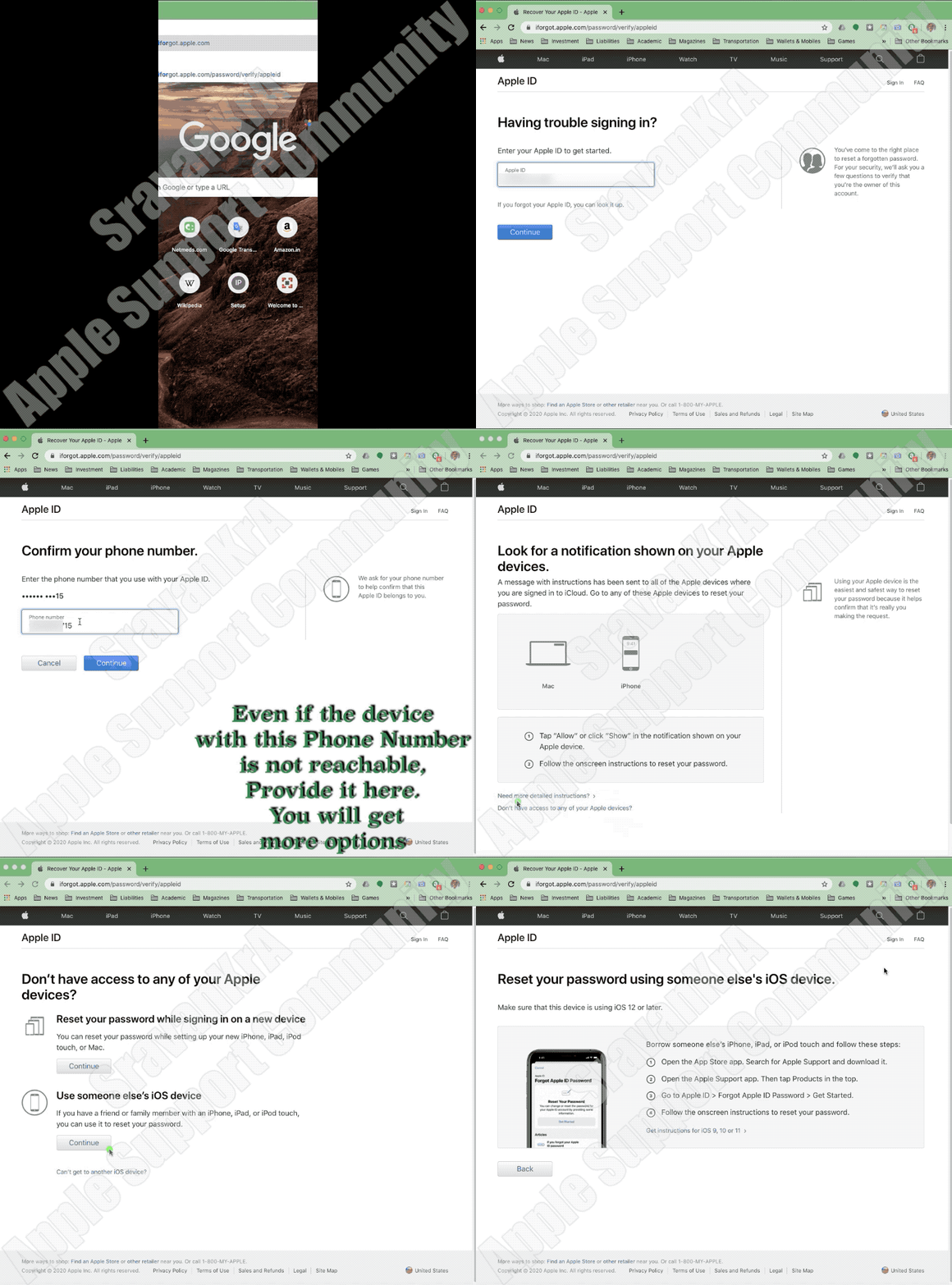
If you use security questions with your Apple ID, or if you don't have access to a trusted device or phone number, go to iforgot.apple.com. Then you can unlock your account with your existing password or reset your password.


Watch this GIF


What if I can't access a trusted device or didn't receive a verification code?

If you're signing in and don’t have a trusted device handy that can display verification codes, you can have a code sent to your trusted phone number via text message or an automated phone call instead. Click Didn't Get a Code on the sign in screen and choose to send a code to your trusted phone number. You can also get a code directly from Settings on a trusted device. Learn how to get a verification code.

If you use iOS 11.3 or later on your iPhone, you might not need to enter a verification code. In some cases, your trusted phone number can be automatically verified in the background on your iPhone. It’s one less thing to do, and your account is still protected with two-factor authentication.


If I can't sign in, how do I regain access to my account?

If you can’t sign in, access a trusted device, reset your password, or receive verification codes, you can request account recovery to regain access to your account. Account recovery is an automatic process designed to get you back in to your account as quickly as possible while denying access to anyone who might be pretending to be you. It might take a few days—or longer—depending on what specific account information you can provide to verify your identity.


Do I still need to remember any security questions?

No. With two-factor authentication, you don't need to remember any security questions. We verify your identity exclusively using your password and verification codes sent to your trusted devices and phone numbers. When you enroll in two-factor authentication, we keep your old security questions on file for two weeks in case you need to return your account to its previous security settings. After that, they're deleted.


Can Apple Support help me regain access to my account?

Apple Support can answer your questions about the account recovery process, but can't verify your identity or expedite the process in any way.


This thread has been closed by the system or the community team. You may vote for any posts you find helpful, or search the Community for additional answers.

Two-Factor Authentication

Welcome to Apple Support Community
A forum where Apple customers help each other with their products. Get started with your Apple Account.