Create a permanent sort in Numbers

I'm tracking my blood pressure, sugar, etc. I enter each test along with the date as a separate record. I need the most recent date to be at the top of the column. Yet I can only enter new data (easily) on the last row. Then I need to manually re-sort based on date.


Is there some way that I can set this sort to auto-execute when I commit the new record? Thanks!

MacBook Pro 15″, macOS 10.15

Posted on Dec 17, 2020 8:55 AM

Reply
5 replies

Dec 17, 2020 9:44 AM in response to DWilsonNance

There is no permanent sort that automatically applies itself. You could make a table that lets you enter your data starting at the bottom. With a filter it can hide all the upper blank rows so it looks like you are using the "top" row.


Here is what it might look like:


Here is what it looks like before hiding column F and applying the filter:


If that is of any interest, I can post formulas later. Gotta go right now.

Dec 17, 2020 1:30 PM in response to DWilsonNance

Formula in cell F2 =IF(ROW()≥ROWS(E)−COUNTIF(OFFSET(E2,0,0,ROWS(E)−ROW()+1,1),TRUE) , "show" , "hide")

Fill down to the last row to complete the column.

My table was only 18 rows. You will want to make yours much longer probably.


I feel there should be a simpler formula to get to this same result but this is the one I came up with that makes it no hassle to add more rows to the table if/when needed. It counts the checked checkboxes from the formula's row to the end of the table. It subtracts that count from the total number of rows in the table. The result is a row number. If the formula's row is at or below that row, the formula's row should show.


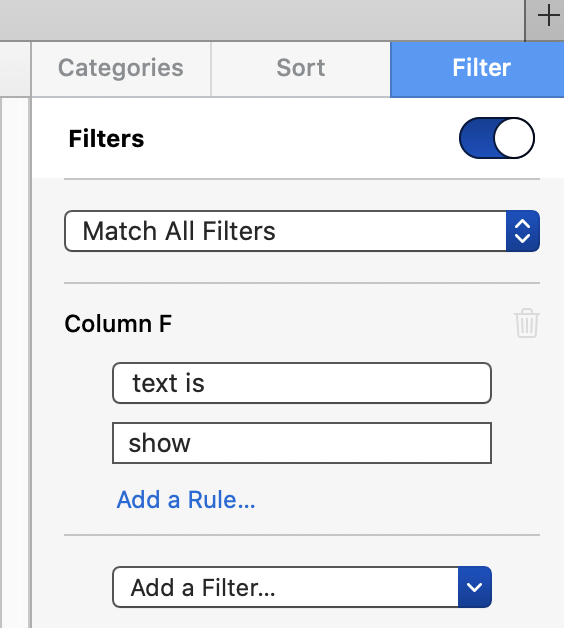
Make a filter for column F in the sidebar as shown below

Hide column F


I mentioned sorting in my last post. The formula is sort-safe if you first select the rows to be sorted vs sorting the entire table. If you ever need to sort it, select the rows to be sorted (all the visible ones minus the blank one at the top), right click inside the selection box in the date column, and choose "sort rows descending by date".


If you accidentally click off a "submit" checkbox, no problem. The first one will cause the empty top row to hide. If you click off another, one of the filled in rows will hide, and so on. Just click them again, one at a time, as they show back up.


Dec 17, 2020 10:00 AM in response to DWilsonNance

Alternatively, if you leave the "organize sidebar open on the right with a sort showing, you can easily click "sort now" after your entry(ies).


One disadvantage of the other method I posted (other than the added complexity) is it is assumes you are entering data in the correct order all the time, never filling in a date out of order. I believe the formula I used is sort-safe, though, so you could sort it if necessary.


Dec 17, 2020 10:47 PM in response to DWilsonNance

Here's an example that will give you a live sort ascending by date on a separate table.


The formula shown is entered in cell A2 of the Sort table, then filled right to column D and down to the end of the table.


The 20 shown limits the sorted list to the 20 most recent lines of Data. COUNT limits it to the number of entries made on the Data table.


One shortcoming I noticed is that adding a blank row to the Data table will cause a blue warning triangle to appear on all cells of Sort, as LARGE is then looking at cells not containing a number (or in this case not containing a Date and Time value.


Placing the Sort table on a separate sheet will keep this distraction out of sight while entering data, and remembering to add no more rows to the Data table than are needed to record the data will remove the triangles from Sort before printing that table. (The warning triangles do not affect the sort itself.)


Regards,

Barry

This thread has been closed by the system or the community team. You may vote for any posts you find helpful, or search the Community for additional answers.

Create a permanent sort in Numbers

Welcome to Apple Support Community
A forum where Apple customers help each other with their products. Get started with your Apple Account.