iphone 12 pro max battery health degrading

I got my new 128GB 12 Pro Max with blue silicon case on the 11/13 launch day. In the weeks since I’ve noticed the battery health has already dropped to 98%. I’ve only used public releases of iOS and haven’t installed any iOS beta’s that would have enabled extra logging functions that could have negatively impacted battery life and health. Optimized charging has been enabled the whole time, and it’s only been charged with a USB-A cable and an Apple 5W charger. I don’t see any apps standing out as battery hogs, and I’m using my phone as much as I did my 11 Pro Max. I’m shocked to see the battery health drop below 100% in the first 6 weeks, and at this rate it will be below 90% by summer 2021. Has anyone else noticed their battery health has dropped below 100% on a 12 Pro Max?

iPhone 12 Pro Max, iOS 14

Posted on Jan 3, 2021 10:50 AM

Reply
Question marked as Top-ranking reply

Posted on Apr 19, 2021 5:51 PM

It has nothing to do with chronological time. It is “80% is normal after 500 full charge cycles”. A full charge cycle is from 0 to 100% (or combinations that add up to 100% such as 20% to 70% twice). And you should never let it go to 0% intentionally; that WILL shorten the capacity of the battery if it happens frequently. Ideally, charge it when it gets to 20%, and charge it overnight, every night, with Optimized charging enabled.

827 replies

Jan 29, 2022 9:33 PM in response to stretch23

I know there’s nothing I can do to stop the battery health dropping, but this issue that happened today wasn’t my fault.


So the water warning popped up after I just plugged my phone in, so I unplugged it, shook the water out, then plugged it back in again. However, it showed the same message, so after using a hair dryer and everything, it finally charged after I plugged it in a third time, which was what I really wanted.


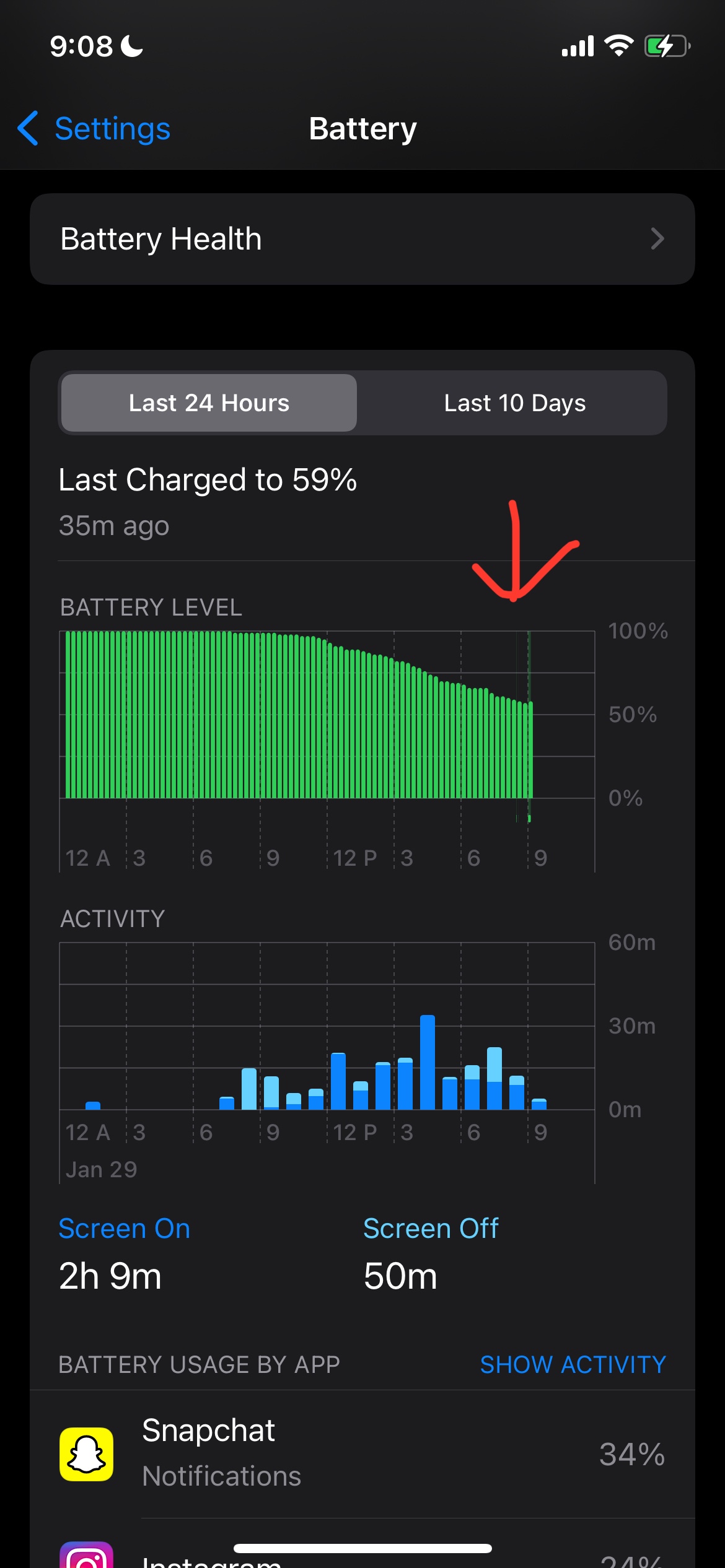
HOWEVER, the thing that’s bothering me is that even when I plugged it in for less than 5 seconds at the time I got the warning, the “last charged to ___%” in the settings app updated, obviously meaning that some electricity still flowed through. Since it wouldn’t be at least 16 hours since I last unplugged before plugging it back in again (yes, that’s a rule I made), I was wondering if this would cause the battery health to decline, since I was doing three different charge cycles that were all within one hour of each other, and as everyone knows, charging too much is never what you want to do. My health didn’t drop, thankfully, but did this potentially cause anything harmful? Will my health drop tomorrow? I’m also worried because normally after I unplug it at 100% or 90% or whatever percentage, the battery stays at that same percentage for the entire night since i put it on airplane mode. however, this was not the case for this situation, but it makes sense because it was only plugged in for 5 seconds or so. So my question is: will that affect how my battery stays at the same percentage overnight? I already know that background apps and stuff can cause drainage, but will specifically this negatively affect it in the future? Basically since it didn’t stay at 59% for more than 10 minutes, tomorrow and every single day after that, will the ability of my phone to stay at 100% for hours not be such a thing anymore? I hate how it didn’t even last 10 minutes at 59%, but it still recorded it in the battery section, as seen below. The tiny green line that the red arrow points to is the 5-second time frame where I tried charging my phone and it gave me the water warning. Again, that’s not what I’m concerned about, but the fact that 1.) I plugged it in less than an hour after I just unplugged it, and 2.) it didn’t “really” charge to 59% in that 5-second time frame, and yet it recorded it there are what I’m asking about.


Jan 29, 2022 9:59 PM in response to muguy

No, I don’t have water damage. It’s just a warning saying that there was liquid detected and that I should get rid of the liquid before I plug it in.


Even if I did charge overnight and that warning came up, the same thing would happen, where the settings app updates the battery even though it wasn’t even plugged in for a full minute. I’m asking if that will have any negative effects on my battery staying at the same level for hours on end in the future.

Jan 29, 2022 10:04 PM in response to crystal_star

crystal_star wrote:
Since it wouldn’t be at least 16 hours since I last unplugged before plugging it back in again (yes, that’s a rule I made), I was wondering if this would cause the battery health to decline, since I was doing three different charge cycles that were all within one hour of each other, and as everyone knows, charging too much is never what you want to do.


There is nothing specifically good or bad about plugging in and disconnecting multiple times within an hour other than perhaps physical wear on the port, connector, and/or cable. I do it all the time and that's never resulted in poor battery performance. The power management system handles it all just fine.

Jan 31, 2022 6:49 AM in response to crystal_star

crystal_star wrote:

So the water warning popped up after I just plugged my phone in, so I unplugged it, shook the water out, then plugged it back in again. However, it showed the same message, so after using a hair dryer and everything, it finally charged after I plugged it in a third time, which was what I really wanted.

You did do pretty much all the wrong things to do when your phone gets wet. 1) Don't plug it in until it has dried for a couple of days. 2) Never use a hair dryer as it can just force water deeper into the phone, causing even more issues.

Feb 21, 2022 12:39 PM in response to stretch23

So I'm at 87%, and I want to charge at around 4:30 PM every day. The thing is, on Tuesdays and Thursdays, I have evening classes, so if I plug it into a power bank and bring it with me, can I still use my phone? I read articles saying that using it while it's on a power bank is detrimental for the battery, while others say it's fine. Which one is it? Keep in mind I want to have it on screen the entire time it's plugged in.

Feb 21, 2022 12:44 PM in response to crystal_star

crystal_star wrote:

So I'm at 87%, and I want to charge at around 4:30 PM every day. The thing is, on Tuesdays and Thursdays, I have evening classes, so if I plug it into a power bank and bring it with me, can I still use my phone? I read articles saying that using it while it's on a power bank is detrimental for the battery, while others say it's fine. Which one is it? Keep in mind I want to have it on screen the entire time it's plugged in.

Those articles are wrong. Using the phone while it is plugged in is not detrimental.

Feb 21, 2022 12:59 PM in response to crystal_star


There is nothing wrong with that.

crystal_star wrote:
So I'm at 87%, and I want to charge at around 4:30 PM every day. The thing is, on Tuesdays and Thursdays, I have evening classes, so if I plug it into a power bank and bring it with me, can I still use my phone? I read articles saying that using it while it's on a power bank is detrimental for the battery, while others say it's fine. Which one is it? Keep in mind I want to have it on screen the entire time it's plugged in.


There is nothing wrong with using an iPhone while it's charging. The only issue would be the quality of the power source. Apple manufactures their own charging cases, and the basic idea is to use while it's powered by an external source.

Feb 21, 2022 9:00 PM in response to crystal_star

crystal_star wrote:
even on a power bank? and if the phone is turned on the entire time?


There are slight differences compared to powering from an AC to DC power adapter, but they're fairly minor. Basically what you'll get out of most power banks is a converting a single 3.7-4.2V lithium-ion battery to 5V. And as far as the device is concerned, it's a clean 5V power supply. One issue may be that some of them turn off after a while if the user doesn't press a button periodically or draw a certain amount of power. But that's not much different than unplugging a power adapter from a wall.


But there are differences in the quality of different power banks. A good one could be clean when powering on, without voltage spikes. And there is some junk out there. But I wouldn't worry about good quality ones, such as what are sold at Apple Stores. The ones I use are made by Mophie, but the house brands at Wal-Mart are fairly decent quality.

Feb 24, 2022 7:50 AM in response to crystal_star

crystal_star wrote:
If I plug the bank charger with the phone still connected to it (known as pass through charging), is that also bad?


Not particularly, but then again there are some that behave differently. Some of those power banks won't produce output current while they're charging. I've seen one where the internal battery got disconnected (the spot weld connection to the battery cracked off). It strangely enough passed through current from the external power source, but only with this specific condition.


Something like a charging case is clearly designed for that.

Mar 18, 2022 4:56 PM in response to stretch23

something TOTALLY strange happened today, it might be because i just got a new update, but i really doubt that's the case.


so i updated to ios 15.4, and after it finished, i plugged my phone in when it was at 55%. i came back 10 minutes later and it was 52%???!!!! that makes absolutely NO sense to me because it was plugged in and i didn't use it at all for the 10 minutes i plugged it in. and i know the charger didn't disconnect because my battery usage said "last charged to 100%" YESTERDAY, and if it had stopped charging, it would've updated that. so i'm wondering what happened??!! my battery health didn't go down thankfully, but HOW did it go from 55 to 52 when it was CONNECTED TO A CHARGER??!!!!!!!

This thread has been closed by the system or the community team. You may vote for any posts you find helpful, or search the Community for additional answers.

iphone 12 pro max battery health degrading

Welcome to Apple Support Community
A forum where Apple customers help each other with their products. Get started with your Apple Account.


