SPAM Phone Calls Breaking Through Do Not Disturb

So, I've had the Do Not Disturb on a schedule (it turns on from 11PM to 9AM) so that I'm not woken up by the relentless SPAM phone calls. I also have my iPhone set to be silenced when the iPhone is locked. Phone calls are allowed from All Contacts. So, if someone I know calls (if they're in my contact list) then they get through. It seems like it works. However, this morning one broke through the defenses around 7:15AM (I went to bed at 2AM - Grrr!). The SPAM caller wasn't in my contact list. How did the SPAM caller get through? Is there anything additional that I can do to block EVERYTHING that isn't in my contact list?


Around 90% of my phone calls are SPAM phone calls. I've stopped answering my phone years ago. I'm spending all this money for a phone number mostly used by the spammers. :(

Posted on Jan 8, 2021 9:33 AM

Reply
Question marked as Top-ranking reply

Posted on Jan 10, 2021 4:17 PM

Hello silver_mica,


Welcome to Apple Support Communities!


If we understand your post correctly, you have the Do Not Disturb feature turned on to avoid spam calls and it usually works but one call came through and they were not one of your contacts and you want to know if there is anything additional that you can do to block these callers. We're happy to help!


"Turn on Silence Unknown Callers

With iOS 13 and later, you can turn on Silence Unknown Callers to avoid getting calls from people you don’t know. This blocks phone numbers that you've never been in contact with and don’t have saved in your contacts list. If you’ve previously texted with someone using their phone number or if a person has shared their phone number with you in an email, a phone call from that number will go through.
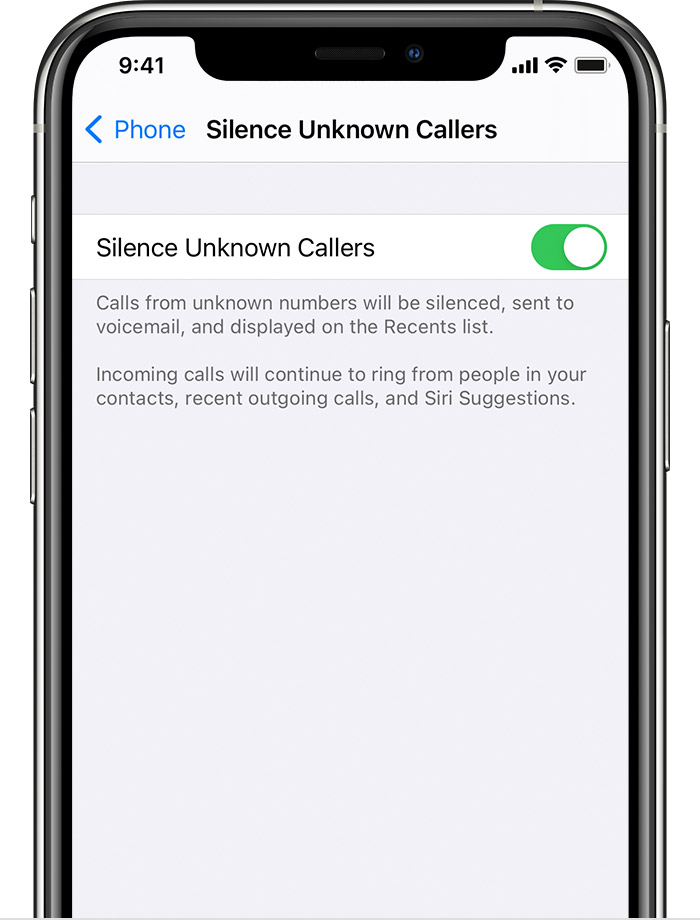
To turn on Silence Unknown Callers, go to Settings > Phone, then scroll down, tap Silence Unknown Callers, and turn on the feature. Calls from unknown numbers are silenced and sent to your voicemail, and appear in your recent calls list.

Incoming calls will come through from people that are saved in your contacts list, recent calls list, and from Siri Suggestions to let you know who’s calling based on phone numbers included in your emails or text messages.

If an emergency call is placed, Silence Unknown Callers will be temporarily disabled for the next 24 hours to allow for your iPhone to be reached.

Before you turn on Silence Unknown Callers, make sure you have important contacts saved or you could miss a phone call that you don’t want to miss. The call will still go to voicemail and appear in your recent calls list, but you won’t get a notification while the call is ringing."


Detect and block spam phone calls


Let us know if that worked for you.

Thank you for using Apple Support Communities.

Take care!


2 replies
Question marked as Top-ranking reply

Jan 10, 2021 4:17 PM in response to silver_mica

Hello silver_mica,


Welcome to Apple Support Communities!


If we understand your post correctly, you have the Do Not Disturb feature turned on to avoid spam calls and it usually works but one call came through and they were not one of your contacts and you want to know if there is anything additional that you can do to block these callers. We're happy to help!


"Turn on Silence Unknown Callers

With iOS 13 and later, you can turn on Silence Unknown Callers to avoid getting calls from people you don’t know. This blocks phone numbers that you've never been in contact with and don’t have saved in your contacts list. If you’ve previously texted with someone using their phone number or if a person has shared their phone number with you in an email, a phone call from that number will go through.

To turn on Silence Unknown Callers, go to Settings > Phone, then scroll down, tap Silence Unknown Callers, and turn on the feature. Calls from unknown numbers are silenced and sent to your voicemail, and appear in your recent calls list.

Incoming calls will come through from people that are saved in your contacts list, recent calls list, and from Siri Suggestions to let you know who’s calling based on phone numbers included in your emails or text messages.

If an emergency call is placed, Silence Unknown Callers will be temporarily disabled for the next 24 hours to allow for your iPhone to be reached.

Before you turn on Silence Unknown Callers, make sure you have important contacts saved or you could miss a phone call that you don’t want to miss. The call will still go to voicemail and appear in your recent calls list, but you won’t get a notification while the call is ringing."


Detect and block spam phone calls


Let us know if that worked for you.

Thank you for using Apple Support Communities.

Take care!


This thread has been closed by the system or the community team. You may vote for any posts you find helpful, or search the Community for additional answers.

SPAM Phone Calls Breaking Through Do Not Disturb

Welcome to Apple Support Community
A forum where Apple customers help each other with their products. Get started with your Apple Account.