How do I find the S/N of my phone when I cannot power it on? Further, I do not have the original package. Or... how do I open the back of the iPhone to verify the SIM Card

I bought this iPhone last month and it no longer powers on. (Even tried all those cold startup, etc... without any success.)


I live in Ottawa Canada and it is impossible to bring it to an apple store (Rideau or Bayshore) as they are not allowing clients to make an appointment to return the phone. And trust me, I have been tring to contact apple for these past four days to make an appointment and I keep getting a central phone call service telling what I already know. Not very helpful for sure!


Trying to find valuable help and staff availability to answer your question is like pulling teeth from a live crocodile without being under sedation.


Any way, to find valuable help full guidance from Apple Support or anyone is very frustrating. I should have bought an Android as suggested by my friends.


Any how.... how do I find the S/N of my new piece of crap of an iPhone when I cannot power it on? Further, I do not have the original package. Or... how do I open the back of the iPhone to verify the SIM Card? I'm no technician.


iPhone 7 Plus

Posted on Jan 14, 2021 4:37 AM

Reply
Question marked as Top-ranking reply

Posted on Jan 14, 2021 6:24 AM

you did not read carefully and missed this part:

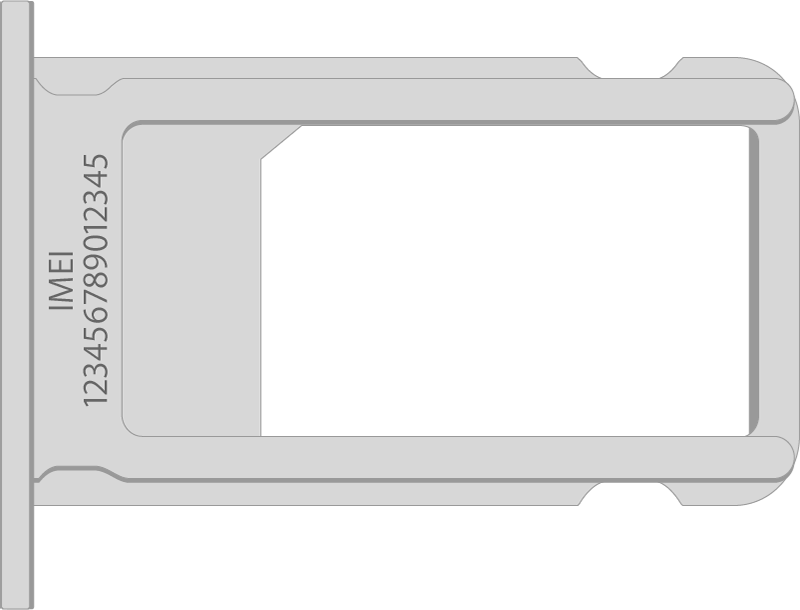
On these devices, find the serial number in Settings and the IMEI/MEID on the SIM tray. If you need support but you can't view the Settings menu, you can use the IMEI/MEID instead of the serial number:

  • iPhone 12
  • iPhone 12 mini
  • iPhone 12 Pro
  • iPhone 12 Pro Max
  • iPhone SE (2nd generation)
  • iPhone 11
  • iPhone 11 Pro
  • iPhone 11 Pro Max
  • iPhone XS
  • iPhone XS Max
  • iPhone XR
  • iPhone X
  • iPhone 8
  • iPhone 8 Plus
  • iPhone 7
  • iPhone 7 Plus
  • iPhone 6s
  • iPhone 6s Plus


pull sim tray and check for IMEI

Similar questions

5 replies
Question marked as Top-ranking reply

Jan 14, 2021 6:24 AM in response to IHateAppleTheyHaveBadSupport

you did not read carefully and missed this part:

On these devices, find the serial number in Settings and the IMEI/MEID on the SIM tray. If you need support but you can't view the Settings menu, you can use the IMEI/MEID instead of the serial number:

  • iPhone 12
  • iPhone 12 mini
  • iPhone 12 Pro
  • iPhone 12 Pro Max
  • iPhone SE (2nd generation)
  • iPhone 11
  • iPhone 11 Pro
  • iPhone 11 Pro Max
  • iPhone XS
  • iPhone XS Max
  • iPhone XR
  • iPhone X
  • iPhone 8
  • iPhone 8 Plus
  • iPhone 7
  • iPhone 7 Plus
  • iPhone 6s
  • iPhone 6s Plus


pull sim tray and check for IMEI

This thread has been closed by the system or the community team. You may vote for any posts you find helpful, or search the Community for additional answers.

How do I find the S/N of my phone when I cannot power it on? Further, I do not have the original package. Or... how do I open the back of the iPhone to verify the SIM Card

Welcome to Apple Support Community
A forum where Apple customers help each other with their products. Get started with your Apple Account.