Line chart to only include cells with numbers

Hello Everyone,


I want to make a line chart from a table. I will be periodically pasting numbers into the table, and those numbers will vary in column length. This information also goes into other tables. I have therefore found it easier to keep many columns open beyond what may be pasted in.


How do I set up a line chart so only the cells with data in it will be included.


Hope I've explained that right.

MacBook Pro 13″, macOS 10.13

Posted on Jan 16, 2021 7:59 AM

Reply

Similar questions

7 replies

Jan 20, 2021 11:13 AM in response to INDY-GO

You can select just the data points you want in the chart. Create the chart with one or more data points. Edit Data References and command-click on additional data points, skipping over the ones you don't want. Removing data points is more difficult so be careful you do not accidentally select one you don't want. You can remove points by editing the data values for the series (in the sidebar when the chart is selected). You can also remove them using Edit Data References and moving/joining/resizing ranges so the point is no longer included then reselecting any points that got uncovered.


Jan 20, 2021 12:40 PM in response to INDY-GO

Keep the table as is, but change the data reference celsl for the chart to include only the columns which already have values entered. Edit the data references each time you enter new data.


OR


Keep the table as is, and set the data reference cells for the chart to include all the columns which currently have entered values plus those that will have values entered later.


The first option will give you a chart that you can manually expand to fit the available data each time more data becomes available.


The second will give you a chart that will initially have an abundance of 'empty' space, into which the chart can expand as more data is added to the table.


In either case, data missing from a cell will cause a gap in the line displaying the change in that datum over time.


Selecting individual data points, as shown in Badunit's post above should bypass that issue, but I think it might also reduce the two choices here to the first option only, considering the difficulty of removing chosen data points.


Regards,

Barry


Jan 20, 2021 1:40 PM in response to INDY-GO

An alternative method that is more automatic but also more complex:
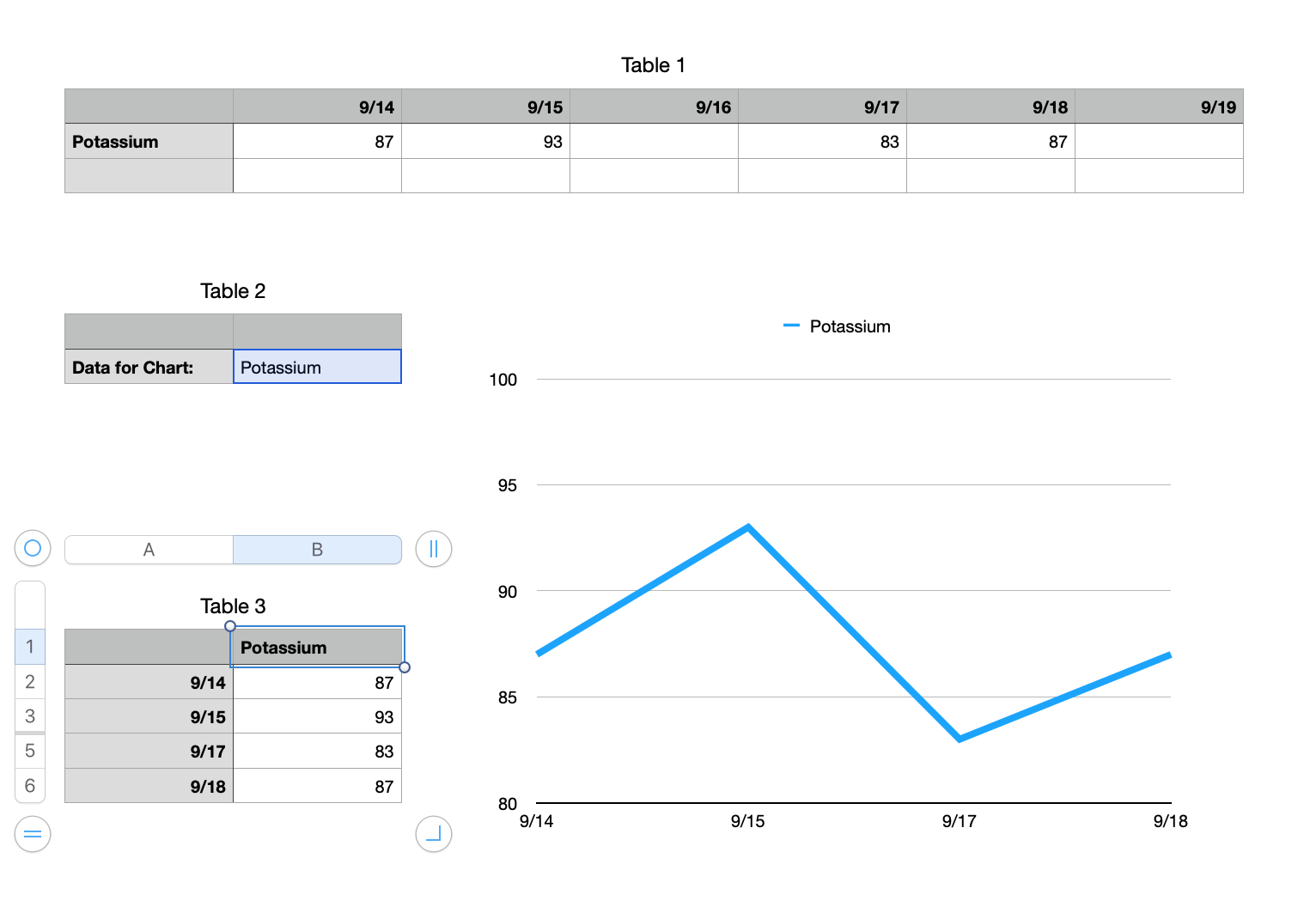


It uses the ability of a chart to ignore hidden cells. So if your blank cells are in hidden rows, they will not be part of the chart.


Table 2 is typed in. No formulas. The word needs to match the name in Table 1 that you want to chart.


Table 3 is made up of formulas and is filtered. As you can see it has hidden rows and is only showing the data to be charted. Make the table with as many or more rows as Table 1 has columns.


B1 =Table 2::B2

A2 =INDEX(Table 1::$1:$1,ROW())

B2 =VALUE(VLOOKUP($B$1,Table 1::$1:$3,ROW(),0)&"")

Edit that formula in B2 so it includes all rows of your table 1. I only have $1:$3.

Fill down to complete the columns

You will have error triangles at the bottom of the table if it is longer than Table 1 is wide

You will have error triangles in column B wherever there was a blank cell in Table 1.


Create your chart from this table. Use the entire table for the chart, error triangles and all.


Create a filter for the table of "show rows where column B text is not..." and type in any non-numeric text, like a space character. The table should shrink up to just the rows with data. The chart should include only those rows.


Move Table 3 to another sheet to get it out of the way. You should never have to mess with it again unless you need to add more rows to it.


Note that the formula in column B is designed around how VLOOKUP and other referencing functions will translate a blank cell into a zero. If you attach a &"" to the end, it does not do that but it makes the result text. VALUE turns it back to a number or, if it cannot, it creates an error. The filter is using that error to filter out the row.


Jan 20, 2021 7:54 AM in response to SGIII

The table is like this.


I want to do a line graph from one of the rows (say potassium) but only including cells which have a number in it.


I know if I reduce the columns down to the single one, I can do this.


The problem is that other tables use the information in this one. If I close this table down to one column, but then expand it suddenly with a lot more info, the other tables will not expand in corresponding fashion. If I leave the table with as many columns open as I may possible use, it will solve this problem, but then cause thew problem with line graphs.


Not sure that makes sense!


This thread has been closed by the system or the community team. You may vote for any posts you find helpful, or search the Community for additional answers.

Line chart to only include cells with numbers

Welcome to Apple Support Community
A forum where Apple customers help each other with their products. Get started with your Apple Account.