IPhone storage almost full even if I delete many apps - other storage at 36GB

I have an iPhone 6S Plus with iOS 14.3 that's been telling me that my storage is almost full for the last few days. I've deleted quite a few apps, including the top 5 or 6 that took the largest amount of data (OneDrive, Outlook, Facebook...) , which equalled almost 2 GB, but my storage barely goes down, as if something is constantly eating up storage.


Now that i have deleted all those important apps, I don't even know if I can install them back again, since I have very limited storage...and I'm getting really worried !


What is going on and how can I fix this ?

iPhone 6s Plus

Posted on Jan 19, 2021 11:30 PM

Reply
Question marked as Top-ranking reply

Posted on Jan 19, 2021 11:34 PM

Update to the latest iOS 14.3, your profile says you have iPhone 6S+


iOS 13.6.1 --> Addresses an issue where unneeded system data files might not be automatically deleted when available storage is low


  • Other: Non-removable mobile assets, like Siri voices, fonts, dictionaries, non-removable logs and caches, Spotlight index, and system data, such as Keychain and CloudKit Database. Cached files can't be deleted by the system.
  • System: Space taken by the operating system. This can vary based on your device and model.


About cached files in "Other"

Finder and iTunes categorize cached music, videos, and photos as Other instead of actual songs, videos, or photos. Cached files are created when you stream or view content like music, videos, and photos. When you stream music or video, that content is stored as cached files on your device so you can quickly access it again.


Your device automatically removes cached files and temporary files when your device needs more space.


If storage on your device differs from what you see in Finder or iTunes

Since Finder and iTunes categorize cached files as Other, reported usage for Music or Videos might differ. To view usage on your device, go to Settings > General > [Device] Storage.


If you want to delete the cached files from your device

Your device automatically deletes cached files and temporary files when it needs more space. You don't need to delete them yourself.


In short --> IGNORE, if you are not convinced, Restart the device. You will see that Others Storage will reduce but total storage will remain more or less the same.


Watch the demo in the GIF below made on my iPhone 6 iOS 12.4.7
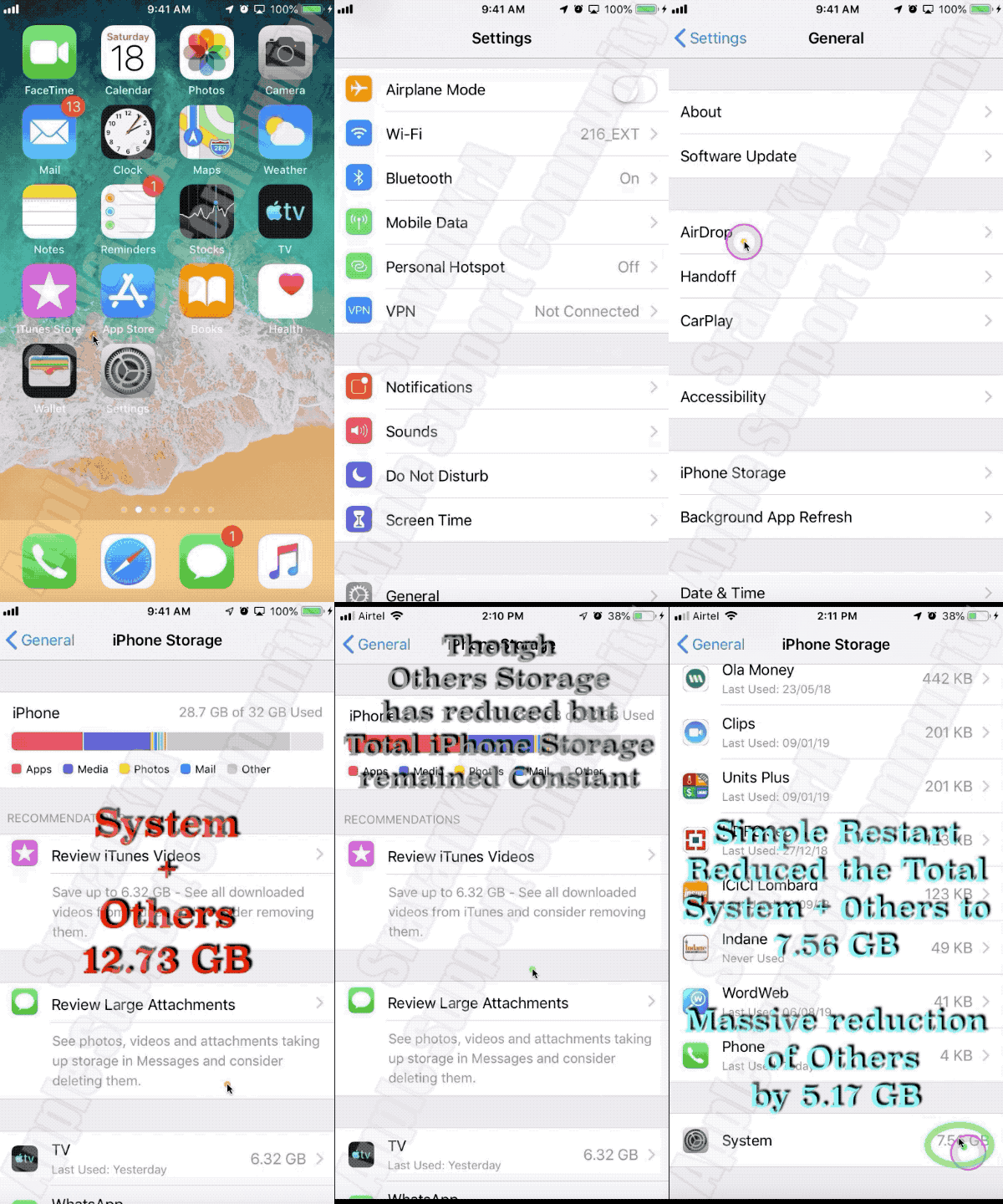

In short --> IGNORE, if you are not convinced, Restart the device. You will see that Others Storage will reduce but total storage will remain more or less the same


4 replies
Question marked as Top-ranking reply

Jan 19, 2021 11:34 PM in response to tempbond

Update to the latest iOS 14.3, your profile says you have iPhone 6S+


iOS 13.6.1 --> Addresses an issue where unneeded system data files might not be automatically deleted when available storage is low


  • Other: Non-removable mobile assets, like Siri voices, fonts, dictionaries, non-removable logs and caches, Spotlight index, and system data, such as Keychain and CloudKit Database. Cached files can't be deleted by the system.
  • System: Space taken by the operating system. This can vary based on your device and model.


About cached files in "Other"

Finder and iTunes categorize cached music, videos, and photos as Other instead of actual songs, videos, or photos. Cached files are created when you stream or view content like music, videos, and photos. When you stream music or video, that content is stored as cached files on your device so you can quickly access it again.


Your device automatically removes cached files and temporary files when your device needs more space.


If storage on your device differs from what you see in Finder or iTunes

Since Finder and iTunes categorize cached files as Other, reported usage for Music or Videos might differ. To view usage on your device, go to Settings > General > [Device] Storage.


If you want to delete the cached files from your device

Your device automatically deletes cached files and temporary files when it needs more space. You don't need to delete them yourself.


In short --> IGNORE, if you are not convinced, Restart the device. You will see that Others Storage will reduce but total storage will remain more or less the same.


Watch the demo in the GIF below made on my iPhone 6 iOS 12.4.7


In short --> IGNORE, if you are not convinced, Restart the device. You will see that Others Storage will reduce but total storage will remain more or less the same


Jan 19, 2021 11:47 PM in response to SravanKrA

My iOS is already up to date and restarting does nothing...


I'm at 63.3 GB of 64 GB even though I just deleted more than 2GB of apps and data. In the past few days, I've even deleted all my music with no effect.


I'm sure there's some kind of bug or corrupt something tha's causing the problem. I just tried to back up my phone on my computer in iTunes (latest version, just installed 10 minutes ago) and back up didn't work, iTunes saying there's an error. Tried a second time and didn't work either...

This thread has been closed by the system or the community team. You may vote for any posts you find helpful, or search the Community for additional answers.

IPhone storage almost full even if I delete many apps - other storage at 36GB

Welcome to Apple Support Community
A forum where Apple customers help each other with their products. Get started with your Apple Account.