Can't access RAW files - iPhone 12Pro

Although my iPhone SAYS its shooting RAW, I can never seem to access a RAW file. It only airdrops a 1.3MB jpeg, and I don't see "RAW" as a choice under "Media Types" in Photos either on my desktop or in iCloud. HOW do I actually access the RAW files?

iPhone XS

Posted on Feb 7, 2021 1:36 PM

Reply
Question marked as Top-ranking reply

Posted on Feb 8, 2021 2:10 AM

Your signature says "iPhone XS". Is that your iPhone model? Only the iPhone 12 Pro and iPhone 12 Pro Max with iOS 14.3 or later are supposed to be able to shoot in RAW. The TechSpecs for the "iPhone XS" are showing "Image formats captured: HEIF and JPEG", not Apple Pro RAW.


If your photo has been taken I RAW, it should be showing the "RAW" badge in the upper left corner. And "Albums > Media" Types would be showing RAW as the last item.

To transfer the original file, try to share an iCloud Link.


34 replies
Question marked as Top-ranking reply

Feb 8, 2021 2:10 AM in response to Juliet Bianchi

Your signature says "iPhone XS". Is that your iPhone model? Only the iPhone 12 Pro and iPhone 12 Pro Max with iOS 14.3 or later are supposed to be able to shoot in RAW. The TechSpecs for the "iPhone XS" are showing "Image formats captured: HEIF and JPEG", not Apple Pro RAW.


If your photo has been taken I RAW, it should be showing the "RAW" badge in the upper left corner. And "Albums > Media" Types would be showing RAW as the last item.

To transfer the original file, try to share an iCloud Link.


Feb 10, 2021 12:04 PM in response to Juliet Bianchi

As far as I know, Catalina has not yet support for Apple ProRAW, but I could not find any reliable information on Apple's own pages. This page does not mention the RAW Support on a Mac: About Apple ProRAW


For me it is working on macOS 11.2 Bug Sur. It would be good to know, if you can edit the files on Catalina in Photos.


Correction: This page About Apple ProRAW has been updated and is now saying:

" For the best experience, however, use apps that are compatible with ProRAW files, like the Photos app on your iPhone with iOS 14.3 or later or on a Mac with macOS Big Sur 11.1 or later."

So you would need to upgrade to Big Sur to work with your Apple ProRAW images with the RAW format and not just with the embedded JPEG.


Feb 9, 2021 10:31 AM in response to Juliet Bianchi

If you are syncing with iCloud photos, then that should transfer the raw file to your mac. At least it does for me on Catalina. However photos on the mac (in catalina) doesn't give a raw icon. Instead, you can tell it is raw by the filename haveing the extension .dng as shown here:


However editing them on Catalina is a dead loss. Even though I can edit raw files from my camera without any problems, Photos 5 is not able to handle the iPhone 12 raw files at all, and if I try to edit, immediately gives a very underexposed result which cannot be fixed.


If I revert to original on the phone, it then displays, and exports fine from the Mac - as long as I don't open the edit mode for it.

Feb 9, 2021 12:20 PM in response to Juliet Bianchi

When you look at the image in iCloud at www.icloud.com, do you selwww.icloud.com, the original or do you just click the download button?

Open the web page www.icloud.com in a browser on your computer and sign in with your iCloud Apple ID. Open the app Photos there. Can you download the the high resolution versions of your photos from this website? When you select some photo at iCloud in Photos and go to the download button in the toolbar, hover the pointer there to reveal the tiny, hidden "v" below the button. This will reveal a menu, where you can select to download the high resolution unmodified originals. Does this download a DNG RAW file?

Feb 9, 2021 2:05 PM in response to Juliet Bianchi

That is weird for the phone not to be able to edit its own photos.


I have two suggestions for that. One is a forced restart:

* press and quickly release the Volume Up button.

* Press and quickly release the Volume Down button.

* Then press and hold the Side button until you see the Apple logo. (KEEP it pressed until the apple Logo appears)


If that doesn't kick it into life. You could try a reset of all settings (obviously any settings you've made on your phone will go back to default - for example you may have to re setup email etc)


Make sure you have an up to date backup of your phone first.


Settigns>general>reset, then tap "reset all settings".

Be very careful NOT to tap "reset all content and settings"

Feb 10, 2021 12:59 AM in response to Juliet Bianchi

So with @léonie's help, I was able to finally DOWNLOAD a DNG

And can you edit the DNG on your Mac? Which system version is installed on the Mac? The Apple RAW support page does not list the Apple Pro RAW, but when I download Apple Pro RAW sample images I can open them in Photos on macOS 11.2.

The RAW support seems only to come with macOS 11.1. All RAW files are showing "RAW" in the upper left corner on Big Sur.


The editing tools are the same as for non-raw images. There are no additional tools for lens correction or for removing colour fringes.

Feb 9, 2021 12:32 PM in response to léonie

I can edit them on the phone, and they still transfer fine as DNG, with the edited preview, and edits intact (I can successfully export the original DNG, and a correctly edited jpg. Just by way of example, here is that same pair of thumbnails, but with the exposure of the DNG corrected on my phone. As you can see by comparing with the screenshot above, this exposure correction has been correctly transferred to my Mac.
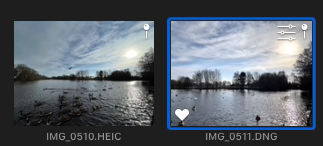


EDIT: However I am wrong about being able to export a jpg using file>export. Photos 5 must use it's own render engine for this, and it comes out underexposed again (this from exactly the same shot without further edits, as the thumbnail here)



EDIT SOME MORE:


If I drag the image to the desktop, I get the correctly exposed preview from the phone.


Upshot is, having the raw file on the mac is not much use for the photos app. I"m going to try editing it in affinity.


This thread has been closed by the system or the community team. You may vote for any posts you find helpful, or search the Community for additional answers.

Can't access RAW files - iPhone 12Pro

Welcome to Apple Support Community
A forum where Apple customers help each other with their products. Get started with your Apple Account.
