Can't access RAW files - iPhone 12Pro

Although my iPhone SAYS its shooting RAW, I can never seem to access a RAW file. It only airdrops a 1.3MB jpeg, and I don't see "RAW" as a choice under "Media Types" in Photos either on my desktop or in iCloud. HOW do I actually access the RAW files?

iPhone XS

Posted on Feb 7, 2021 1:36 PM

Reply
Question marked as Top-ranking reply

Posted on Feb 8, 2021 2:10 AM

Your signature says "iPhone XS". Is that your iPhone model? Only the iPhone 12 Pro and iPhone 12 Pro Max with iOS 14.3 or later are supposed to be able to shoot in RAW. The TechSpecs for the "iPhone XS" are showing "Image formats captured: HEIF and JPEG", not Apple Pro RAW.


If your photo has been taken I RAW, it should be showing the "RAW" badge in the upper left corner. And "Albums > Media" Types would be showing RAW as the last item.

To transfer the original file, try to share an iCloud Link.


34 replies

Feb 10, 2021 12:06 AM in response to Juliet Bianchi

It might be that the controls work differently than you are used to in photoshop. To bring up shadows, or down higlights, I use the shadow or highlight tools.


See the blocked out shadows in the trees mid left in my shot above. This is what the shadow tool brings out...
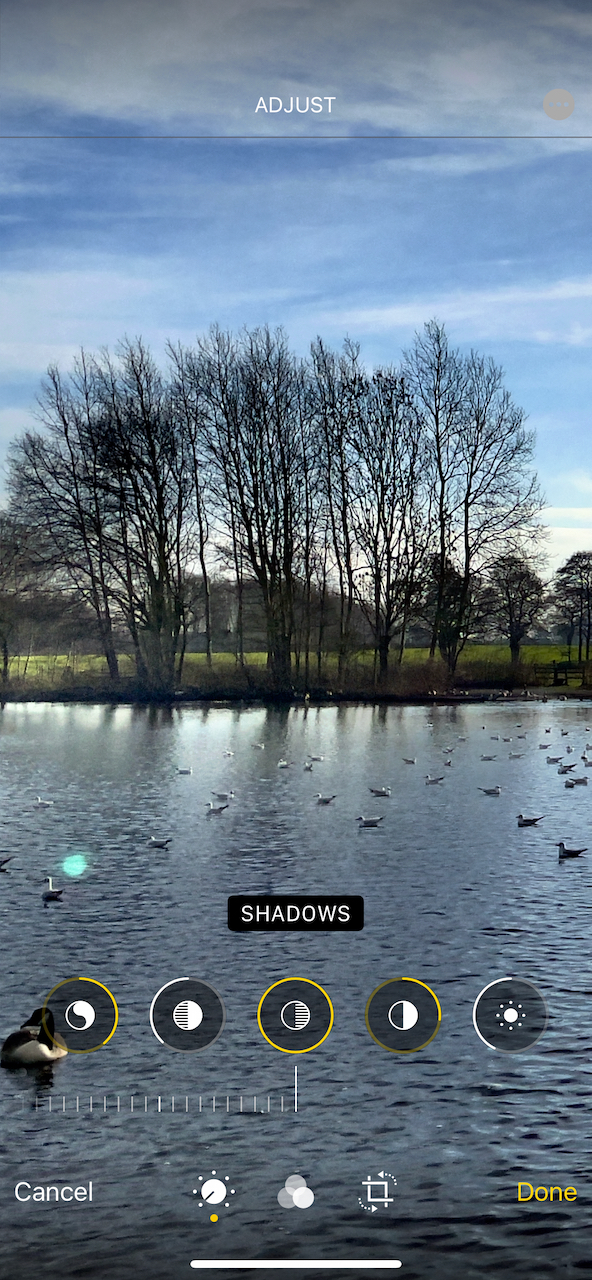

I can't get anywhere near that with the shot taken at the same time without raw.


Try some side by side comparisons with raw/non raw - I'm sure you'll see a diference in the exposure latitude you can get. It might not be as good as you get if you are used to raw from an SLR though. We are still talking about a phone camera sensor here.



Feb 10, 2021 10:56 AM in response to TonyCollinet

When I downloaded the dng I could use camera RAW in photoshop to edit it. When I edit the same photo with my iPhone, it seems to not have the amount of range I would expect from a raw file and edits exactly the same as a jpeg.


the thing I’m still hung up on is why my iPhotos doesn’t indicate which photos are raw. I was able to download them using the technique léonie suggested, but I had to guess which ones were RAW.

Feb 10, 2021 2:41 PM in response to Juliet Bianchi

Again - I am certain if you do a comparison with a raw and non raw photo of the same subject at the same time, you'll see the difference.


Probably photoshop - being a pro and expensive app - will do a better job than the included app on your phone.


The Photos app (I assume you are not using iPhoto which doesn't work with Big Sur) will normally show the filename below the thumbnail (unless you are showing square thumbnails). This will include the extension DNG for raw versions.

This thread has been closed by the system or the community team. You may vote for any posts you find helpful, or search the Community for additional answers.

Can't access RAW files - iPhone 12Pro

Welcome to Apple Support Community
A forum where Apple customers help each other with their products. Get started with your Apple Account.