I can edit them on the phone, and they still transfer fine as DNG, with the edited preview, and edits intact (I can successfully export the original DNG, and a correctly edited jpg. Just by way of example, here is that same pair of thumbnails, but with the exposure of the DNG corrected on my phone. As you can see by comparing with the screenshot above, this exposure correction has been correctly transferred to my Mac.
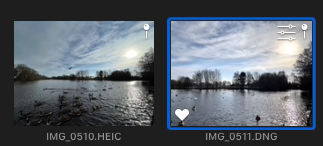
EDIT: However I am wrong about being able to export a jpg using file>export. Photos 5 must use it's own render engine for this, and it comes out underexposed again (this from exactly the same shot without further edits, as the thumbnail here)

EDIT SOME MORE:
If I drag the image to the desktop, I get the correctly exposed preview from the phone.
Upshot is, having the raw file on the mac is not much use for the photos app. I"m going to try editing it in affinity.


