
Hide page sidebar in iPadOS?
Is there a way to minimise the sidebar when viewing a PDF? When trying to markup a PDF with Apple Pencil, my palm taps the sidebar and the pages change randomly. It is kinda annoying to find the page I was on before.
Is there a way to minimise the sidebar when viewing a PDF? When trying to markup a PDF with Apple Pencil, my palm taps the sidebar and the pages change randomly. It is kinda annoying to find the page I was on before.
Greetings, Apple_User_5949!
Thanks for reaching out to the Apple Support Communities! That's a great question you have about hiding the sidebar when viewing a PDF document on your iPad. Check out this article for Quick navigation in Pages on iPad:
"1. Do one of the following to show page thumbnails:
 at the top of the screen, turn on Page Thumbnails, then tap the document to close the view.
2. To hide page thumbnails, swipe left across the thumbnails.
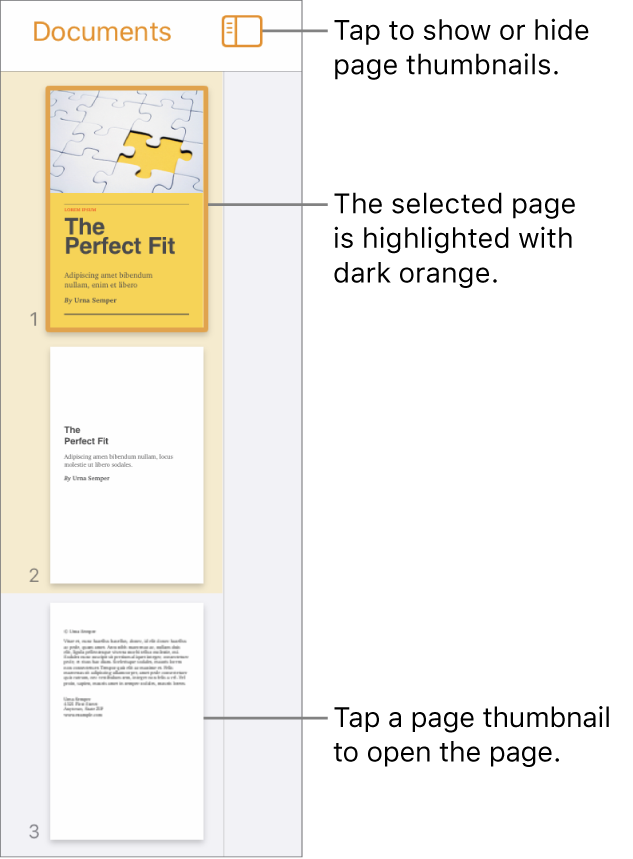
In Page Thumbnails view, you can rearrange sections in a word-processing document or rearrange pages in a page layout document. See Add, delete, and rearrange pages."
Thanks again for the question and take care!
I have the same problem viewing the downloaded CDC coronavirus community profile report on an iPad.
The navigation sidebar on the right overlays some of the content. The answer above seems to be about Pages and did not work when viewing the PDF.
Is there a way to hide navigation sidebars when viewing downloaded PDFs?
Thanks!
Hide page sidebar in iPadOS?


