
How do I authorize my Mac book for Apple Music from iCloud?
When I try to download my Apple Music from iCloud I get a pop up that says I must authorize this device (Mac Book Pro). How do I do that? Thanks in advance
MacBook
When I try to download my Apple Music from iCloud I get a pop up that says I must authorize this device (Mac Book Pro). How do I do that? Thanks in advance
MacBook
Hey hey Rixck,
Thank you for using the Apple Support Communities! Sounds like you're trying to setup Apple Music on your MacBook Pro but you need to authorize your computer first. We can help.
You'll find the steps in this article: Authorize or deauthorize your computer for iTunes Store purchases. We've also quoted the steps for you below:
"How to authorize a Mac or PC
Before you authorize a Mac, update it to the latest version of macOS. On a PC, update to the latest version of iTunes for Windows.
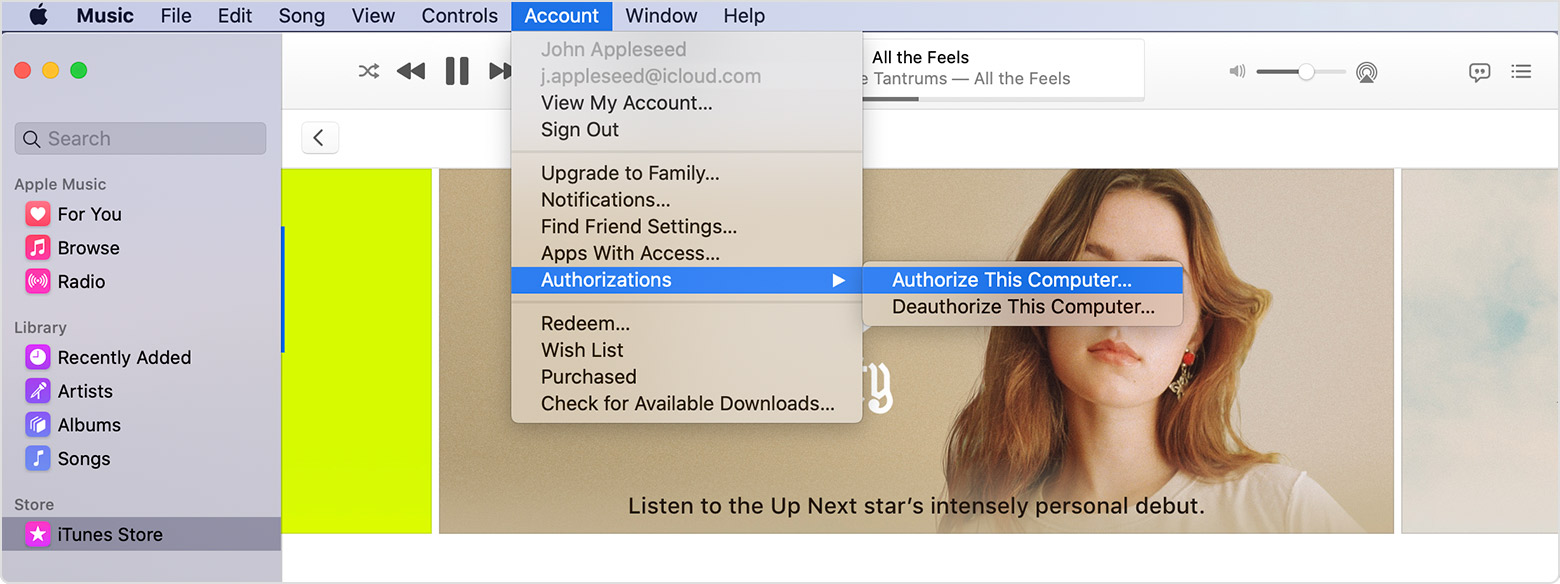 If you're asked to authorize your computer again, it won't use a new authorization. Apple ID uses the same authorization for the same computer."
Turn on Sync Library with Apple Music
Best regards to you!
Hey hey Rixck,
Thank you for using the Apple Support Communities! Sounds like you're trying to setup Apple Music on your MacBook Pro but you need to authorize your computer first. We can help.
You'll find the steps in this article: Authorize or deauthorize your computer for iTunes Store purchases. We've also quoted the steps for you below:
"How to authorize a Mac or PC
Before you authorize a Mac, update it to the latest version of macOS. On a PC, update to the latest version of iTunes for Windows.
If you're asked to authorize your computer again, it won't use a new authorization. Apple ID uses the same authorization for the same computer."
Turn on Sync Library with Apple Music
Best regards to you!
Thank You!
How do I authorize my Mac book for Apple Music from iCloud?
