How to custom zoom into the video player in Final Cut Pro

I'm trying to custom zoom into the video player of Final Cut Pro with a custom percentage. Or even to be able to easily zoom closer and further out with my fingers and my track pad.

I use this so much in other editing software but can't figure out how to do it in FCP.


Is it only possible to see your video in the video preview/viewer at Fit, 12.5%, 25%, 50%, 100%, etc??


Thank you for any help!!

iMac 27″, macOS 11.2

Posted on Mar 16, 2021 7:56 AM

Reply
Question marked as Top-ranking reply

Posted on Mar 16, 2021 6:36 PM

You can use this "Camera" effect (free download):

https://fcpxtemplates.com/downloads/


It's an effect. There's a couple of different ways to use this.


1) Just add it to any clip. Make sure the effect is at the bottom of the Effect list (or deal with some unusual interactions -- no big deal). When you're done with it -- or just want to go back to "normal" -- simply "uncheck" the effect in the inspector.
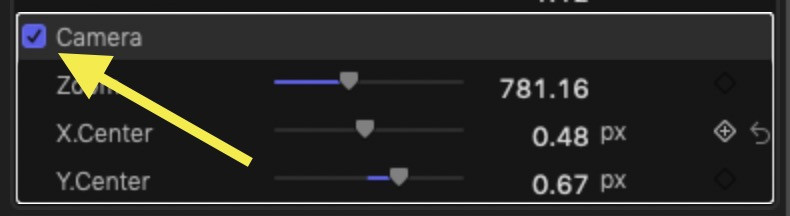

2) Add it to any adjustment layer title (can be stretched out in time to cover many clips at once.) Select the Adjustment Layer and type the V key to toggle it's "visibility".


There is an OSC that will help you pan around the image while scaled. (Best to set the Viewer to Fit or 100% — not scaled up to begin with).


Scale is *not technically* used - Z position is (distance of camera to the "scene"). The high value goes to 2000 which is approximately 360%-400% "zoom" (I think...)


I have found that the image quality in the 300% or so scale equivalent is better than a similar effect that uses a straight "scale".


I never finished developing this effect, so it's not terribly practical for anything else, but it will serve you in a smooth scale from 100% to ~400% with excellent results with onscreen panning for looking around that may suit your purposes.


If you need help installing it:

https://fcpxtemplates.com/installing-plugins-for-fcpx/


If you have any questions... just let me know.


12 replies
Question marked as Top-ranking reply

Mar 16, 2021 6:36 PM in response to Octopus512

You can use this "Camera" effect (free download):

https://fcpxtemplates.com/downloads/


It's an effect. There's a couple of different ways to use this.


1) Just add it to any clip. Make sure the effect is at the bottom of the Effect list (or deal with some unusual interactions -- no big deal). When you're done with it -- or just want to go back to "normal" -- simply "uncheck" the effect in the inspector.


2) Add it to any adjustment layer title (can be stretched out in time to cover many clips at once.) Select the Adjustment Layer and type the V key to toggle it's "visibility".


There is an OSC that will help you pan around the image while scaled. (Best to set the Viewer to Fit or 100% — not scaled up to begin with).


Scale is *not technically* used - Z position is (distance of camera to the "scene"). The high value goes to 2000 which is approximately 360%-400% "zoom" (I think...)


I have found that the image quality in the 300% or so scale equivalent is better than a similar effect that uses a straight "scale".


I never finished developing this effect, so it's not terribly practical for anything else, but it will serve you in a smooth scale from 100% to ~400% with excellent results with onscreen panning for looking around that may suit your purposes.


If you need help installing it:

https://fcpxtemplates.com/installing-plugins-for-fcpx/


If you have any questions... just let me know.


Mar 16, 2021 1:26 PM in response to Octopus512

Octopus512 wrote:

I'm trying to custom zoom into the video player of Final Cut Pro with a custom percentage. Or even to be able to easily zoom closer and further out with my fingers and my track pad.
I use this so much in other editing software but can't figure out how to do it in FCP.

Is it only possible to see your video in the video preview/viewer at Fit, 12.5%, 25%, 50%, 100%, etc??

Thank you for any help!!


Find the left edge of the Viewer window and you can click and drag incrementally.


Al

This thread has been closed by the system or the community team. You may vote for any posts you find helpful, or search the Community for additional answers.

How to custom zoom into the video player in Final Cut Pro

Welcome to Apple Support Community
A forum where Apple customers help each other with their products. Get started with your Apple Account.




