iMac G5 GPU Fault?

Hello!

I have an iMac G5 iSight 20" Desktop computer. It was given to me with some old software.

After fixing the front bezel coming off the back, I powered it on and everything worked fine. Then I installed a bunch of software. After I installed a copy of Norton Utilities 8 for Mac OS 10.0, (My Mac was running 10.4.11), then it prompted me to restart to finish the installation. When it started up, strange lines covered the screen, in a purple or occasionally green colour. Help! Can I fix this? Did Norton Utilities cause the issue? Thanks.

  • Josh

Posted on Apr 1, 2021 11:35 AM

Reply
Question marked as Top-ranking reply

Posted on Apr 2, 2021 8:31 AM

Welcome Josh.


When it started up, strange lines covered the screen, in a purple or occasionally green colour.


It is neither Norton (but avoid it anyway) nor due to something you did. That symptom sadly reflects a factory defect.


A massive number of later-model iMac G5s were factory-fitted with faulty display panels. All the affected units came from one vendor factory; that factory is denoted by the code "W8" at the start of the serial number. Eventually the displays failed presenting odd colors and, especially, the lines.


Apple had a Repair Extension Program in place to fix this at no cost but it expired years ago.


That model was also plagued with a bad capacitor issues test affected the entire industry. Again, the propgram to fix is long gone.


Can I fix this?


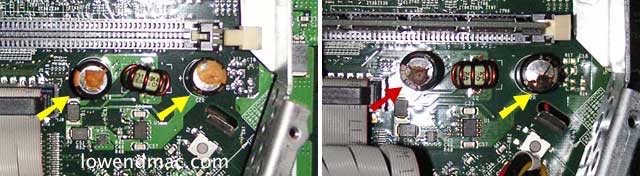
Probably not if it is capacitors. If you can see any capacitors through the RAM door or with the computer apart, look for capacitors whose metal can is bulging at the base and/or is showing brown goo leaking out. (images are from an eMac of the same period but capacitors wil look the same if bad.)


That requires a new, healthy logic board.


As the video problem appeared after you fixed the bezel, there is a slim chance that it may be a loose video connector. All you can do is check. Otehrwise you need a new display panel. There were so many affected G5 iMacs that there are very few compatible display panels out there on the used/pulled market that are not affected.


Check out some of the "fixit" sites for more recent info on availability of non-affected G5 display units.


I've opened a lot of problem Macs and most of them survived my interventions and repairs. Faced with one issue, I would be game for attempting a fix. However, with potentially two major issues in one of the more trouble-plagued Mac models ever, my decision would be euthanasia.



Similar questions

2 replies
Question marked as Top-ranking reply

Apr 2, 2021 8:31 AM in response to Hiker159

Welcome Josh.


When it started up, strange lines covered the screen, in a purple or occasionally green colour.


It is neither Norton (but avoid it anyway) nor due to something you did. That symptom sadly reflects a factory defect.


A massive number of later-model iMac G5s were factory-fitted with faulty display panels. All the affected units came from one vendor factory; that factory is denoted by the code "W8" at the start of the serial number. Eventually the displays failed presenting odd colors and, especially, the lines.


Apple had a Repair Extension Program in place to fix this at no cost but it expired years ago.


That model was also plagued with a bad capacitor issues test affected the entire industry. Again, the propgram to fix is long gone.


Can I fix this?


Probably not if it is capacitors. If you can see any capacitors through the RAM door or with the computer apart, look for capacitors whose metal can is bulging at the base and/or is showing brown goo leaking out. (images are from an eMac of the same period but capacitors wil look the same if bad.)


That requires a new, healthy logic board.


As the video problem appeared after you fixed the bezel, there is a slim chance that it may be a loose video connector. All you can do is check. Otehrwise you need a new display panel. There were so many affected G5 iMacs that there are very few compatible display panels out there on the used/pulled market that are not affected.


Check out some of the "fixit" sites for more recent info on availability of non-affected G5 display units.


I've opened a lot of problem Macs and most of them survived my interventions and repairs. Faced with one issue, I would be game for attempting a fix. However, with potentially two major issues in one of the more trouble-plagued Mac models ever, my decision would be euthanasia.


This thread has been closed by the system or the community team. You may vote for any posts you find helpful, or search the Community for additional answers.

iMac G5 GPU Fault?

Welcome to Apple Support Community
A forum where Apple customers help each other with their products. Get started with your Apple Account.