applescript PDF Highlighted text to variable

Hi Guys,

Just wondering if its possible to get text as variable from PDF which are highlighted

example

pink highlighted text = variable A

blue Highlighted text = Variable B

I want to use them for keywords, rename them etc

Just wondering if it can be done natively or with skim

Cheers

Posted on Apr 2, 2021 11:35 AM

Reply
Question marked as Top-ranking reply

Posted on Apr 4, 2021 8:29 AM

To demonstrate how unreliable Preview annotations are when one attempts to extract their text, here is a screen shot of the text annotations applied by Preview in a PDF exported from Pages 11.0 on macOS 11.2.3:
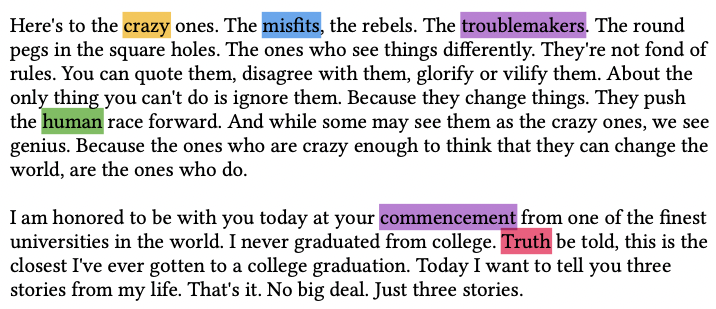


and the output of my AppleScript/Objective-C script on this PDF:


and the result from opening a duplicate of this same PDF content, removing the individual highlight annotations, and then replacing them with Acrobat Reader DC highlight annotations, and saving the PDF. Note the consequence of Adobe using a lozenge style highlight and that it "blooms" over the adjacent unselected punctuation character:


and the result of running the script on this PDF content. Note that I am removing leading/trailing punctuation marks.


# pdf_highlights.applescript

# Reference: https://discussions.apple.com/thread/252623954

# extract into an array, the text from individual PDF highlight annotations
# although it is certainly possible to capture entire highlighted text passages,
# this script is constraining the text to one word highlighted text as the
# original goal was to use these highlight annotations as PDF keywords.
# There is presently no attempt to remove duplicates, but that is a simple matter.

# Note that this script remains unreliable with highlight annotations applied by
# Apple's Preview, but quite accurate when those highlights are applied by
# Adobe's Acrobat Reader DC.

# Tested: macOS 11.2.3
# VikingOSX, 2021-04-04, Apple Support Communities, no warranties expressed/implied

use AppleScript version "2.4" -- Yosemite (10.10) or later
use framework "Foundation"
use framework "PDFKit"
use scripting additions

property NSString : a reference to current application's NSString
property NSURL : a reference to current application's NSURL
property NSArray : a reference to current application's NSArray
property NSCharacterSet : a reference to current application's NSCharacterSet
property PDFDocument : a reference to current application's PDFDocument
property PDFPage : a reference to current application's PDFPage

# where we store hightlighted text words
set hkey to NSArray's array()'s mutableCopy()
set uti_pdf to {"com.adobe.pdf"}
set allowed to NSCharacterSet's alphanumericCharacterSet
# exclude any character not in the implied allowed set
set disallowed to allowed's invertedSet()

# only display PDF documents in the file chooser
set thePDF to POSIX path of (choose file of type uti_pdf default location (path to desktop)) as text

set pdfURL to NSURL's fileURLWithPath:thePDF
set pdf to PDFDocument's alloc()'s initWithURL:pdfURL
set pageCnt to pdf's pageCount()
set pdf_page to PDFPage

repeat with apage from 1 to pageCnt
	# we subtract 1 because PDF pages are 0-based in PDFKit
	set pdf_page to (pdf's pageAtIndex:(apage - 1))
	repeat with anno in pdf_page's annotations()
		if ((anno's type()) as text) = "Highlight" then
			set arect to anno's |bounds|()
			set atext to (pdf_page's selectionForRect:arect)'s |string|()
			if atext is not missing value then
				# because AcroReader highlight annotations may bloom beyond specific text selection
				# and make adjacent punctuation an unintended part of the highlight text
				set trimmed_text to ((NSString's stringWithString:atext)'s stringByTrimmingCharactersInSet:disallowed)
				
				# exclude multiple word highlight annotations
				if (count of (words of (trimmed_text as text))) = 1 then
					# add the text word to the array
					(hkey's addObject:(trimmed_text as text))
				end if
			end if
		end if
	end repeat
end repeat

# create a text string of array entries punctuated by returns for display purposes
set captured_highlights to (hkey's componentsJoinedByString:return) as text
set pdf_name to (NSString's stringWithString:thePDF)'s lastPathComponent() as text
display dialog "PDF file: " & pdf_name & return & captured_highlights with title "Highlighted Words in PDF"
return


8 replies
Question marked as Top-ranking reply

Apr 4, 2021 8:29 AM in response to VikingOSX

To demonstrate how unreliable Preview annotations are when one attempts to extract their text, here is a screen shot of the text annotations applied by Preview in a PDF exported from Pages 11.0 on macOS 11.2.3:


and the output of my AppleScript/Objective-C script on this PDF:


and the result from opening a duplicate of this same PDF content, removing the individual highlight annotations, and then replacing them with Acrobat Reader DC highlight annotations, and saving the PDF. Note the consequence of Adobe using a lozenge style highlight and that it "blooms" over the adjacent unselected punctuation character:


and the result of running the script on this PDF content. Note that I am removing leading/trailing punctuation marks.


# pdf_highlights.applescript

# Reference: https://discussions.apple.com/thread/252623954

# extract into an array, the text from individual PDF highlight annotations
# although it is certainly possible to capture entire highlighted text passages,
# this script is constraining the text to one word highlighted text as the
# original goal was to use these highlight annotations as PDF keywords.
# There is presently no attempt to remove duplicates, but that is a simple matter.

# Note that this script remains unreliable with highlight annotations applied by
# Apple's Preview, but quite accurate when those highlights are applied by
# Adobe's Acrobat Reader DC.

# Tested: macOS 11.2.3
# VikingOSX, 2021-04-04, Apple Support Communities, no warranties expressed/implied

use AppleScript version "2.4" -- Yosemite (10.10) or later
use framework "Foundation"
use framework "PDFKit"
use scripting additions

property NSString : a reference to current application's NSString
property NSURL : a reference to current application's NSURL
property NSArray : a reference to current application's NSArray
property NSCharacterSet : a reference to current application's NSCharacterSet
property PDFDocument : a reference to current application's PDFDocument
property PDFPage : a reference to current application's PDFPage

# where we store hightlighted text words
set hkey to NSArray's array()'s mutableCopy()
set uti_pdf to {"com.adobe.pdf"}
set allowed to NSCharacterSet's alphanumericCharacterSet
# exclude any character not in the implied allowed set
set disallowed to allowed's invertedSet()

# only display PDF documents in the file chooser
set thePDF to POSIX path of (choose file of type uti_pdf default location (path to desktop)) as text

set pdfURL to NSURL's fileURLWithPath:thePDF
set pdf to PDFDocument's alloc()'s initWithURL:pdfURL
set pageCnt to pdf's pageCount()
set pdf_page to PDFPage

repeat with apage from 1 to pageCnt
	# we subtract 1 because PDF pages are 0-based in PDFKit
	set pdf_page to (pdf's pageAtIndex:(apage - 1))
	repeat with anno in pdf_page's annotations()
		if ((anno's type()) as text) = "Highlight" then
			set arect to anno's |bounds|()
			set atext to (pdf_page's selectionForRect:arect)'s |string|()
			if atext is not missing value then
				# because AcroReader highlight annotations may bloom beyond specific text selection
				# and make adjacent punctuation an unintended part of the highlight text
				set trimmed_text to ((NSString's stringWithString:atext)'s stringByTrimmingCharactersInSet:disallowed)
				
				# exclude multiple word highlight annotations
				if (count of (words of (trimmed_text as text))) = 1 then
					# add the text word to the array
					(hkey's addObject:(trimmed_text as text))
				end if
			end if
		end if
	end repeat
end repeat

# create a text string of array entries punctuated by returns for display purposes
set captured_highlights to (hkey's componentsJoinedByString:return) as text
set pdf_name to (NSString's stringWithString:thePDF)'s lastPathComponent() as text
display dialog "PDF file: " & pdf_name & return & captured_highlights with title "Highlighted Words in PDF"
return


Apr 2, 2021 11:51 AM in response to one208

Not without some nasty Apple PDFKit framework development effort. The Preview AppleScript scripting dictionary support does not expose annotation content so it is a first sentence issue. Let me look into this and see if it is even possible within a reasonable amount of programming effort.


Skim v1.6.2 AppleScript dictionary does not expose any Annotation content, though it can provide you either a list of existing keywords or the keywords as a string. It does not appear to allow you to edit (add/change/remove) keywords. So it will be of limited to no use to you in your original quest.

Apr 3, 2021 6:53 PM in response to VikingOSX

I have invested more time in this. I have three PDF documents with an identical paragraph of text, with common and different text highlights in different colors:

  1. PDF exported from LibreOffice Writer v7.1 with Helvetica text. Highlights applied in Preview from macOS 11.2.3.
  2. PDF exported from Pages v11.0 based on Helvetica text. Highlights applied in Preview from macOS 11.2.3.
  3. PDF exported from LibreOffice v7.1, and default Liberation-serif text. Highlights of the same color applied in Adobe Acrobat Reader DC v2021.001.20145.


It is hit, or miss, if either the AppleScript or Python code returns the text from annotation highlights applied by Preview, but reliably succeed when originally applied by Adobe Acrobat Reader DC. If I open the Preview PDF, in Adobe Acrobat Reader DC, and remove the annotations, and then reapply the annotation highlight to the same words, and save, then either script dutifully finds those words.


What is the likelihood you want to doctor all of your PDF annotation highlights in Adobe Acrobat Reader DC?

May 12, 2021 4:31 AM in response to one208

You are welcome.


I waited until macOS 11.3.1 was released and tried the AppleScript/Objective-C code again with the same and newly highlighted PDF. Same results as when I tested this on macOS 11.2.3. Preview highlights undependable for extraction, and Adobe Reader highlights worked properly every time.


I then wrote the same solution in strictly Objective-C, and the results matched the first paragraph, so I know the AppleScript/Objective-C code is working correctly, and the problem is with Preview. That said, I sent feedback to the macOS product team describing the issue with Preview.


Stay safe in an uncertain world…

Apr 3, 2021 1:19 PM in response to one208

The PDFKit framework's PDFAnnotation class does not provide a means to select highlight annotations by their color name. The highlighted text has an internal color model, and RGBA information as decimal values and this is useless for anything.


Earlier today, and after some serious eyestrain, I managed to get both a Python/Objective-C and its port to AppleScript/Objective-C capturing the annotation highlighted text occurrences. Then either I borked the code with some tweak, or simply changing the color of the PDF highlight annotations caused both the Python and AppleScript to just return the first highlighted text string in the same PDF. Neither an hour of tweaking nor Time Machine restores have resolved this yet. Fragile.


When you assign a keyword to a PDF, it must be a single word, not a string of words, or it will attempt to assign every word in the string as a new keyword. For that reason, although I was able to capture a full sentence that was highlighted, I restricted the code to capturing single-word entries. I am not presently attempting to eliminate duplicates, but that should be a consideration when adding keywords to a PDF.

Apr 2, 2021 4:52 PM in response to one208

I have a Python/Objective-C script that can extract the text from the first text highlight on my sample PDF document but ignores the second incidence of highlighted text on the same page. Apparently, others have experienced this reliability issue for capturing PDF highlighted text strings using non-Apple PDF libraries and other programming languages. Not sure I can solve this issue. Will try again tomorrow.


I also have a Python script that adds, lists, or removes keywords from a PDF document. It is more involved than the first paragraph.

May 12, 2021 2:16 AM in response to VikingOSX

Hi VikingOSX, as always you have been very quick.

Apologies for not replying sooner, been very busy at work, pandemic does not help anyone, just happy to be around

Like you mentioned highlights in preview is temperamental, and results are intermittent. same document, script sometimes picks up the highlighted text, other times it does not.

It works very well with Acrobat reader, but wont play well with Acrobat (highlighted at work in windows)

I would persist with it, and report back

Thank you for being very helpful

Cheers

This thread has been closed by the system or the community team. You may vote for any posts you find helpful, or search the Community for additional answers.

applescript PDF Highlighted text to variable

Welcome to Apple Support Community
A forum where Apple customers help each other with their products. Get started with your Apple Account.