Making vote counting easier

Hi,


I have a Patreon page, and I run polls each month. Patreon has a limitation where every supporter, no matter the amount they pay you, gets one equal vote. In the past, I have been counting votes manually but since my list is getting longer, I feel like I have to find something more efficient.


I can download a CSV of my poll results. In the poll options, 1 is a vote, and 0 is no vote.

I can also get a CSV on my premium tiers ($5, $10, and $50)


I manually give my $5 tier 5 votes and my $10 + $50 tier 10 votes. Is there a way to do it faster?


Let me know if you need more information or pictures.

Posted on May 2, 2021 8:15 PM

Reply
14 replies

May 3, 2021 12:12 PM in response to Miskie

As I read this, the minimum accepted pledge is $2, those pledging between $200 and $4.99 will not be listed on the PLEDGES table, and if pledges of less than $2 are permitted, those will either not be listed in the csv or will be listed, but will show 0 in all five columns.


If that is correct, there should be no need for changes in what follows.


The solution uses three tables:
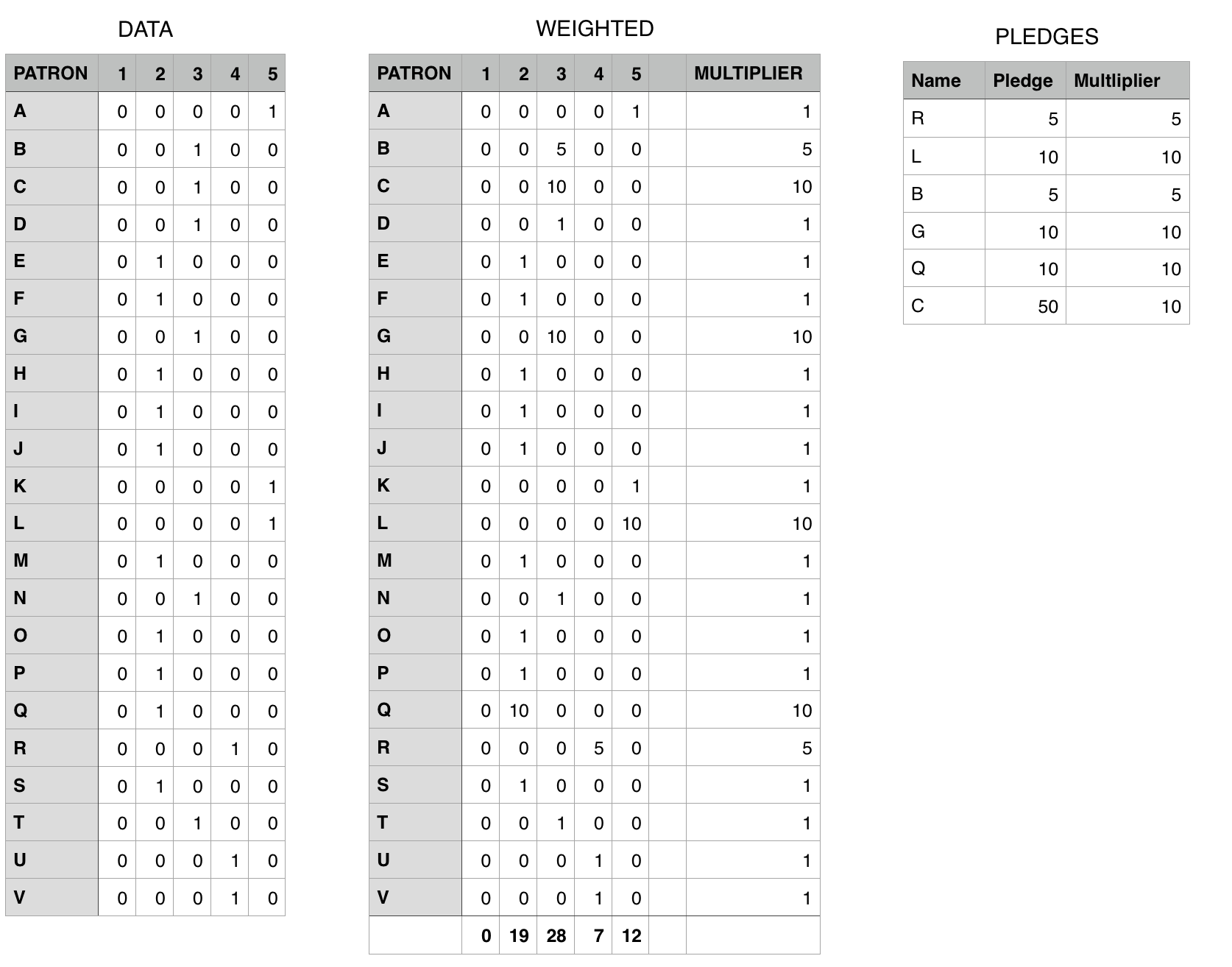
DATA is the table into which the values in the csv file will be pasted. This table contains only the pasted data shown plus the column lables in the top row.


PLEDGES is your pledge list table, with one added column to record the vote multiplier corresponding with that person's pledge.


WEIGHTED is the workhorse. All entries in this table (except the labels in row 1) are created by formula.


There are four formulas in this table:
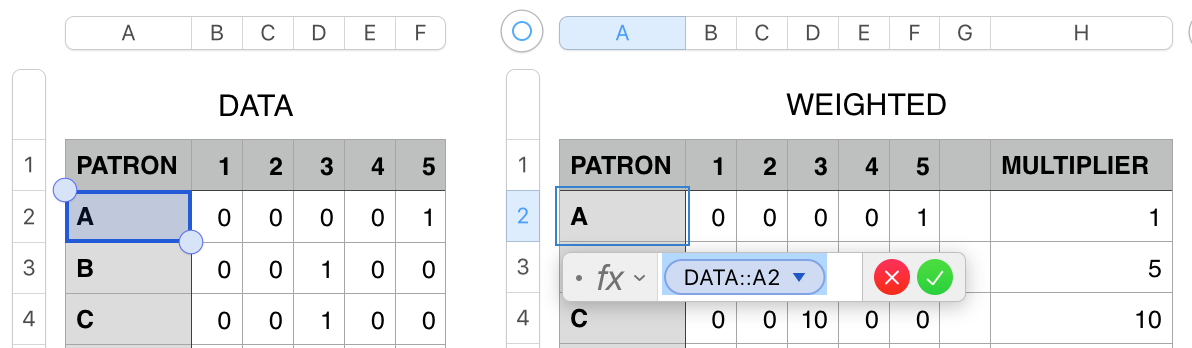

The formula in A2 is a simple cell reference to the same cell on DATA.


To enter it in A2 of WEIGHTED:

  • Click once on A2, then type = to open the Formula Editor
  • With the formula editor open, click once on cell A2 of DATA.
  • Click the green checkmark to confirm the formula and close the editor.


Fill this formula down to the last non-footer cell in column A ( A23 ). (see Note below)


The formula in B2 collects the value from the corresponding cell of DATA and multiplies it by the value in the same row of column H of WEIGHTED.


Click on B2, open the Editor as described above, then:

  • Click on cell B2 of DATA
  • Type * (This will immediately change to the multiplication sign)
  • Click on Cell H2 of WEIGHTED
  • In the formula editor, click on the token for H2, then click the checkbox to Preserve Column.
  • Click the green checkmark. to confirm the formula and close the editor.


Fill the formula right to G2, and down to row 23 (the last body row of this table)

(All cells in columns C to G of Weighted shold show zeros at this point due to th absence of numbers in column H.)

Footer row:

With the table selected, go to the Table menu and choose Footer Rows > 1 to add a Footer row to this table.


Formula in Footer Row ( C24-G24 )


In column C of the Footer row:
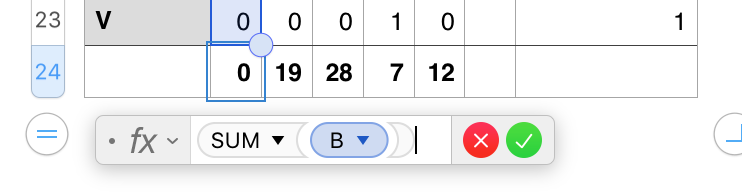
  • Open the formula editor, enter the formula shown below.
  • Fill right to column G.

(These results should also show zeros at this point.)


Formula in H2:
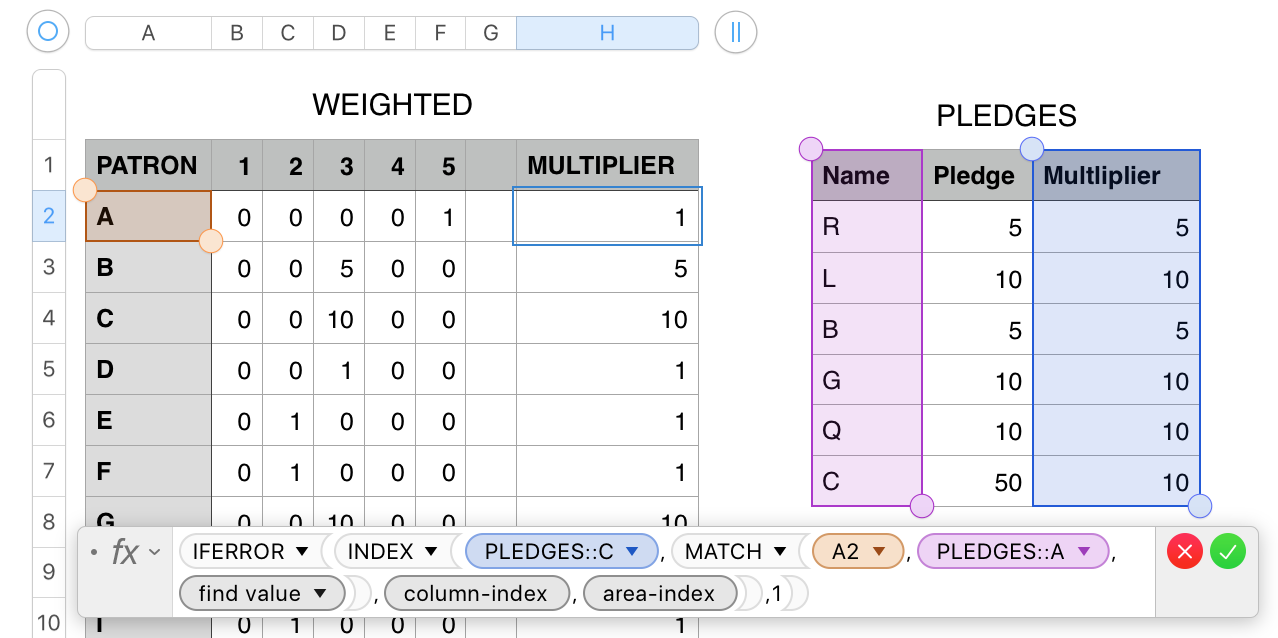


H2: IFERROR(INDEX(PLEDGES::C,MATCH(A2,PLEDGES::A,0),column-index,area-index),1)


The core formula here is a lookup formula. MATCH searches column a of PLEDGES for the name on 'this row' of WEIGHTED, and returns a number indicating the position of that name on the list.

If the name is not found, MATCH throws an error messafe, and IFERROR returns the value 1.

INDEX uses this number to locate the multiplier value in the same row of column D of PLEDGES found in A2,


Enter the formula as shown (or copy it from here and paste it into the editor for cell H2, then fill it down the rest of column H, omitting the Footer row.


NOTE on Filling a formula:


Enter the formula in to top left cell of the block into which it is to be filled.

After closing the editor, select the cell containing the formula.

Hover the mouse pointer near the edge of that cell colest to the direction in which you want to fill the formula.

Use the pointer to grab the small yellow dot that appears and drag it in the direction you want to fill,


Alternate:

After entering the formula, click the cell once to select it.

Copy.

Scrol down and right to the bottom right cell of the block into which the formula is to be filled.

Shift-click on that cell.

Press command-V.


Regards,

Barry


May 3, 2021 12:12 AM in response to Miskie

Ah, I wasn't aware I couldn't do this with numbers.


Hi Miskie,


Considering that this is the Numbers for Mac community, I was surprised to see a recommendation that did not even consider the possibility of doing this in Numbers.


My request for some sample data was to build a set of formulas to handle the count you described, using data of the type you receive.


Regards,

Barry

May 3, 2021 2:09 AM in response to TheLittles

TheLittles wrote:

Miskie Said:
"[...]Considering that this is the Numbers for Mac community, I was surprised to see a recommendation that did not even consider the possibility of doing this in Numbers.[...]"

No, Miskie did not say that. Barry said that.


I think that your replies are driving the Original Poster away. Please wait for the OP to show some example data.


Regards,

Ian.

May 3, 2021 10:02 AM in response to Miskie

As I read your example tables, the top one is the result of pasting the csv file into a Numbers tale, starting at cell A1. The contents of this table will change with each survey.


The second is a 'permanent' table containing a list of donors and the amount donated by each donor. Its contents are entered manually, and will change each time a new donor makes a donation, a current donor adds to his/her donation, or an existing donor does not make a new donation within x days of her/his most recent donation.


You wrote, in your initial post: "I manually give my $5 tier 5 votes and my $10 + $50 tier 10 votes. Is there a way to do it faster?"


My reading of this is that a the vote of a donor of $0.00 to $4.99 would be counted as one vote, the vote of a donor of $5.00 to $9.99 would be counted as 5 votes, and the vote of a donor of $10.00 or more would be counted as 10 votes.

Is that correct?


Are ALL Patron names on the data table listed on the Pledge list table?

Are non-donors permitted to vote?

If so, do non-donors get listed on the pledges table as well?


Will start on a solution while awaiting reponses to those questions.


Regards,

Barry

May 3, 2021 1:07 PM in response to Miskie

You are welcome. Thanks for the star.


Some suggestions for your next round:


Provide as much detail as you can regarding the issue. Remember that we're not in the room and can't see your screen or your actions. Screen shots are often useful, as are descriptions of what you've tried (in appropriate).


The more information you provide, the easier it is to get a handle on the issue and head for a solution.


Don't be in a rush to mark a reply as having solved your issue.

As you may have noticed, that checkmark puts a green dot beside your question, which may deter others from joining a discussion where the issue has already been "solved"


Looking forward to your next question.


Regards,

Barry

This thread has been closed by the system or the community team. You may vote for any posts you find helpful, or search the Community for additional answers.

Making vote counting easier

Welcome to Apple Support Community
A forum where Apple customers help each other with their products. Get started with your Apple Account.


