iPad Pro stuck in YouTube

youtube app don’t let me come out, I try to reboot pushing for 20 seconds the home button and the volume up but don’t even react. When I just simple turn off the IPad I turn ON and still in YouTube. The YouTube don’t have sound and don’t move. Please help

iPad Pro, iPadOS 14

Posted on Jun 13, 2021 7:20 PM

Reply
Question marked as Top-ranking reply

Posted on Jun 14, 2021 4:36 AM

If iPad isn’t responding, do one of the following:


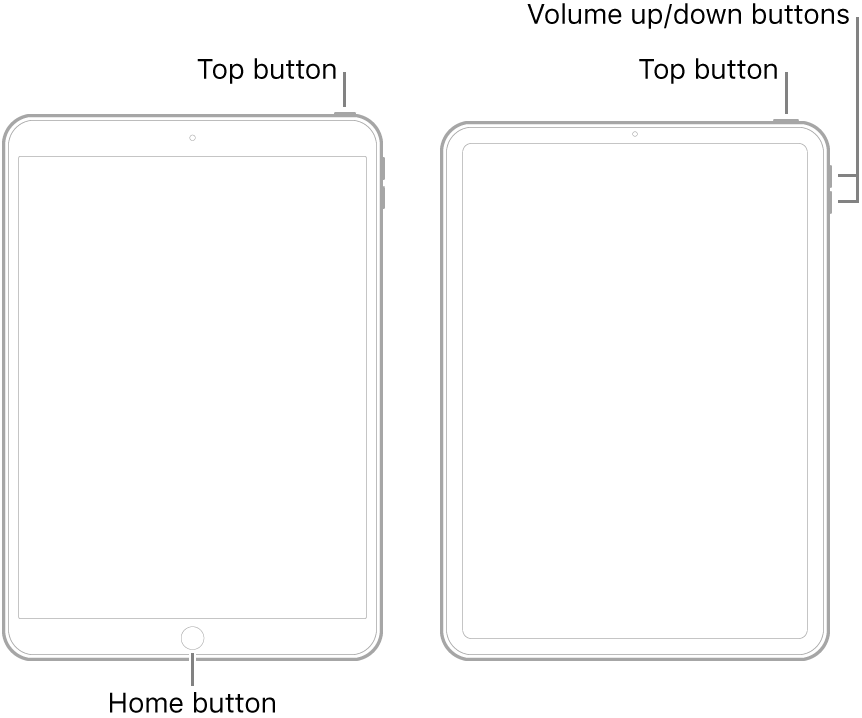
  • On an iPad with a Home button: Press and hold the top button and the Home button at the same time. When the Apple logo appears, release both buttons.
  • On other iPad models: Press and quickly release the volume up button, press and quickly release the volume down button, then press and hold the top button. When the Apple logo appears, release the button.


If iPad still doesn’t turn on, or if it gets stuck during start up, see the Apple Support article If your iPhone, iPad, or iPod touch won't turn on or is frozen. Or if your iPad isn’t working correctly after you restart it, see the iPad Support website.

7 replies
Question marked as Top-ranking reply

Jun 14, 2021 4:36 AM in response to bigTXbig2021

If iPad isn’t responding, do one of the following:


  • On an iPad with a Home button: Press and hold the top button and the Home button at the same time. When the Apple logo appears, release both buttons.
  • On other iPad models: Press and quickly release the volume up button, press and quickly release the volume down button, then press and hold the top button. When the Apple logo appears, release the button.


If iPad still doesn’t turn on, or if it gets stuck during start up, see the Apple Support article If your iPhone, iPad, or iPod touch won't turn on or is frozen. Or if your iPad isn’t working correctly after you restart it, see the iPad Support website.

Jun 14, 2021 4:59 AM in response to bigTXbig2021

If your iPad will not respond to a forced-restart, you will need to seek assistance from Apple Support or the technicians at the Genius Bar of an Apple Store.


You can directly contact Apple Support using the Get Support link at top right of this page. Similar direction is also provided within the final link of my previous reply.


I the meantime, I recommended that you review the material already providing - being careful to follow the instructions precisely as documented.

This thread has been closed by the system or the community team. You may vote for any posts you find helpful, or search the Community for additional answers.

iPad Pro stuck in YouTube

Welcome to Apple Support Community
A forum where Apple customers help each other with their products. Get started with your Apple Account.