
Apple logo stuck on iPad
My daughters iPad is stuck with the apple logo. I’ve tried the auto reset and the logo won’t disappear. It won’t shut off.
iPad, iOS 10
My daughters iPad is stuck with the apple logo. I’ve tried the auto reset and the logo won’t disappear. It won’t shut off.
iPad, iOS 10
If iPad isn’t responding, do one of the following:
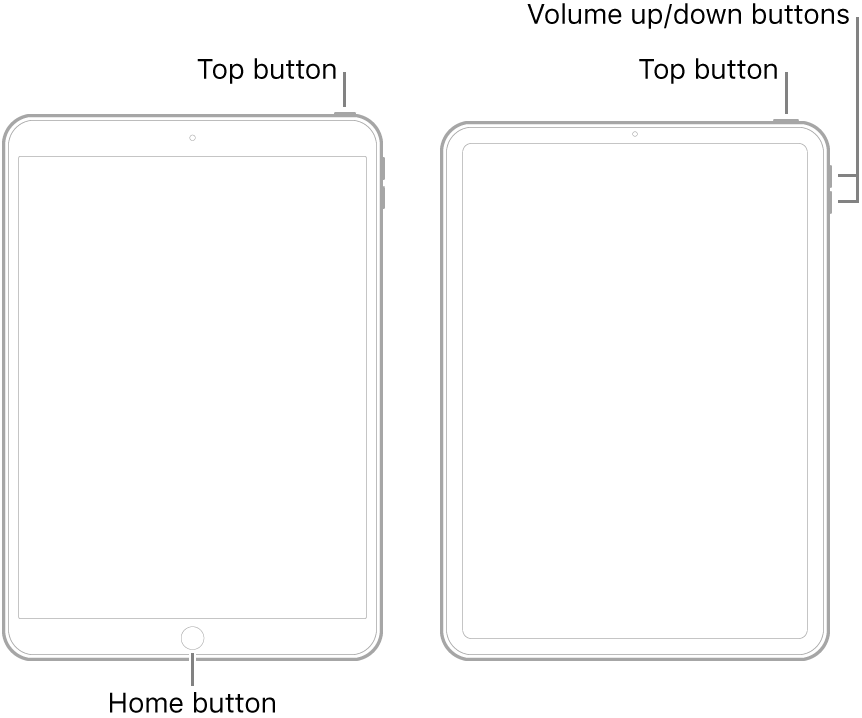
If iPad still doesn’t turn on, or if it gets stuck during start up, see the Apple Support article If your iPhone, iPad, or iPod touch won't turn on or is frozen. Or if your iPad isn’t working correctly after you restart it, see the iPad Support website.
If iPad isn’t responding, do one of the following:
If iPad still doesn’t turn on, or if it gets stuck during start up, see the Apple Support article If your iPhone, iPad, or iPod touch won't turn on or is frozen. Or if your iPad isn’t working correctly after you restart it, see the iPad Support website.
I don't know what an auto-reset is.
Try a "forced" restart using these instructions:
On an iPad with a Home button: Press and hold the top (power) button and the Home button at the same time. When the Apple logo appears, release both buttons.
If the issue still persists, it might be a different problem (battery?). Contact Apple Support directly (they have tools to run remote diagnostics, battery included), using this link:--> Get Support
Regards
Giulio
Apple logo stuck on iPad

