Where can you get free .usdz files?

I have recently started playing again with Motion and quickly "discovered" the 3D files.


I also read somewhere that in addition to the 60 included in the app there are many others available on the web both free and paid for.


Several google searches led me to sites offering one crappy free effect and numerous other highly priced ones!


As I am just playing around and having fun I have no intention of forking out the readies.


So is there anywhere that offers a decent selection of free effects for experimentation?


I know that YouTube has countless 3D green green effects but you can't manipulate them in 3D space yourself.

Posted on Jul 14, 2021 6:43 AM

Reply
Question marked as Top-ranking reply

Posted on Jul 23, 2021 2:44 PM

@Ian. The best resource right now is for free models to play around with is probably Sketchfab. If you filter your search for "Downloadable", you can look in the upper right corner of the preview and if there is a $. If there is no $ you can probably download it for free to play with. For the models Sketchfab now offers, everything (paid/free) as USDZ or gltf (which you can convert to USDZ with several software packages.


The caveats:

  • Yeah, you may not find exactly the thing you want or things with the "look" you need. You project needs might not meet what people put out for free. Many of these assets are for things like games, or examples of personal projects by the artists. You may have to dig to find what will work for your project.
  • You get what you pay for. If the model is free, quality and build issues can be common. Building 3D objects, especially quality ones takes time and skill. If you have a particular item you need, the best quality one may cost money. Some models may be highly detailed, while others may be super low res with bad texture setups. Also some items may have been setup for a specific 3D software, assuming the person downloading/buying it will go back to that software to do what they need. USDZ is a newer format, so...
  • Things may not work as you expect or there may not be downloads for all examples shown with a model. I have found a few that have various animation cycles (stand, run, jump, etc.) shown as being available, but you can only actually download one fo them. This is a Sketchfab/Creator setup issue. For example you might be able to look at all the variations but only one (like jump) will download.
  • Some things might just not work properly. This could be because the person posting it did not set things up right (wrong model scale, models far from the origin (0,0,0) bad texture setup, odd rigging, etc.) I've had some models that work great and others that look like a child stomped on them. Sketchfab does the conversion to USDZ with some internal tool, they don't check the conversion to make sure it's all setup right.
  • Things may look a bit different in the examples vs. in the app you use, this is just how rendering works. The render engine you work with (Motion, Blender, Maya, etc.) will have its own look.


On the "plus" side Sketchfab is joining Epic, and the chances are, there will be a lot more creators adding models in the future.


As Luis pointed out, NASA has been converting a lot of their models that have been available for years, just do a search for "nasa usdz". The Smithsonian has also been starting to put out some USDZ models https://3d.si.edu.


Finally you can convert free models found on the web in .obj or .fbx to USDZ. This will likely require a dedicated 3D software or converter like "USDZ Converter". This route of converting takes more time and understanding of 3D software but will also give you the flexibility to alter and edit things. USD is rapidly becoming one of the primary standards for distributing 3D scenes for AR and exchange between creators.


Remember, Motion is not designed for altering USDZ models other than basic transforms. Using static, or animated USDZ models in Motion just allows a bit more flexibility in content and design options. If you don't want or need to edit the 3D Object in Motion (edit geometry, textures, rigging and animation) or you just don't know 3D, it's a fantastic format. I'm using it for some composting of 3D items into footage or adding 3D items to graphic pieces. USDZ is also great if you have to deal with 3D items that need quick adjustments in a 3D software, it can be a huge time saver just make a quick change in my 3D app, export the model, and update the asset in Motion, no waiting for long 3D app renders.

15 replies
Question marked as Top-ranking reply

Jul 23, 2021 2:44 PM in response to Ian R. Brown

@Ian. The best resource right now is for free models to play around with is probably Sketchfab. If you filter your search for "Downloadable", you can look in the upper right corner of the preview and if there is a $. If there is no $ you can probably download it for free to play with. For the models Sketchfab now offers, everything (paid/free) as USDZ or gltf (which you can convert to USDZ with several software packages.


The caveats:

  • Yeah, you may not find exactly the thing you want or things with the "look" you need. You project needs might not meet what people put out for free. Many of these assets are for things like games, or examples of personal projects by the artists. You may have to dig to find what will work for your project.
  • You get what you pay for. If the model is free, quality and build issues can be common. Building 3D objects, especially quality ones takes time and skill. If you have a particular item you need, the best quality one may cost money. Some models may be highly detailed, while others may be super low res with bad texture setups. Also some items may have been setup for a specific 3D software, assuming the person downloading/buying it will go back to that software to do what they need. USDZ is a newer format, so...
  • Things may not work as you expect or there may not be downloads for all examples shown with a model. I have found a few that have various animation cycles (stand, run, jump, etc.) shown as being available, but you can only actually download one fo them. This is a Sketchfab/Creator setup issue. For example you might be able to look at all the variations but only one (like jump) will download.
  • Some things might just not work properly. This could be because the person posting it did not set things up right (wrong model scale, models far from the origin (0,0,0) bad texture setup, odd rigging, etc.) I've had some models that work great and others that look like a child stomped on them. Sketchfab does the conversion to USDZ with some internal tool, they don't check the conversion to make sure it's all setup right.
  • Things may look a bit different in the examples vs. in the app you use, this is just how rendering works. The render engine you work with (Motion, Blender, Maya, etc.) will have its own look.


On the "plus" side Sketchfab is joining Epic, and the chances are, there will be a lot more creators adding models in the future.


As Luis pointed out, NASA has been converting a lot of their models that have been available for years, just do a search for "nasa usdz". The Smithsonian has also been starting to put out some USDZ models https://3d.si.edu.


Finally you can convert free models found on the web in .obj or .fbx to USDZ. This will likely require a dedicated 3D software or converter like "USDZ Converter". This route of converting takes more time and understanding of 3D software but will also give you the flexibility to alter and edit things. USD is rapidly becoming one of the primary standards for distributing 3D scenes for AR and exchange between creators.


Remember, Motion is not designed for altering USDZ models other than basic transforms. Using static, or animated USDZ models in Motion just allows a bit more flexibility in content and design options. If you don't want or need to edit the 3D Object in Motion (edit geometry, textures, rigging and animation) or you just don't know 3D, it's a fantastic format. I'm using it for some composting of 3D items into footage or adding 3D items to graphic pieces. USDZ is also great if you have to deal with 3D items that need quick adjustments in a 3D software, it can be a huge time saver just make a quick change in my 3D app, export the model, and update the asset in Motion, no waiting for long 3D app renders.

Jul 24, 2021 5:15 PM in response to Ian R. Brown

I have a question. Did Motion improve it's handling of USDZ files at some point? I'm still in Mojave using 5.4.7 and even the models others have claimed are "good", they all look terrible to me.


For instance:

here is the ISS on NASA's site:

and this is what the usdz looks like in Motion:


I added a circle to cast a shadow - 3D objects in Motion don't cast shadows.

This doesn't even look like it does in Finder QuickView:

as you can see, the solar panels look like they're supposed to and the ISS body is solid (not so in Motion).


Many spherical models have holes in the texture:


And here is Hubble:

Again, not anything like it looks like in QuickView:


So, did Apple fix this in 5.5?


Jul 14, 2021 11:32 AM in response to Ian R. Brown

So far, I have not been impressed with USDZ 3D objects... anywhere. Most (not all) of them seem "cartoonish" (USDZ was developed at Pixar, I believe). I so much preferred the 3D models I can make directly in Motion with 3D Text. Apple didn't have very far to go to enhance the toolkit to make it an outstanding environment. For one, they could allow SVG paths. (It's easy enough to convert SVG Paths into TrueType fonts.) They could allow us to SAVE SVG paths from Bezier paths to be used/reimported for 3D. They could add "revolve" tools for more spherical shapes. However, even with all that is lacking, I still prefer 3D Text:

https://fcpxtemplates.com/portfolio-3d-gallery/


Jul 15, 2021 1:34 AM in response to Ian R. Brown

I tend to be careful using brand names. The lens was the primary model. I kludged together a camera body to go with it but it needs a couple of extra features to make the body edges more convincing, so it looks a little lame.


YoursELF was a "marketing" attempt ("you" as santa's elf, sort of thing)... I developed a 3D model with a dropzone that can be used to put greenscreen footage into the scene - it looks very convincing! (I had to use rather questionable free stockfootage to promote it — long story short — a relative failure). There's only one reindeer because of the rather large performance hit (it's also 3D Text)

https://youtu.be/QXA2B4jql2s

https://youtu.be/fu-zURXJ3EM


The slate has a remarkable amount of editability, for a 3D model!

https://youtu.be/_xwJFheF3TU

All the text is editable and the icons can be toggled active/inactive.

This video also uses the magnifying glass and the Intertitle 3 effect.


After all the work I've put into 3D Text modeling, there's very little interest in it, sadly. I don't believe there will be much more interest in the USDZ 3D objects either.

Jul 24, 2021 12:35 AM in response to GFXZen

Thank you GFXZen for that comprehensive analysis of USDZ.


As I mentioned above, I just wanted to play around as I have a "butterfly" mind and I had already long forgotten 3D models and moved on to the next item to catch my attention!


However, your contribution has rekindled the dying embers and I will once again make a foray into the depths of Motion and the world of 3D modelling.


Although I frequently castigate people on this forum who are looking for cheap effects to spice up their movies, I am secretly cursed with the same urges which I can only assume come from my obsession with conjuring during my childhood and teens. After all, magic and film making are both arts of illusion.

Jul 25, 2021 12:06 PM in response to Ian R. Brown

Interesting, I was gonna grab that same ISS model Fox grabbed and play with it. 😊I downloaded the model and saw the same thing Fox posted. I think this is good example of my forth and fifth bullet points above. I started by opening the model in Xcode and saw the same rendering issue, but then opened it in the main 3D application I use and did not see the deformed geometry. The "error" looked to me like subdivisions smoothing at the polygon level (a way of getting smoother geometry with fewer polygons). I did some poking around in Xcode and found that there is an option to control this in the attribute inspector in Xcode. I changed the value from 1 to 0 and it that seems to fix it.


I then exported from Xcode and my 3D software. The Xcode version looks correct in Motion, the export from the 3D software also looks correct but the textures need to be reconnected (probably Reality Converter would be best).


I think the point and lesson here is not every model is going to work perfect when moving from one 3D package to another. Some outside tools may be required or if someone is generating and providing models for you, they may have to do fixes along the way depending on where it is exported from. I don't know how NASA is generating the models they provide (Unity, Unreal Engine, Maya, Blender, etc.). My 3D app fixed the model geometry but messed up the textures on the export so its not clear where the problems are or who if anyone is doing something wrong. I've also downloaded more models from sketchfab without problems than ones with problems. Perhaps when hitting these types of issues it's best to submit feedback of examples to Apple to make sure they know about and can investigate it.


Here's my result with the resaved Xcode version (top) and the original version (bottom).


Jul 25, 2021 5:31 PM in response to GFXZen

That's good to know - but completely out of my reach for now.


Apple cut off Mojave rather quickly when they introduced 3D Objects in Motion (updated to Catalina). Reality Converter cannot be downloaded for Mojave and if XCode can be used, I wouldn't even know where to begin. [I never could stand XCode and absolutely hate objective C. My last Mac programming environment was CodeWarrior and I invented my own version of object oriented programming in C because I also cannot stand OPC (other people's code) — they all turned the (**classic**) Macintosh Toolbox into a bloody mess.] [I also understand that most of the USDZ stuff is in Python... a language I know nothing about (and I know a lot of them...)


... getting off soapbox...


I prefer to work with 3D inside Motion. Don't want to learn another app at this point in my life (getting old...and I've already tried most of them. I did okay with Adobe Dimensions* until it was discontinued, and later with Sketchup... but I didn't keep up with it.) [*Not to be confused with Adobe Dimension which is a whole new app and I don't do subscriptions!]


The underlying problem just might be that Apple is unwilling to have to add too much "fat" to the app. The "purpose" of Motion is focused on developing effects/templates for FCPX, after all.


3D Text is just about 3 or 4 features short of being phenomenal.

  • Revolve - spheres, bends, etc. around the anchor point
  • ability to customize texture mapping, especially on Sides

right now, there is a automatic texture mapping that divides sides into quarters and

alternates (flips) the texture (image) 180º and feathers the edges to blend overlaps

works okay for wood grains, and stuff, but images are toast

  • better intersection behavior

If you have a character with 0% opacity with an image/texture applied that does not

extend the full size of the character, the transparent parts of the shape will

"cut lines" into any other shape at the intersections... they're dark... and ugly!

  • the ability to save individual (closed) paths as SVG files (so that they can be uploaded to Glyphter or icomoon on converted to fonts)


(that's pretty much my wish list. There might be a few others, but I can't think of them right now.)


In the end, 3D Text is not made for modelling and 3D Objects are not intended to be photo-realistic (yet).


*I* can model with 3D Text because I really know how to make fonts (years of experience), build shapes and know pretty much beforehand what can be done with them in Motion. Most people don't know anything about fonts, how they're made, and they don't want to know. (Most people don't have any Bézier skills at all even though the most needed shapes are simple circles, squares, rectangles...) I don't need to use any other external app except the process to compile the font.


3D Objects in Motion are just an add-on to kind of fill in a gap. [Wow - I just found out I can interact the two 3D environments together! I thought it used to be layer ordered - so when did that change??]
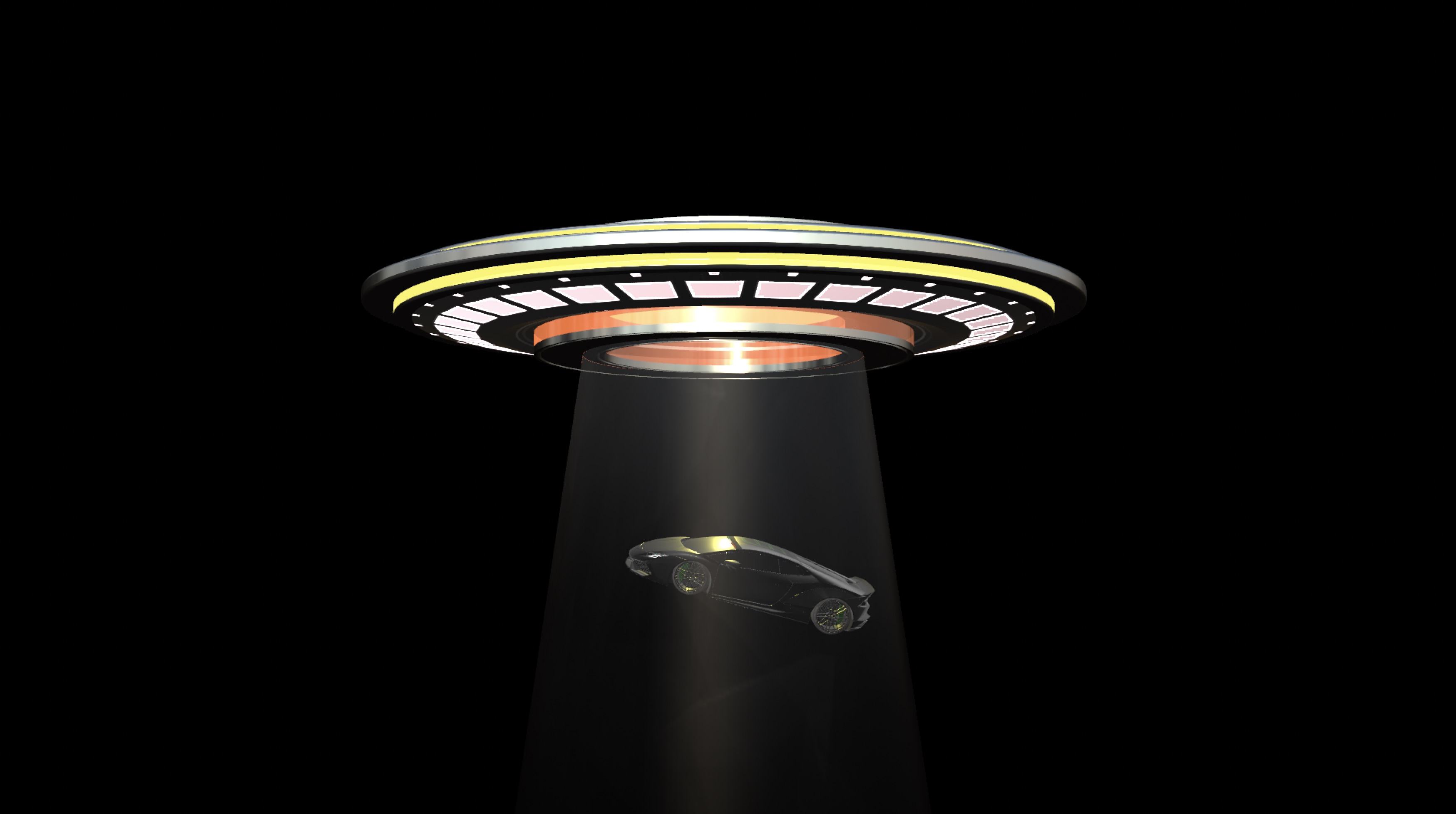


[Lamborghini Huràcan Wide Body" (https://skfb.ly/6YxOE) by SDC]
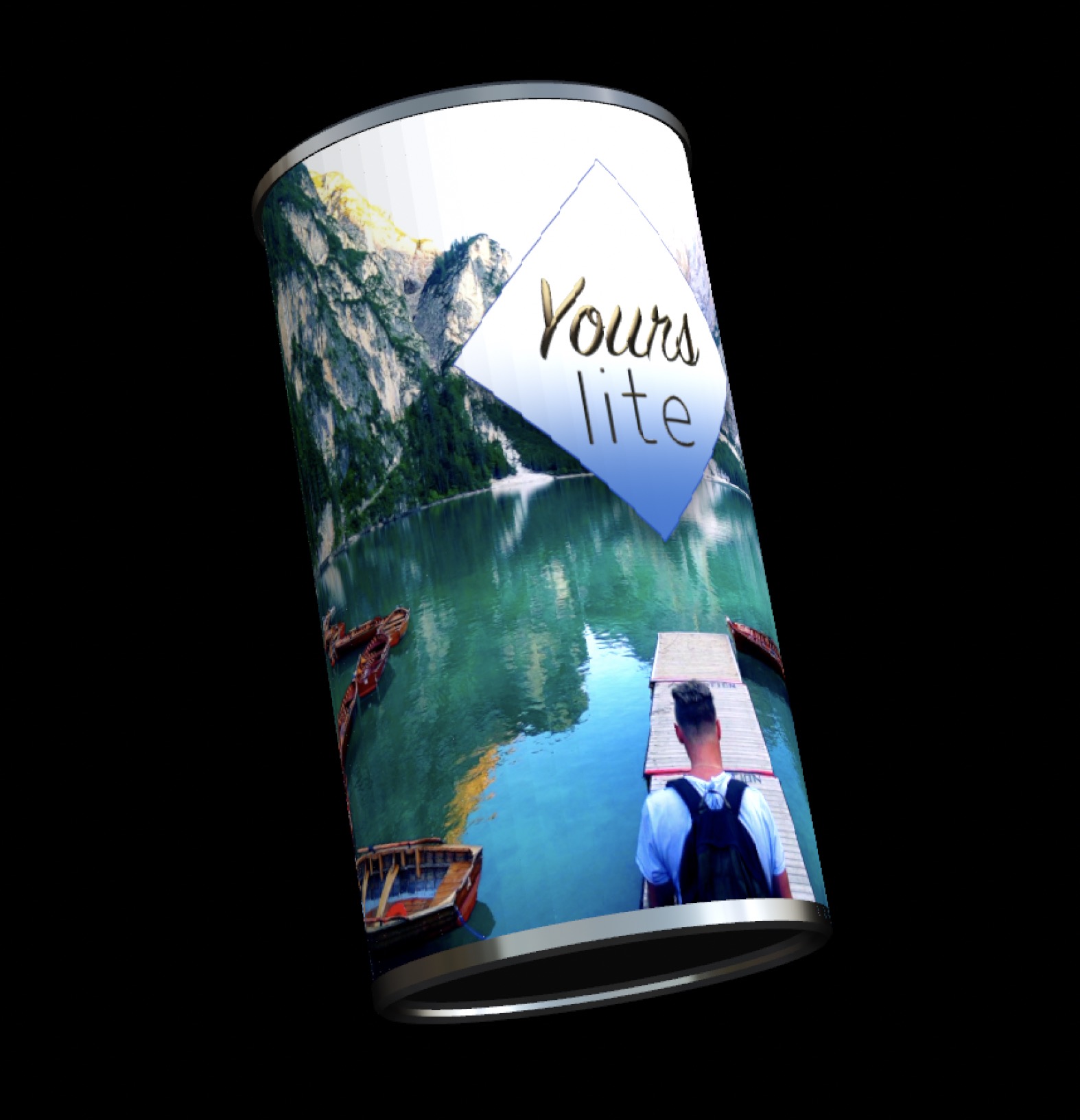

(wrapping video [Pond5 free clip of the week] on a "cylinder" in Motion with graphic overlay uses a long narrow rectangle and text layout on a circle shape. This wouldn't be necessary if texture wrapping could be customized.)


PS — I, personally, can work with 3D Text and I, personally, have little use for pre-made 3D models that I cannot customize (like spinning wheels on cars, propellers on planes, etc... which I *could* do with mObject [https://www.youtube.com/watch?v=kwGqkeaYQUI; https://www.youtube.com/watch?v=1jZltkKP7U4; https://youtu.be/99UvA6yJ7Gw; https://youtu.be/qt5WUh00W-c ] A little corny, I know... but these were like... 6 years ago and 3D for Motion was still new! (I also no longer endorse MotionVFX m02; mObject broke and the update was about 4 times the cost of the original.) I can't bring myself to recommend the extra software expense being added on to Motion. I really wish Apple had just bought the original mObject and developed 3D from there.



Jul 27, 2021 3:25 PM in response to Ian R. Brown

Please, don't get me wrong! I am NOT about photo-realism — I just want to be "convincing". I was just trying to make the point that 3D Text was not designed for modeling, it's designed for titling. Similarly, 3D Objects are not really designed to be used to create 3D *scenes*.


I did make an erroneous statement about layer ordering — 3D Text and 3D Objects ARE layer ordered. The two "models" don't interact in 3D space. What was new was my technique for creating "volumetric lighting". It created the illusion of interacting...


[actually used a mask for this one] [Lamborghini credit carries over from earlier][(still need to fix the lighting on the car :P )]


My "passion and enthusiasm" has been based on Motion being the *easiest* tool to develop the kinds of things I make than any other actual 3D app I have used in the last 30 years — especially since all the animation is handled exactly as everything else is in Motion. However, I think I can count on (less than) two hands the number of people in the entire world who are interested in making models like this. There's a wealth of easily accessible "shape" characters in the unicode characters set (I released this 3 days after Motion 5.2 came out: https://youtu.be/r-BEqBaYJ9k)... still doesn't get a rise out of people... My attempt at evangelism over the years has just been a waste of time.

This thread has been closed by the system or the community team. You may vote for any posts you find helpful, or search the Community for additional answers.

Where can you get free .usdz files?

Welcome to Apple Support Community
A forum where Apple customers help each other with their products. Get started with your Apple Account.
