Macbook Pro is having issues with various apps loading upon startup.

All of a sudden my Macbook Pro is having issues with apps loading upon startup. These are apps that are not set to startup automatically, like safari, photos, music, settings, calendar, etc. I have contacted support but they haven't been able to fix it. Has anyone else experienced this?


Different apps load each time. I can't do it on demand though, it's just random. Could it be a virus?

MacBook Pro 15″, macOS 11.4

Posted on Jul 27, 2021 11:01 AM

Reply
Question marked as Top-ranking reply

Posted on Jul 27, 2021 11:38 PM

Hi kalyani0804,

Welcome to the Apple Community.


Macs generally work as they are set up to do.

It could be a setting somewhere ?

(Please excuse if the suggestions below are rather simplistic for you.)


As the random apps are loading on start up:

Wondering if your MacBook Pro is set up to re-load windows that were open when you last shut down ?


Log out, sleep, wake, restart, or shut down your Mac

Eg: If you don’t want app windows that are open to reopen when you log back in,

de-select “Reopen windows when logging back in.”

https://support.apple.com/en-au/guide/mac-help/mchlp2522/11.0/mac/11.0


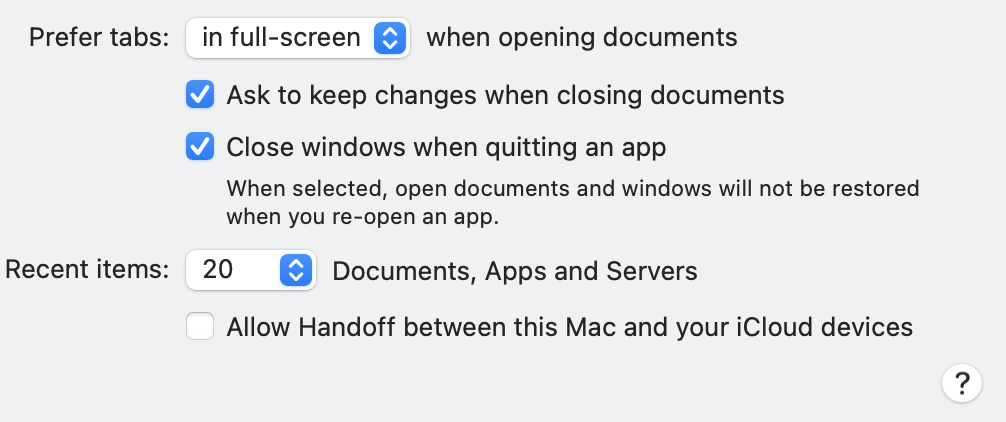
Or are windows being "restored" when an app opens ?

See: Customise your Mac with System Preferences:

Eg: Check what you have selected In the "general" tab of System Preferences

(bottom section is reproduced below):

https://support.apple.com/en-au/guide/mac-help/mh15217/mac


Or, could it be something to do with

Working in multiple spaces on Mac: ?

https://support.apple.com/en-au/guide/mac-help/mh14112/mac


Hope this helps troubleshoot :)

10 replies
Question marked as Top-ranking reply

Jul 27, 2021 11:38 PM in response to kalyani0804

Hi kalyani0804,

Welcome to the Apple Community.


Macs generally work as they are set up to do.

It could be a setting somewhere ?

(Please excuse if the suggestions below are rather simplistic for you.)


As the random apps are loading on start up:

Wondering if your MacBook Pro is set up to re-load windows that were open when you last shut down ?


Log out, sleep, wake, restart, or shut down your Mac

Eg: If you don’t want app windows that are open to reopen when you log back in,

de-select “Reopen windows when logging back in.”

https://support.apple.com/en-au/guide/mac-help/mchlp2522/11.0/mac/11.0


Or are windows being "restored" when an app opens ?

See: Customise your Mac with System Preferences:

Eg: Check what you have selected In the "general" tab of System Preferences

(bottom section is reproduced below):

https://support.apple.com/en-au/guide/mac-help/mh15217/mac


Or, could it be something to do with

Working in multiple spaces on Mac: ?

https://support.apple.com/en-au/guide/mac-help/mh14112/mac


Hope this helps troubleshoot :)

Jul 28, 2021 5:48 PM in response to kalyani0804

Hi Kalyani0804,

Thank you for checking through the settings, and for your reply.

Mmmm. now I'm as stumped as you, and Apple support.


A virus would not normally stand a chance getting into a Mac.

Virus checkers are deemed unnecessary, and are sometime the cause of trouble.


Wondering if there is any third-party (non-Apple) software on your Mac that could be causing interference ?

Some Apps seem to be incompatible with Apple's latest Operating Systems, or some Apps may need to be updated.


Although I'm not one of them, I understand some of the experts here in the Apple Community, are adept at checking results from running "Etrecheck".


Etrecheck is a free download, that can generate a helpful report.(eg: to locate all the bits of any non-Apple software causing a problem so you can ensure it is removed).

https://etrecheck.com:


All the best :)


Jul 30, 2021 4:35 AM in response to kalyani0804

Suggest downloading from a Trusted Developer and Respected ASC Contributor the application Malwarebytes for Mac. It is free or paid for added features. Run the Application and it should remove the malware / adware. Once done, restart computer and test.


There are no known Viruses in the wild that self replicate and affect macOS. There are Malware and Adware that does affect macOS and are often times downloaded as part of an Application from Third Party UnTrusted Site and get installed along with the Application.

Jul 28, 2021 7:30 AM in response to brbo

Thanks for the reply. I have worked with Apple Support on two occasions and they cannot find out what the problem is and said I would probably have to reload the software. I really don't want to have to do that.


There is nothing in the settings to indicate loading apps automatically. It is very bizarre. It isn't the same apps every time. It can be random. Sometimes it will even open an email that I had not opened before. I thought maybe I have a virus but I'm not sure how to check. My system is up-to-date with the latest version of macOS Big Sur 11.5.1. This has been going on for a couple of months.

This thread has been closed by the system or the community team. You may vote for any posts you find helpful, or search the Community for additional answers.

Macbook Pro is having issues with various apps loading upon startup.

Welcome to Apple Support Community
A forum where Apple customers help each other with their products. Get started with your Apple Account.
