
how can i keep my ipad stay bright and what is the "sun" symbol mean?
the "sun" symbol is not going away and my ipad is so dim, how can I fix it?
iPad, iPadOS 14
the "sun" symbol is not going away and my ipad is so dim, how can I fix it?
iPad, iPadOS 14
Where are you seeing the “sun symbol”?
If you see a small animated circular icon at top right of the screen - near the WiFi and battery level icons - then this is the network activity indicator. This will be seen whenever your iPad is attempting to access the internet. Depending upon your running Apps, this my be entirely normal behaviour.
Screen brightness can be adjusted from iPad settings, or the Control Centre:
Adjust the screen brightness and color on iPad - Apple Support
If you can post a screenshot showing the “sun symbol”, it should be easy to identify:
Take a screenshot on your iPad – Apple Support
You can attach your screenshot here using this button in the editing window:
If instead you see a larger spinning/animated circular symbol at the centre of the screen - and see nothing else - then your iPad may be trying to start-up or shut-down, or perhaps be updating its internal software.
If iPad isn’t responding, do one of the following:
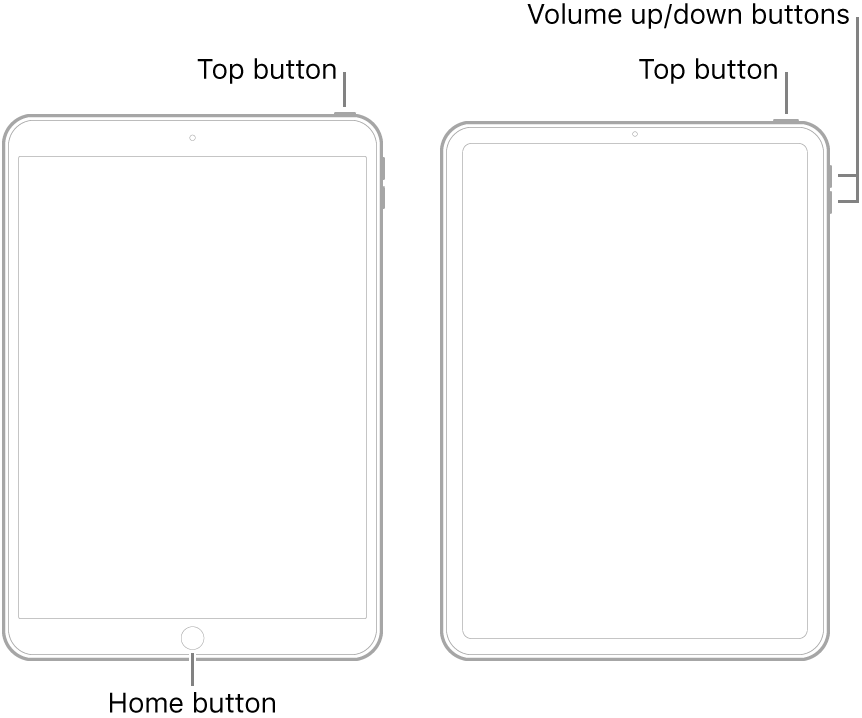
If iPad still doesn’t turn on, or if it gets stuck during start up, see the Apple Support article If your iPhone, iPad, or iPod touch won't turn on or is frozen - Apple Support. Or if your iPad isn’t working correctly after you restart it, see the iPad Support website.
Where are you seeing the “sun symbol”?
If you see a small animated circular icon at top right of the screen - near the WiFi and battery level icons - then this is the network activity indicator. This will be seen whenever your iPad is attempting to access the internet. Depending upon your running Apps, this my be entirely normal behaviour.
Screen brightness can be adjusted from iPad settings, or the Control Centre:
Adjust the screen brightness and color on iPad - Apple Support
If you can post a screenshot showing the “sun symbol”, it should be easy to identify:
Take a screenshot on your iPad – Apple Support
You can attach your screenshot here using this button in the editing window:
If instead you see a larger spinning/animated circular symbol at the centre of the screen - and see nothing else - then your iPad may be trying to start-up or shut-down, or perhaps be updating its internal software.
If iPad isn’t responding, do one of the following:
If iPad still doesn’t turn on, or if it gets stuck during start up, see the Apple Support article If your iPhone, iPad, or iPod touch won't turn on or is frozen - Apple Support. Or if your iPad isn’t working correctly after you restart it, see the iPad Support website.
Sun symbol: Please take a screenshot and post it here so that we can better understand:--> Take a screenshot on your iPad - Apple Support
Dim brightness: see this support article:--> Adjust the screen brightness and color on iPad - Apple Support
Regards
Giulio
how can i keep my ipad stay bright and what is the "sun" symbol mean?

