
iPhone test alerts

I have an iphone8 and it has stopped alerting for messages/text when locked. This is very frustrating and has been going on for a while. Any ideas?


Posted on Aug 13, 2021 7:24 AM

Reply
1 reply

Aug 13, 2021 7:35 AM in response to Dj171

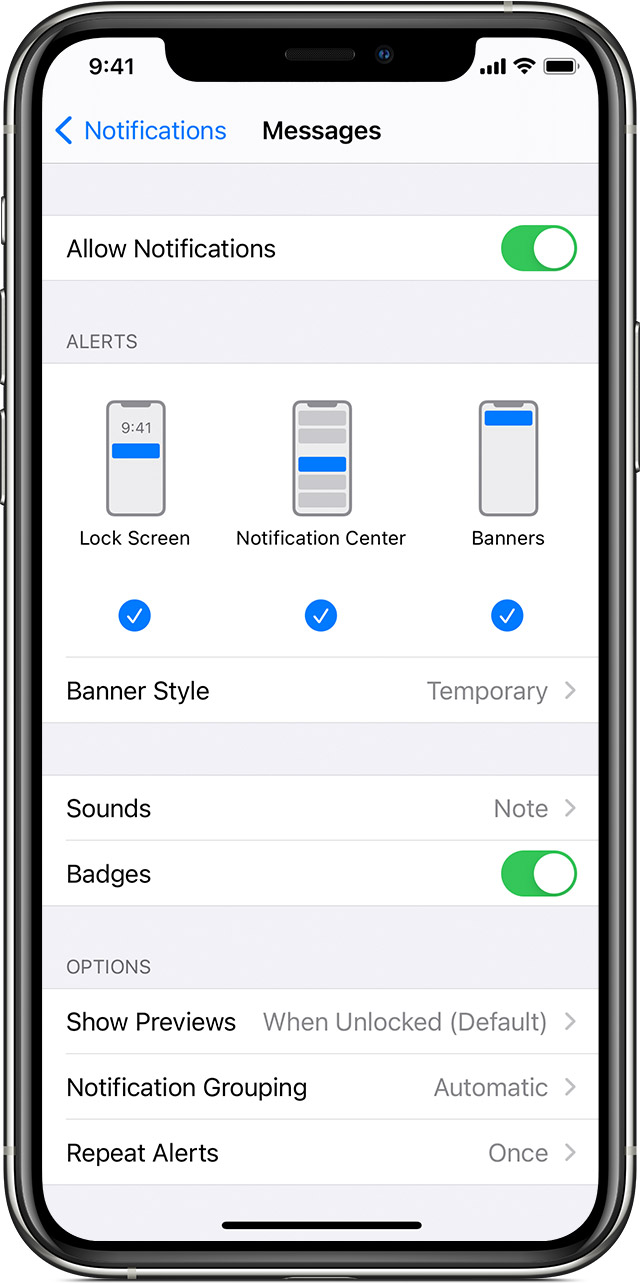
Change alert styles

To add or change an alert style for a notification:

  1. Go to Settings > Notifications.
  2. Select an app under Notification Style. 
  3. Choose a type of alert and banner style. 

You can also turn sounds and badges on or off.

Change group notification settings

You can use group notifications or keep them separate.

  1. Go to Settings > Notifications.
  2. Select an app and tap Notification Grouping.
  3. Select one of these options:
    • Automatic: Notifications from each app will appear in groups based on app alerts.
    • By App: All notifications from each app will be grouped into single expandable alerts.
    • Off: Notifications appear in the order they’re received, without grouping.

From here you can also choose how to show notification previews for specific apps. For example, you can have notification previews show up all the time or never, even when your device is locked.


This thread has been closed by the system or the community team. You may vote for any posts you find helpful, or search the Community for additional answers.

iPhone test alerts

Welcome to Apple Support Community
A forum where Apple customers help each other with their products. Get started with your Apple Account.
