Choose installment account?

Hello - I have 3 active apple installments on my apple card - I would like additional payments to go towards the installment with the smallest balance first (or ideally the installment I select) - instead it appears to be going to the largest one. How/Can I select which account I want the extra sent to.

iPhone 5, iOS 10

Posted on Aug 19, 2021 8:39 AM

Reply
Question marked as Top-ranking reply

Posted on Aug 19, 2021 9:46 AM

The payment goes to what is due at the time. There is no separation of what is owed when it is due. It is all a lump sum at that point.


It does not go specifically to the phone or to the Airpods, it pays the due amount in total, whatever it is.


If you pay more than what is due that month, then it subtracts from the complete sum of what is owed. i.e the entire balance. Whether it's owed entirely in that month or not.


Link-> How to make Apple Card payments - Apple Support

The monthly balance includes all of your spending in a calendar month (except for any pending transactions), interest charges, and credits posted to your account. It also includes any remaining balance from the previous month. If you have Apple Card Monthly Installmentsyour monthly balance includes your interest-free monthly installment. When you pay the monthly balance, it stops additional interest charges on your account.


You owe it all at once. If you pay early, it goes to whatever is your total balance from the sum of all installments and any charges you have made that month.


If you owe $1000 dollars on the iPhone, $200 dollars on the AirPods and $45 of other charges that month, your total balance is $1245. although on the installment plans you may only need to pay say $40 for the iPhone and $20 for the Airpods plus the $45, you technically only need to pay that month $105 to not accrue interest for late payments.


It pays the entire due amount. Not specific items. There is no separation of items.


If you pay more than what is due that month, then it subtracts from your total Balance. So if you pay $200 for that month, it will reduce your entire balance by $200 instead of just the $105 you must pay to avoid interest. So you would only have left to pay in total $1045. Instead of $1140.


10 replies
Question marked as Top-ranking reply

Aug 19, 2021 9:46 AM in response to greglose

The payment goes to what is due at the time. There is no separation of what is owed when it is due. It is all a lump sum at that point.


It does not go specifically to the phone or to the Airpods, it pays the due amount in total, whatever it is.


If you pay more than what is due that month, then it subtracts from the complete sum of what is owed. i.e the entire balance. Whether it's owed entirely in that month or not.


Link-> How to make Apple Card payments - Apple Support

The monthly balance includes all of your spending in a calendar month (except for any pending transactions), interest charges, and credits posted to your account. It also includes any remaining balance from the previous month. If you have Apple Card Monthly Installmentsyour monthly balance includes your interest-free monthly installment. When you pay the monthly balance, it stops additional interest charges on your account.


You owe it all at once. If you pay early, it goes to whatever is your total balance from the sum of all installments and any charges you have made that month.


If you owe $1000 dollars on the iPhone, $200 dollars on the AirPods and $45 of other charges that month, your total balance is $1245. although on the installment plans you may only need to pay say $40 for the iPhone and $20 for the Airpods plus the $45, you technically only need to pay that month $105 to not accrue interest for late payments.


It pays the entire due amount. Not specific items. There is no separation of items.


If you pay more than what is due that month, then it subtracts from your total Balance. So if you pay $200 for that month, it will reduce your entire balance by $200 instead of just the $105 you must pay to avoid interest. So you would only have left to pay in total $1045. Instead of $1140.

Aug 19, 2021 10:04 AM in response to greglose

Hi, did you read my reply above? Did you follow the links for paying extra? I’ll copy and paste it for you convenience,


Pay your monthly installment

Your minimum payment for Apple Card includes your Apple Card Monthly Installment. When you pay your minimum payment each month, you automatically pay the monthly installment for each of your installment plans.

Pay extra

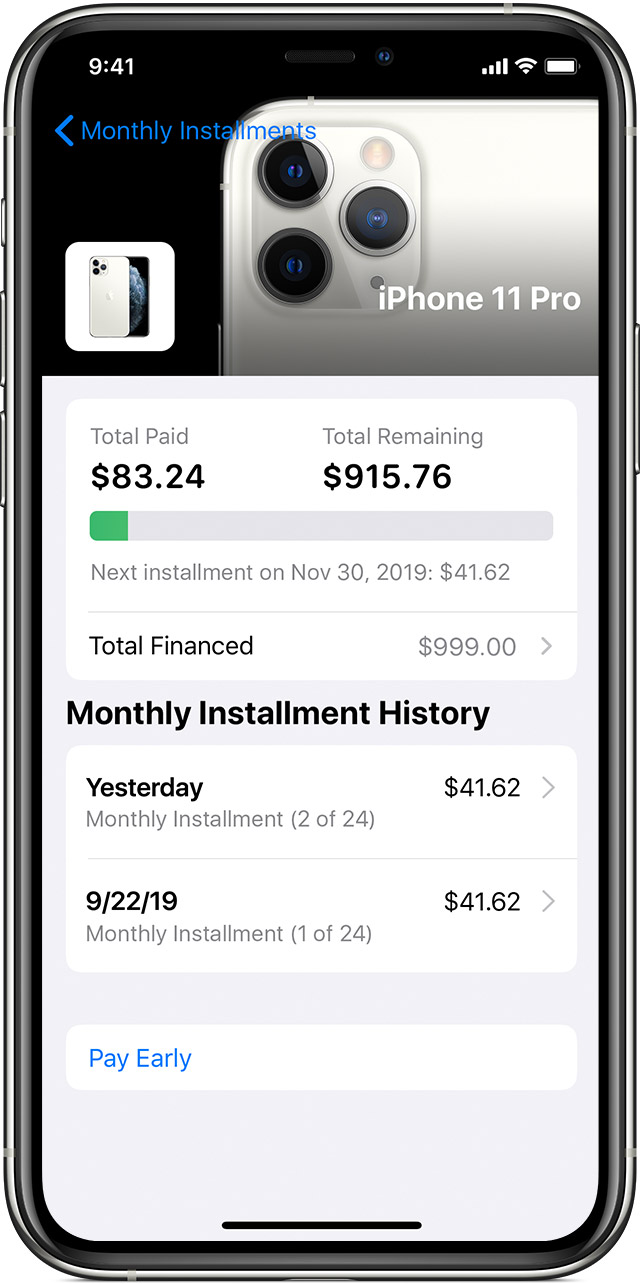
To pay extra on your Apple Card Monthly Installments, you need to first pay your entire Apple Card balance. Then, to make an additional payment towards your installment balance, choose Pay Early. If you have multiple installments, your additional payment is applied to the outstanding balance of your oldest installment plan.

To Pay Early:

  1. Open the Wallet app and tap Apple Card.
  2. Tap the more button , then tap Monthly Installments. If you have multiple monthly installments, you see the balance for all of your monthly installments.
  3. Tap Pay Early, then tap Continue.
  4. Choose an amount to pay, then tap Pay Now or Pay later and follow the instructions on your screen.

If you don't pay a monthly installment, you aren't charged a fee or interest. To keep your account in good standing, pay your monthly installments on time as part of your Apple Card minimum payment due every month.

Aug 19, 2021 8:50 AM in response to greglose

Not possible. Any payment made goes to the current balance owed. There is no way to select specific purchases to pay.


The balance is the lump sum of all installments and charges you owe at the time they are due.


So if you have an installment that is at $30 / mo, one that is $50 / mo and one that is $40 / mo.


Then your balance is $120 for that particular due date. If you pay less than that it will cover as much as it can. And you will owe and be late on the remainder which will generate interest.


Aug 19, 2021 9:34 AM in response to greglose

Hi, here is a support article that covers the installment plan and how payments and additional/extra payments are applied,


https://support.apple.com/HT210644


Pay extra

To pay extra on your Apple Card Monthly Installments, you need to first pay your entire Apple Card balance. Then, to make an additional payment towards your installment balance, choose Pay Early. If you have multiple installments, your additional payment is applied to the outstanding balance of your oldest installment plan.

To Pay Early:

  1. Open the Wallet app and tap Apple Card.
  2. Tap the more button , then tap Monthly Installments. If you have multiple monthly installments, you see the balance for all of your monthly installments.
  3. Tap Pay Early, then tap Continue.
  4. Choose an amount to pay, then tap Pay Now or Pay later and follow the instructions on your screen.


I hope this helps.

Aug 19, 2021 10:09 AM in response to Jeff Donald

Yep - That's what I did - not the issue. Issue is the amount went to the oldest installment - not one I could select.


"If you have multiple installments, your additional payment is applied to the outstanding balance of your oldest installment plan" I did not see that as I was making a payment.


My point is they should let you pick the installment you want to pay on if everything else is current.

Aug 19, 2021 9:07 AM in response to Phil0124

I understand you response but I don't think that makes sense as far as Apple and Customers.


I have airpods for 50/month for like 40 bucks each month and an iphone for 40/month for 24 months - they allocated the payment solely to the iPhone. Obviously I would want it to go to the airpods to reduce my month payments from ~80/mon to ~40/month.


Aug 19, 2021 9:56 AM in response to Phil0124

I get all that but they should allow you to choose - here is why.


I have 3 installments and nothing else


Airpods 6 months at 41.50

iPad 12 months at 32.50

IPhone 24 months at 49.91


I sent in enough to totally pay off the Airpods - thus leaving me with two installments (32.50 and 49.91). Instead, what they did was sent the 200 to the IPhone which leaves me with 3 installments each month (32.50, 49.91 and 41.50) - its just that the the IPhone now has 3/4 fewer months due. I haven't lost any money etc. its just that I was going to pay the two smaller installments off and let the iphone go the 24 months. Either way its 0% interest to me - its just now I know not to send extra money as reducing the iphone length down isn't appealing to me - what is is dropping 2 of the 3 installment payments.


I'll just keep the extra in savings.....


Aug 19, 2021 10:27 AM in response to greglose

Hi, thank you for the reply. If this is an important issue to you please provide feedback to both Apple and Goldman Sachs. Here is the link to provide feedback to Apple on the Apple Card Installment Plan,


https://www.apple.com/feedback/apple-pay.html


In the Product Category please select Apple Card from the drop down and let Apple know of your feedback. Apple reads all feedback, but will not reply to individual responses.


Goldman Sachs support team welcomes your feedback as well. Here is how you can contact the Apple Card support team at Goldman Sachs,


CONTACTING — Goldman Sachs Bank 

• Using Messages; chat with an Apple Card specialist

• Calling us toll-free at 877-255-5923; or

• Writing to us at Lockbox 6112, P.O. Box 7247, Philadelphia, PA 19170-6112.


I’ve personally given feedback to Goldman Sachs team and I know it can work.


I hope this helps.

This thread has been closed by the system or the community team. You may vote for any posts you find helpful, or search the Community for additional answers.

Choose installment account?

Welcome to Apple Support Community
A forum where Apple customers help each other with their products. Get started with your Apple Account.