
Error BigSur update
tried to update mac bigsur and brought me here, what’s this guys ?
MacBook Pro 13″, macOS 10.15
tried to update mac bigsur and brought me here, what’s this guys ?
MacBook Pro 13″, macOS 10.15
Set a firmware password on your Mac
When you set a firmware password, users who don't have the password can't start up from any disk other than the designated startup disk.
This feature requires a Mac with an Intel processor. For the equivalent level of security on a Mac with Apple silicon, simply turn on FileVault.
How to turn on a firmware password
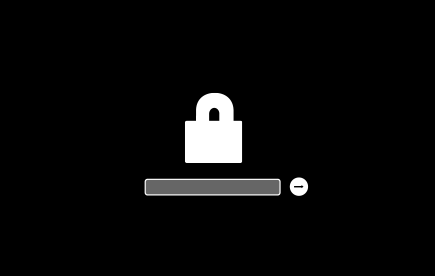
Your Mac asks for the firmware password only when attempting to start up from a storage device other than the one selected in Startup Disk preferences, or when starting up from macOS Recovery. Enter the firmware password when you see the lock and password field:

How to turn off a firmware password
If you forgot your firmware password
If you can't remember your firmware password, schedule an in-person service appointment with an Apple Store or Apple Authorized Service Provider. Bring your Mac to the appointment, and bring your original receipt or invoice as proof of purchase.
Very little details supplied to attempt to assist.
Writing an effective Apple Support Communities question
Welcome !
So was that the answer to your question ??
Thank you too :-))
Personally, would keep a copy of the Firmware password in my Safety Deposit Box at Bank and another on iPhone using a six digit alpha numeric PIN for the iPhone. The back up, at Bank - would be better even if had to wait for the weekend to pass - better than the Proof of Ownership and trip to Apple Store
This is the error am getting
Thank you!
Yes, correct answer
Yeah i’m gonna do that next time, great advice
Very Best and hope it is resolved soon
Thank you, but sorry, at appl store how are they gonna fix this, will they change ram
Good Question and do not know. Imagine they may explain the process if you ask when there. Would in interested in knowing - it time permits.
Error BigSur update
