
Force Apple Watch to Use Cellular Connection - WatchOS8, iOS15, 13 Pro and Series 6

When I start a run from my house, I want to FORCE the watch to use cellular before I leave the house. I like this because otherwise, spotify starts skipping and sometimes just fails as I run farther away from my wifi and my phone (which I leave at home). Usually, I'm able to do this successfully by:

  1. Turn off wifi on my apple watch through control center.
  2. Turn off bluetooth on my iphone through control center.
  3. Wait 30 seconds or so, and cellular would come on the watch automatically.


Today, after I got my new iphone 13 pro, and have repaired my watch series 6 successfully, and updated to iOS15/WatchOS8, this no longer works. The watch now always says it's connected to my iphone even though it's clearly not. I even went to airplane mode w/ no wifi or Bluetooth on my iphone, and STILL the watch sat "connected to iphone" - after 10 minutes I stopped waiting and playing trying to make it work.


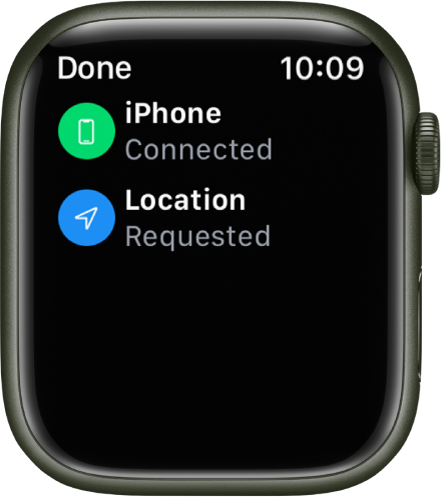
I know it was not connected to cellular as the Cellular icon on the watch control center was still white. Additionally, nothing worked - including siri, because there was clearly no connection to both cellular or my phone. The watch continued to look like this:

And it NEVER turned green like this (right side):
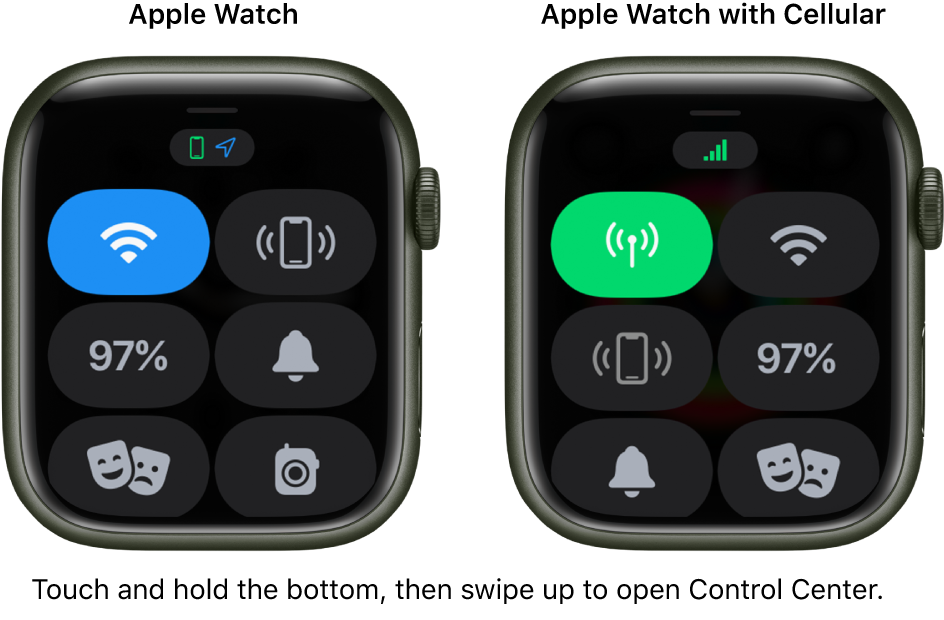

Images from: https://support.apple.com/guide/watch/control-center-apd06bc15da1/watchos

Posting another old thread that is similar but not quite my circumstance: https://discussions.apple.com/thread/250250159

Posted on Sep 25, 2021 5:01 AM

Reply
4 replies

Sep 26, 2021 11:27 AM in response to ShackrockScott

Hello ShackrockScott,


Welcome to Apple Support Communities. We understand you have a new iPhone with iOS 15 that you paired your cellular Apple Watch to, but the watch isn't switching properly to cellular when you need.


Have you unpaired and erased your Apple Watch, then re paired it to your new iPhone?


We also recommend checking for any carrier settings updates on your iPhone, then re pairing your Apple Watch and testing it:


Manually update your carrier settings on your iPhone or iPad


If you go to the Apple Watch app from your iPhone then Settings > General > About > ICCID, do you see "No SIM" or a number listed?


We look forward to working on this with you.


All the best.

Oct 5, 2021 7:30 AM in response to ShackrockScott

Thanks for your update with the additional troubleshooting you've worked through, ShackrockScott.


Since even erasing your Apple Watch and restoring from a backup still haven't resolved the issue, our next suggested step would be to work with our support teams. They'll be able to dive deeper into what might be going on, and provide helpful next steps. You can reach them through this link: 


Get Support - Apple


You can also contact our phone support directly through the number listed for your country at this link: 


Contact Apple for support and service


Take care.

Sep 26, 2021 5:48 PM in response to Soosie_J215

i didn’t unpair much old watch. I transferred over when I got my new phone (transferred everything including apps to my new phone at Best Buy). The watch didn’t transfer successfully though. I saw when I got home that my watch was frozen on a loading state for some reason. At that point I restarted the watch and it started up. I then went to pair an exiting watch in the watch app on my phone. It wouldn’t work. So I wiped my watch, then picked new watch from my phones watch app - and restored from backup. Everything generally seems to work except the cell service as described, and I realize now that also the ‘unlock w Apple watch’ also doesn’t work. It says ‘unable to communicate with apple watch’


I’ve tried restarting the watch and phone (force restart) and still no luck.


in the Apple Watch app it shows my Verizon service as functional and enabled.


on my Apple Watch it shows an ICCID. Although it shows network ‘not available’ on the same screen.

This thread has been closed by the system or the community team. You may vote for any posts you find helpful, or search the Community for additional answers.

Force Apple Watch to Use Cellular Connection - WatchOS8, iOS15, 13 Pro and Series 6

Welcome to Apple Support Community
A forum where Apple customers help each other with their products. Get started with your Apple Account.