Shell script to change weekday of file on desktop

Hi,

I am looking to create a shell script (not AppleScript or automator) that will change the name of a file on the desktop to the current weekday.

So, the file on the desktop would be, for example, Sunday and the shell script would change it to the appropriate day of the week when it ran.


The file extension could be anything, if that matters. I used Sunday.png in this example


I clearly have less than rudimentary knowledge of this beyond the fact that I believe the first line would be #!/bin/sh

The path to the desktop file would be /Users/mimac/Desktop/Sunday.png

Please don't assume anything.

Thanks for your help

iMac Line (2012 and Later)

Posted on Oct 1, 2021 12:51 PM

Reply
Question marked as Top-ranking reply

Posted on Oct 2, 2021 7:53 AM

Try this script:


#!/usr/bin/env zsh

WHERE="/Users/YOUR_SHORT_UNIX_USER_NAME_HERE/Desktop"
TYPE="txt"
DAYS=( "Sunday" "Monday" "Tuesday" "Wednesday" "Thursday" "Friday" "Saturday" )

TODAY=$(date "+%A")

for j in "${DAYS[@]}"
do
    if [[ -e "${WHERE}/$j.${TYPE}" ]]; then
        OLD="${WHERE}/$j.${TYPE}"
        break
    fi
done

if [[ -z "${OLD}" ]]; then
    touch ${WHERE}/${TODAY}.${TYPE}
else
    mv "${OLD}" ${WHERE}/$TODAY.${TYPE}
fi


YOUR_SHORT_UNIX_USER_NAME_HERE needs to be replaced with your username.


I assumed the file type was .txt. Change as desired.


Although, you might consider leaving it as .txt, and after the rename, append to the file, the current date, so the file becomes of log of each time CCC completed its backup


date >>"${WHERE}/${TODAY}.${TYPE}"


Caution: If you have more than 1 day-of-the-week file on your desktop. this script will just find the first one. If the day-of-the-week file spelling does not match the DAYS array selling and upper/lowercase, the old file will not be found.

8 replies
Question marked as Top-ranking reply

Oct 2, 2021 7:53 AM in response to mrokloricred37

Try this script:


#!/usr/bin/env zsh

WHERE="/Users/YOUR_SHORT_UNIX_USER_NAME_HERE/Desktop"
TYPE="txt"
DAYS=( "Sunday" "Monday" "Tuesday" "Wednesday" "Thursday" "Friday" "Saturday" )

TODAY=$(date "+%A")

for j in "${DAYS[@]}"
do
    if [[ -e "${WHERE}/$j.${TYPE}" ]]; then
        OLD="${WHERE}/$j.${TYPE}"
        break
    fi
done

if [[ -z "${OLD}" ]]; then
    touch ${WHERE}/${TODAY}.${TYPE}
else
    mv "${OLD}" ${WHERE}/$TODAY.${TYPE}
fi


YOUR_SHORT_UNIX_USER_NAME_HERE needs to be replaced with your username.


I assumed the file type was .txt. Change as desired.


Although, you might consider leaving it as .txt, and after the rename, append to the file, the current date, so the file becomes of log of each time CCC completed its backup


date >>"${WHERE}/${TODAY}.${TYPE}"


Caution: If you have more than 1 day-of-the-week file on your desktop. this script will just find the first one. If the day-of-the-week file spelling does not match the DAYS array selling and upper/lowercase, the old file will not be found.

Oct 2, 2021 12:13 PM in response to BobHarris

Having read pg 240, it says the scripts run as 'root', so the script should most likely change ownership. Here is a modified script


#!/usr/bin/env zsh

YOUR_USERNAME=appleal  # change this to be your actual short username
TYPE="txt"             # change to the file type you prefer

WHERE="/Users/${YOUR_USERNAME}/Desktop"
DAYS=( "Sunday" "Monday" "Tuesday" "Wednesday" "Thursday" "Friday" "Saturday" )
TODAY=$(date "+%A")
NEW="${WHERE}/${TODAY}.${TYPE}"

for day in "${DAYS[@]}"
do
    if [[ -e "${WHERE}/$day.${TYPE}" ]]; then
        OLD="${WHERE}/$day.${TYPE}"
        break
    fi
done

if [[ -z "${OLD}" ]]; then
    touch "${NEW}"
else
    mv "${OLD}" "${NEW}"
fi
chown ${YOUR_USERNAME} "${NEW}"


Oct 3, 2021 9:01 AM in response to mrokloricred37

All you have to do is return to your "Mis-spent Youth" and spend the next 50 years working from the Unix command line 😀


  • For CCC, you store the script in a file. It would be best to use something like BBedit (free for basic functions).
    • While you can use TextEdit, you MUST change the file to Plain Text: TextEdit -> Format -> Make Plain Text.
    • Or you could save it in a file from an Applications -> Utilities -> Terminal session
cat >/path/to/the.file
# paste the file now
# Control-D # to close out the cat command
  • Next you change the file permissions to executable from an Applications -> Utilities -> Terminal session
chmod +x /path/to/the.file
  • Then in CCC, you click on the "Run a Shell Script 📁", and navigate to your script.


You should run the script manually from a Terminal session.

cd path/to
zsh the.file

just to make sure it is working correctly. You could create a day-of-the-week that is not today, and see if the script renames it as desired.

Oct 1, 2021 4:17 PM in response to VikingOSX

Thanks for your help, but I am still confused. I wanted to place this script in a folder of scripts that would run as a post flight script in Carbon copy Cloner. I thought I could just place a script that would do what I want into the CCC script folder and "simply" run it as a post flight script.


Sorry, but probably both of these are true: I know little and you know far more than I can imagine.

Oct 1, 2021 2:56 PM in response to mrokloricred37

Here is a brief Zsh script to do what you want. Doesn't matter is your default shell is Bash or Zsh.
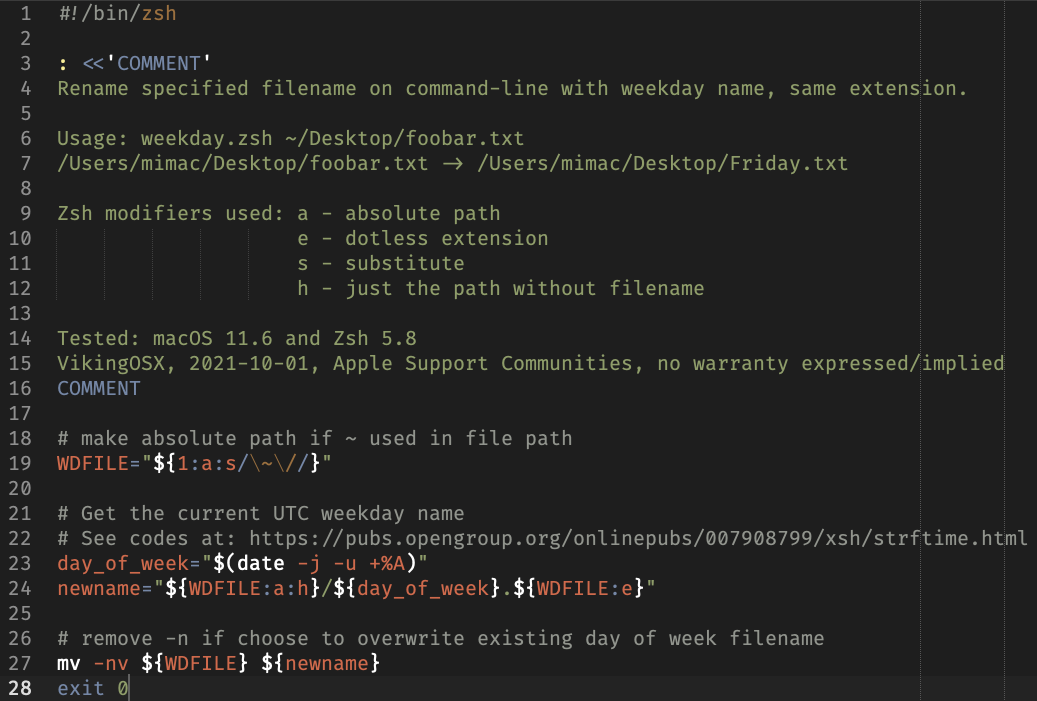


Copy/paste the following code into a text editor or plain-text TextEdit document. Save it as weekday.zsh on your Desktop.

#!/bin/zsh

: <<'COMMENT'
Rename specified filename on command-line with weekday name, same extension.

Usage: weekday.zsh ~/Desktop/foobar.txt
/Users/mimac/Desktop/foobar.txt -> /Users/mimac/Desktop/Friday.txt

Zsh modifiers used: a - absolute path
                    e - dotless extension
                    s - substitute
                    h - just the path without filename

Tested: macOS 11.6 and Zsh 5.8
VikingOSX, 2021-10-01, Apple Support Communities, no warranty expressed/implied
COMMENT

# make absolute path if ~ used in file path
WDFILE="${1:a:s/\~\//}"

# Get the current UTC weekday name
# See codes at: https://pubs.opengroup.org/onlinepubs/007908799/xsh/strftime.html
day_of_week="$(date -j -u +%A)"
newname="${WDFILE:a:h}/${day_of_week}.${WDFILE:e}"

# remove -n if choose to overwrite existing day of week filename
mv -nv ${WDFILE} ${newname}
exit 0


Once you have this in a weekday.zsh file on your Desktop, you need to launch the Terminal and make the script executable:

cd ~/Desktop
chmod +x ./weekday.zsh


and then run it providing your candidate file on the command-line:


./weekday.zsh ~/Desktop/foobar.txt
/Users/mimac/Desktop/foobar.txt -> /Users/mimac/Desktop/Friday.txt


The file extension does not matter as the script takes care of that based on the input file type.



This thread has been closed by the system or the community team. You may vote for any posts you find helpful, or search the Community for additional answers.

Shell script to change weekday of file on desktop

Welcome to Apple Support Community
A forum where Apple customers help each other with their products. Get started with your Apple Account.