Has the search function changed?

It's been a while since I last purchased songs from iTunes (on my MacBook Air). What am I missing? I see no results? I randomly chose the song covered in the latest commercial for this post/question- it has no significance. Do I hit "return" or tap on the arrow to get results? Please see 2 screenshots below. Is something wrong with my app? Thanks in advance.

Posted on Nov 2, 2021 5:37 PM

Reply

Similar questions

2 replies

Nov 2, 2021 6:09 PM in response to nature_girl75

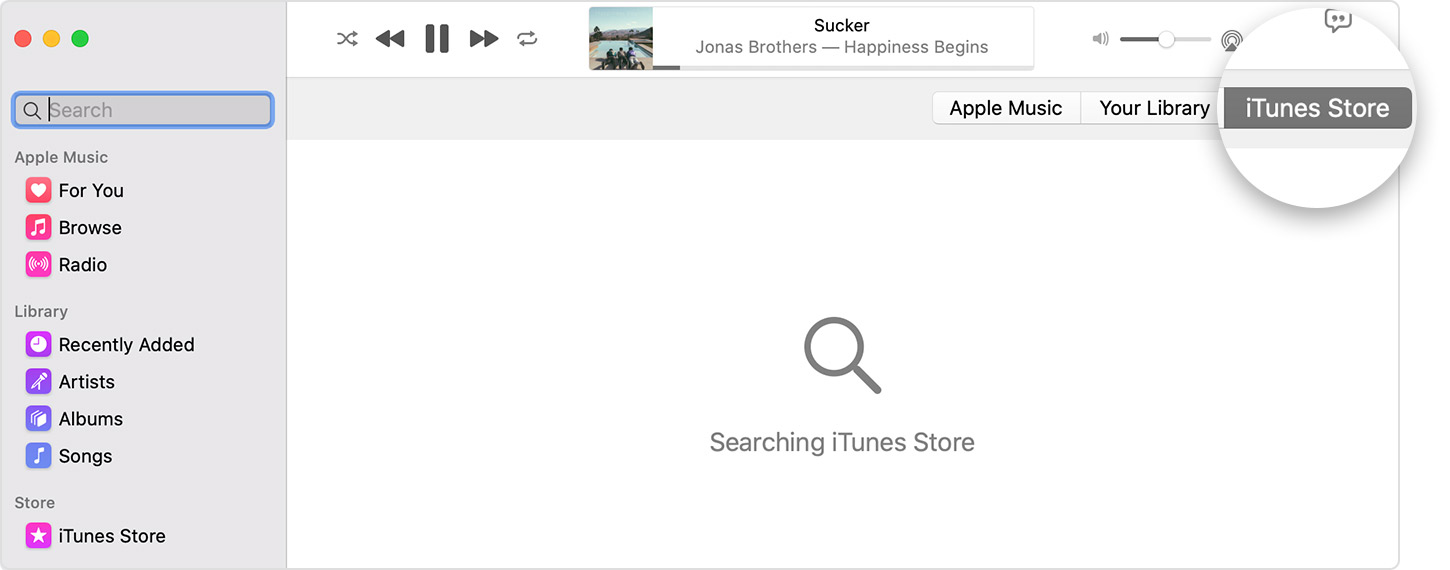
Did you click iTunes store at the top right of the main window? See the following from Buy music from the iTunes Store - Apple Support


  1. Open the Apple Music app.
  2. Use the Search bar to find the song or album that you want to buy.
  3. Click the iTunes Store button in the upper-right corner. Don't see the iTunes Store?
  4. Click the price next to the song or album to buy it.
  5. Sign in with your Apple ID and password to complete the purchase. Need help?

After you buy music, you can find it in your music library. 

To download music to listen to offline, find the song or album in your library, then click the Download button 


This thread has been closed by the system or the community team. You may vote for any posts you find helpful, or search the Community for additional answers.

Has the search function changed?

Welcome to Apple Support Community
A forum where Apple customers help each other with their products. Get started with your Apple Account.