Greetings, JodyJody.
Welcome to the Apple Support Communities. Adding a link to an email can be important, so it’s understandable that you’d want more information.
“ Tap an object, text box, or selected text you want to turn into a link, then tap Link.
Tap Link To and choose a link type (Webpage, Email, Phone Number, Page, or Bookmark).
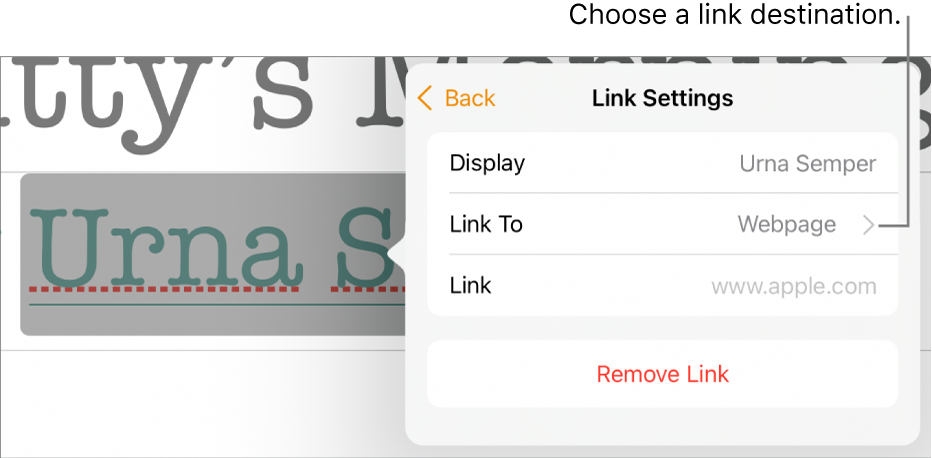
- Specify details for the destination:
- Webpage: Opens a webpage in a browser. In the Display field, enter the text you want readers to see. For example, you may want to show the domain name and not the entire web address. In the Link field, enter the URL for the webpage.
- Email: Opens an email message preaddressed with the address you provide in the To field. In the Display field, enter the text you want readers to see. For example, you may want to show the recipient name and not the entire email address. Enter a subject in the Subject field or leave it blank.
- Phone Number: Calls a phone number. In the Number field, enter a phone number. In the Display field, enter the text you want readers to see. For example, you may want to show the name of the business or person the number belongs to.
- Page: Goes to another page in the document. Tap the page thumbnail below Link To, then tap the destination page number. In the Display field, enter the text you want readers to see.
- Bookmark: Goes to text you’ve bookmarked. Tap the bookmark you want to link to. In the Display field, enter the text you want readers to see.
- To verify the destination, tap Back, then tap the button for Open Link, Compose Email, Call, Go to Page, or Go to Bookmark.
- If you don’t need to verify the link, tap the document to close the controls.
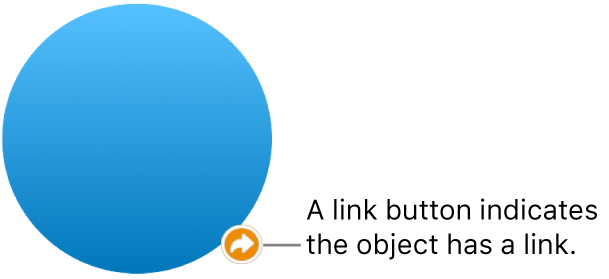
Linked text is underlined, and a link button (it looks like a curved arrow) appears next to objects that are linked.” Link to a webpage, email, phone number, or page in Pages on iPad
We hope this helps! Thanks for being a part of the community.
Sincerely.


