2018 Intel Mac Mini Display Issues

Hello,


I’ve been struggling with display issues since purchasing my (fully specced out) Mac mini in April 2021. Computer won’t wake from sleep and drive displays - turned off sleep. Displays won’t wake if they sleep.


Displays will black screen randomly or upon restart. I usually have to fiddle with cables and then do a hard restart.


Many people seem to be experiencing similar problems. I found a third party app that fixed the displays from wake problem - MonitorControl. Computer restart is still a problem.


At this point my computer is somewhat usable but it’s gone back to repair shop and they state that there are no issues with displays when upgrading to Monterey but my professional audio gear is not yet supporting Monterey.


Question: have most peoples display issues been resolved with Monterey? I’ve reinstalled OSX so many times I don’t want to do it again just to have the computer fail.

Mac mini, macOS 11.6

Posted on Nov 30, 2021 6:45 PM

Reply

Similar questions

18 replies

Dec 5, 2021 9:08 PM in response to MylesTheGray

  1. ”Put…” should be unchecked
  2. Set “Turn display off…” to a suitable timer, no need for manual switch offs
  3. 15’ HDMI cables are definitely a problem, use 5 or less, most likely the cause of all your display issues
  4. “Mac Mini has been branded as a device to run a home theatre system” - not true anymore. Use Apple TV 4K 2G for theatre-like functionality


I’m thinking this discussion has run out of gas…have a nice day!

Dec 5, 2021 8:51 PM in response to hcsitas

Hello,


Sorry the delay. I picked up the computer from shop after they mentioned no issues with computer when updated to Monterey. Note: shop did not have enough displays to test computer.


Display to cable configuration:


ASUS VP28U - Stock HDMI cable to LMP HDMI to USB C Adapter


Samsung ULED TV 65” - HDMI Cable 15feet(4.5meter), 4K HDMI Lead-Snowkids 18Gbps HDMI 2.0 Cable 4K@60Hz direct into Mac Mini (HDMI Cable 15feet(4.5meter), 4K HDMI Lead-Snowkids 18Gbps HDMI 2.0 Cable 4K@60Hz, 3D Support, Ethernet Function, Video 4K UHD 2160p, HD 1080p, 3D - (for Fire TV, for PS3/4, for Netfilx) https://www.amazon.ca/dp/B07M65ZB5W/ref=cm_sw_r_cp_api_glt_i_JW6980N51ZSX4HDJT5YF?_encoding=UTF8&psc=1)


——


Computer still having intermittent issues with large Samsung display and ASUS Display.


Asus: display takes a long time to turn on or get connection. I have to boot computer and use Samsung TV to input login details and then ASUS display turns on when OSX has fully booted after user/password login.


Samsung: the HDMI connection seems to be reliable for the most part but every once and a while it won’t work on boot up or restart resulting in me reconfiguring cables and hard restarting computer.


——


Monterey - big improvement on how OSX handles displays and now my computer seems to reliably boot with functional HDMI port. However, as of now - ASUS screen is operational but Samsung TV will not pick up information from MAC Mini. Note: issue seems to be better in Monterey. Before, I would dread any type of computer restart as it would not reliably boot. Monterey seems to work 6/10 times. For now, computer won’t be turned off.


Computer still has problems waking displays up unless I use third party app. So, for now I have prevented the displays from sleeping and just turn off ASUS when not in use.


Yes, the cable for the TV is longer then 3ft but the Mac Mini has been branded as a device to run a home theatre system. Some people have rack equipment far away from the screen. HDMI cables are quite capable of long cable runs. Note: changing to smaller cable and placing Mac Mini near TV does not seem to help.


Thoughts?
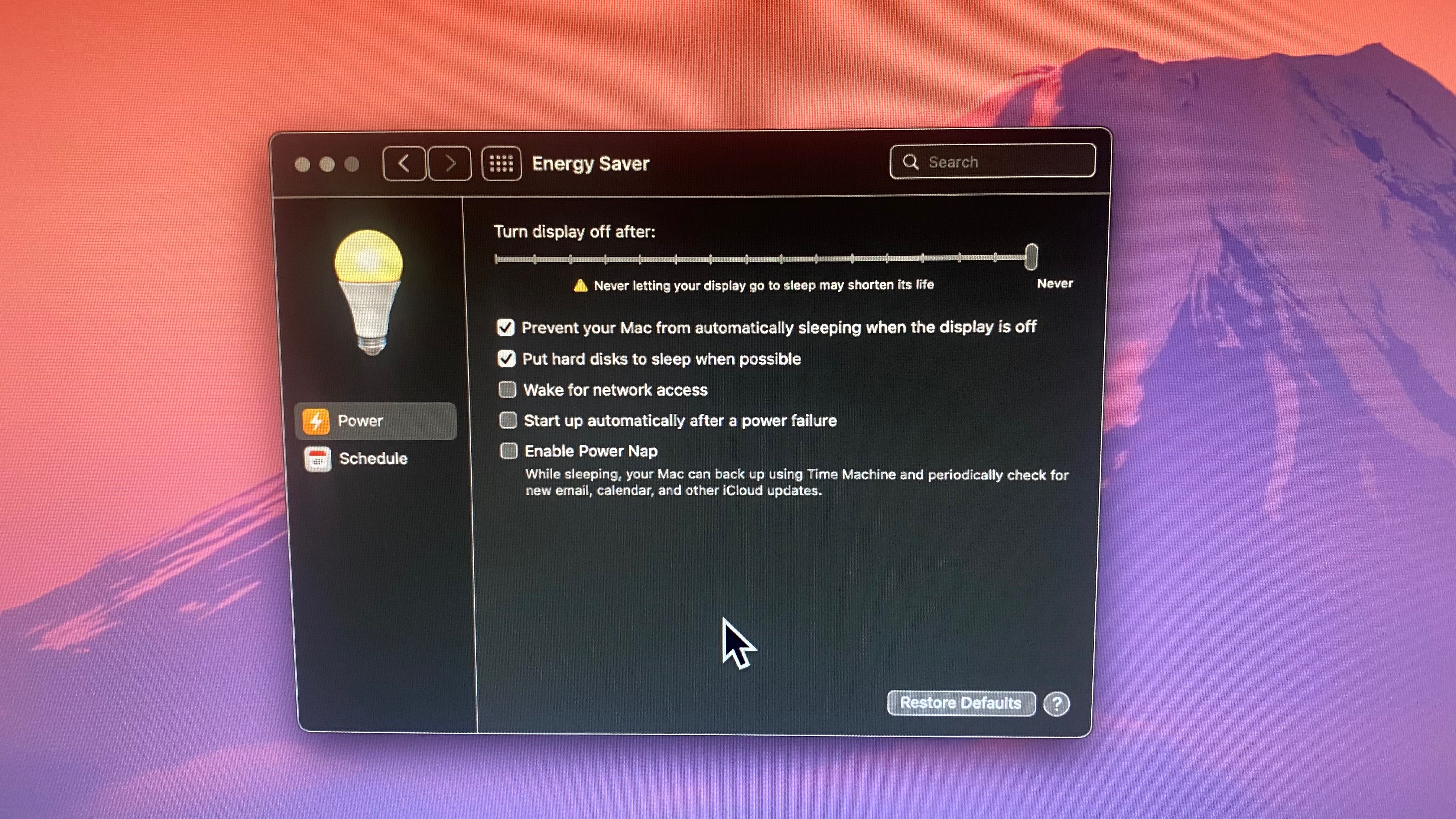


Nov 30, 2021 10:40 PM in response to hcsitas

Computer is still in shop so I cannot post screenshot.


However,


HDMI slot is hooked up to Samsung 4K TV

Ausu VP28UPG 4k display is hooked up via adapter to Thunderbolt port.


Repair shop is an authorized apple dealer in Kelowna, Canada. They cannot replicate problem with displays but do not have two 4k screens to test equipment with and they also wiped my computer and installed Monterey. Almost immediately after buying computer the logic board was replaced as the store thought that was the problem. However, it was not. Display issues with Mac Minis seem to be a known issue with Big Sur.


I am anxious that I will get my computer back and it will still have the problem while running Big Sur as I cannot run my professional audio system using Monterey at the time.


I paid a lot of money for this computer and it hasn’t run correctly since I bought it. It has been most stable using Mojave but then I cannot use the features of OSX that I want.


Hcsitas, thanks for the reply. I will post a screenshot when I get my computer back tomorrow.


Dec 1, 2021 1:20 AM in response to hcsitas

Hi, I’ve changed cables and what not so many times.


The HDMI cable that drives the Samsung is longer then 5’ but that does not appear to be the problem.


I’ve tried just driving one display with a short cable out of both the HDMI port and the Thunderbolt adapter but the problem persists with either display no matter the length of cable or port. Changed cables and adapter, etc.


I am not using an apple branded adapter but ones recommended to me by the computer shop. Brand: LMP


Dec 1, 2021 5:22 AM in response to MylesTheGray

Hcsitas,


Numerous people appear to be having the same issues as me. These two forum posts go far into detail regarding various display issues with 2018 Mac Minis.


https://forums.macrumors.com/threads/mac-mini-2018-hdmi-failes-after-os-upgrade-patch.2221573/page-10


https://forums.macrumors.com/threads/hdmi-port-no-longer-working-after-update-to-macos-11-big-sur.2268966/page-4


thoughts?

Dec 5, 2021 9:20 PM in response to hcsitas

I don’t think you fully read my reply.


ASUS display will not turn back on if put in sleep mode. It will not wake up. So it will remain unchecked.


Streaming to a 4k TV so my artists can look at a screen outside of control room is not a solution. It’s extremely laggy.


I am not someone who hasn’t been using computers for very long. I work in audio studios and create professional recordings. I’ve been using computer since 1996 and Macs since 2003.


Its obvious other people are having issues.


No solution then, I guess. Thanks for the help…


Dec 5, 2021 9:40 PM in response to hcsitas

Not once does apple literature state that cables need to be 5ft or less in anything that I have read. That’s Ludacris.


If there is literature stating that then I’d love to see it.


Samsung TV seems to be driving no problem with adapter.


I want to be able to use (3) 4k monitors. I’ll hook them all up and use the hdmi port for a shorter cable and then and see how it goes.


Also, you stated to not let hard disks fall asleep. I swear I was doing this before as I had read that starting and stopping disks wears them out. What is your opinion?


Thanks for the help. (I still think 15ft should be a non issue though…!)

This thread has been closed by the system or the community team. You may vote for any posts you find helpful, or search the Community for additional answers.

2018 Intel Mac Mini Display Issues

Welcome to Apple Support Community
A forum where Apple customers help each other with their products. Get started with your Apple Account.
