itunes autorization or de-autorization

hello, if it's not difficult, help me, I have a problem with authorization, I don’t know how, but in itunes, I have 5 computers authorized, if it’s not fun to reset these devices, since I can’t log in, thank you in advance.

Windows, Windows 10

Posted on Dec 5, 2021 1:17 PM

Reply
Question marked as Top-ranking reply

Posted on Dec 5, 2021 1:48 PM

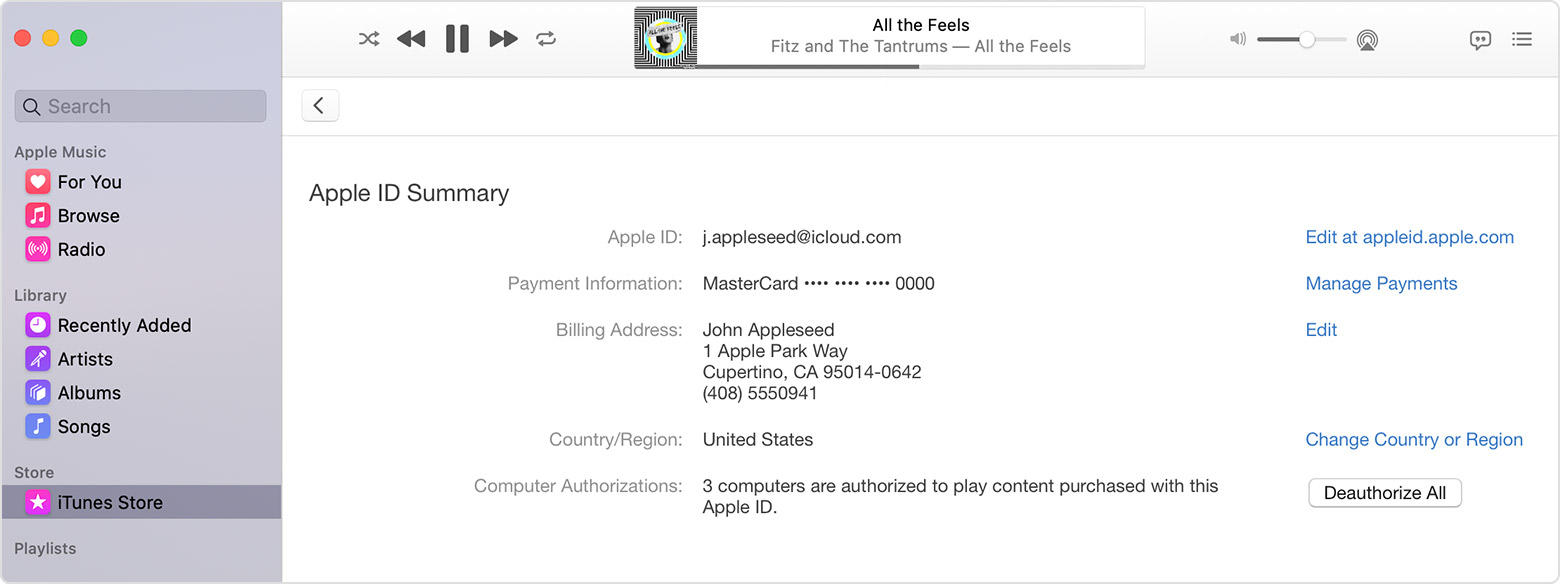
"Deauthorize all" and then authorize any computers you still want to use. See the "Deauthorize All" button in the second screenshot in the following instructions from Authorize or deauthorize your computer for iTunes Store purchases - Apple Support


See your authorized computers

To automatically sign in to your Account Information page from your computer, click here. Or follow these steps:

  1. On a Mac, open the Music app, Apple TV app, or Apple Books app. On a PC, open iTunes for Windows.
  2. Sign in with your Apple ID.
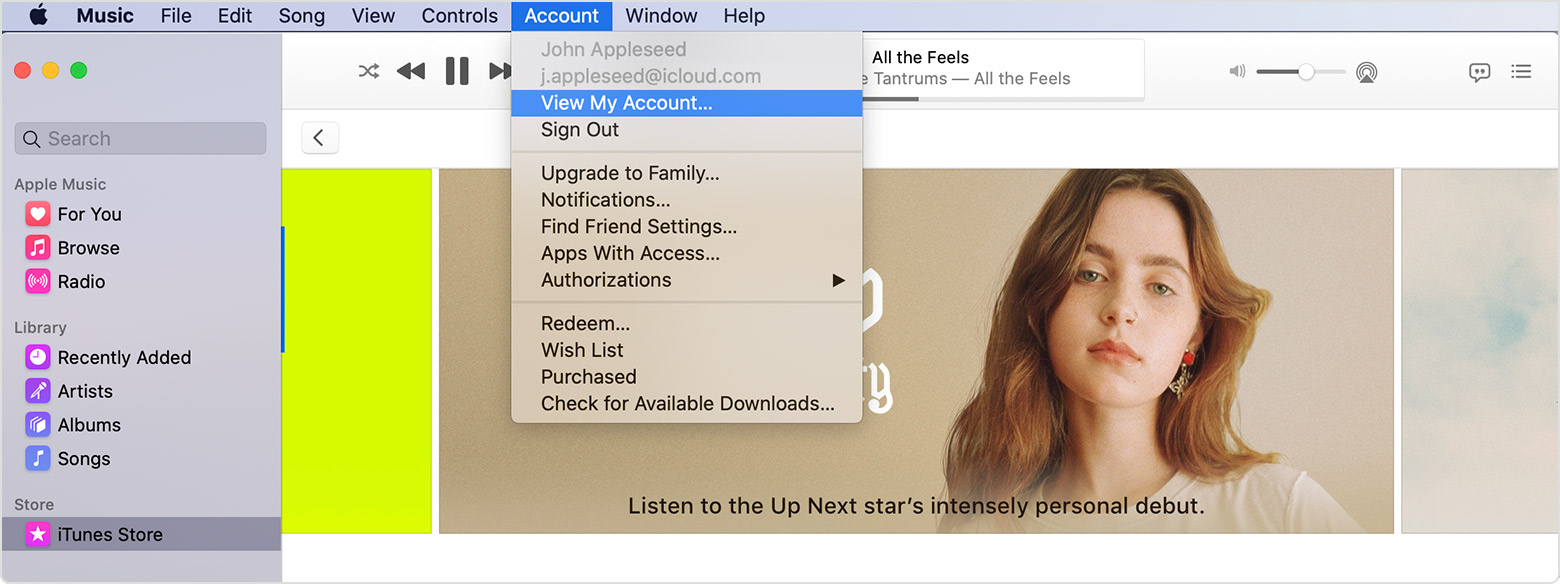
  3. In the menu bar on your Mac or PC, choose Account > View My Account.

  4. Sign in with your Apple ID.
  5. On the Account Information page, scroll to the Apple ID Summary section. You'll see the number of computers that you've authorized with your Apple ID. You can’t see the names of those computers. If you haven't authorized 2 or more computers, you won't see this section.

If the number of authorized computers listed is more than what you expect, you might not have deauthorized the computers that you no longer use, gave away, or sold. You need to deauthorize all of your computers and then authorize each one that you still use.

1 reply
Question marked as Top-ranking reply

Dec 5, 2021 1:48 PM in response to Stas777

"Deauthorize all" and then authorize any computers you still want to use. See the "Deauthorize All" button in the second screenshot in the following instructions from Authorize or deauthorize your computer for iTunes Store purchases - Apple Support


See your authorized computers

To automatically sign in to your Account Information page from your computer, click here. Or follow these steps:

  1. On a Mac, open the Music app, Apple TV app, or Apple Books app. On a PC, open iTunes for Windows.
  2. Sign in with your Apple ID.
  3. In the menu bar on your Mac or PC, choose Account > View My Account.

  4. Sign in with your Apple ID.
  5. On the Account Information page, scroll to the Apple ID Summary section. You'll see the number of computers that you've authorized with your Apple ID. You can’t see the names of those computers. If you haven't authorized 2 or more computers, you won't see this section.

If the number of authorized computers listed is more than what you expect, you might not have deauthorized the computers that you no longer use, gave away, or sold. You need to deauthorize all of your computers and then authorize each one that you still use.

This thread has been closed by the system or the community team. You may vote for any posts you find helpful, or search the Community for additional answers.

itunes autorization or de-autorization

Welcome to Apple Support Community
A forum where Apple customers help each other with their products. Get started with your Apple Account.