Short answer - NO !
Rosetta 2 enables a Mac with Apple silicon to use apps built for a Mac with an Intel processor.
Installing Rosetta
If you have a Mac with Apple silicon, you are asked to install Rosetta the first time you open an app built for an Intel-based Mac. Click Install, then enter your user name and password to allow installation to proceed.
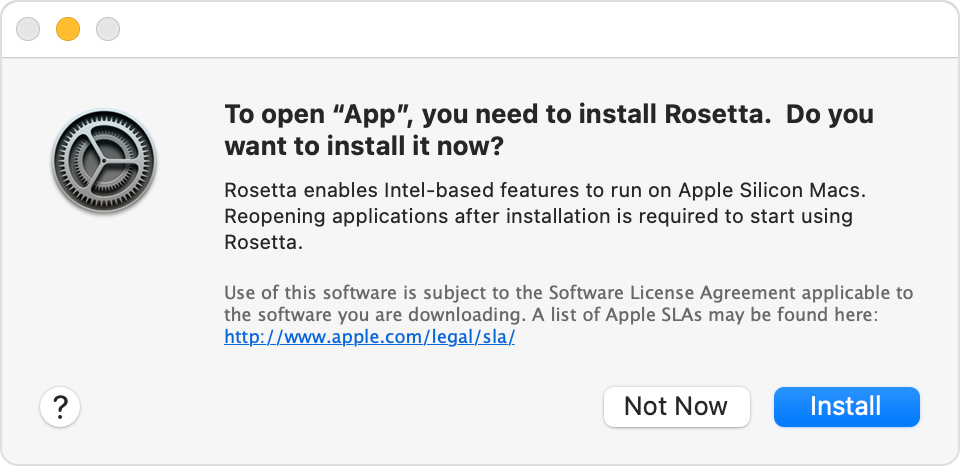
After installing Rosetta, it is available to any other apps that need it, so you will not be asked to install it again. If you choose not to install Rosetta now, you will be asked again the next time you open an app that requires Rosetta.
Using Rosetta
Rosetta is not an app that you need to open. Rosetta works automatically in the background whenever you use an app built only for Mac computers with an Intel processor. It translates the app for use with Apple silicon.
In most cases, you won't notice any difference in the performance of an app that needs Rosetta. But you should contact the app developer to inquire about a version that can natively use the full power and performance of Apple silicon.
Which of your apps need Rosetta?
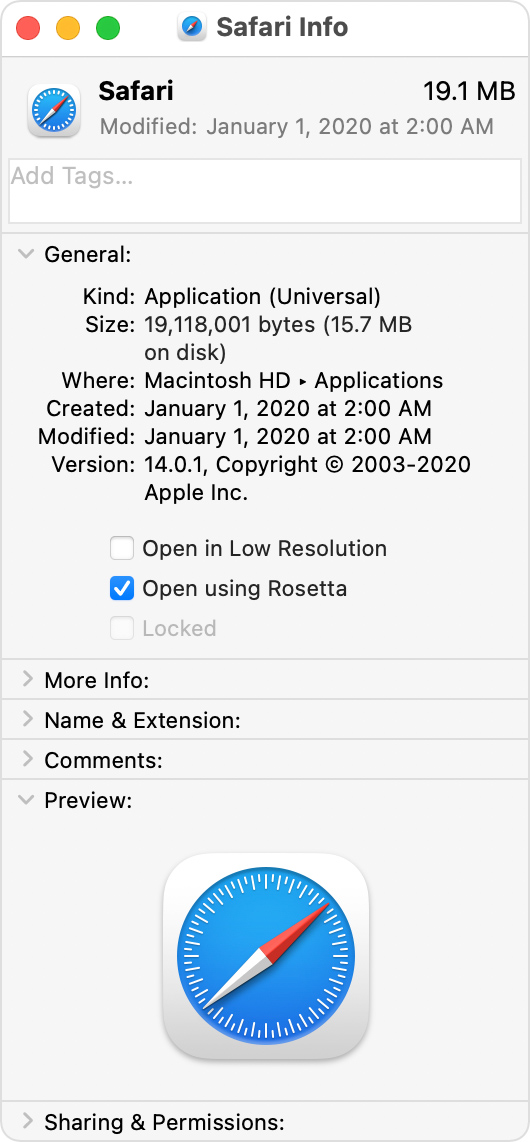
You can use Get Info to identify apps that need Rosetta or can use Rosetta:
- Select the app in the Finder.
- From the File menu in the menu bar, choose Get Info.
- See the information labeled Kind:
- Application (Intel) means the app supports only Intel processors and needs Rosetta to work on any Mac with Apple silicon.
- Application (Universal) means the app supports both Apple silicon and Intel processors, and uses Apple silicon by default.
For universal apps only, the Info window includes the setting “Open using Rosetta.” This setting enables universal apps such as web browsers or email apps to use plug-ins, extensions, and other add-ons that haven't been updated to support Apple silicon. If a universal app doesn't recognize an add-on that you installed for the app, you can quit the app, select this setting, and try again.
Published Date: October 25, 2021



