Adding Rows in Numbers Dependent on Column Info

Hello all! I'm trying to add rows dependent on when information in a column changes. I'm already using "True/False" in a helper column. I know in Microsoft, you would do a search for the "False", highlight all the "False" entries, then add a row dependent on that. I just can't figure out how to do it on a Mac. Appreciate the help!

MacBook Air 13″, macOS 11.6

Posted on Jan 12, 2022 5:57 PM

Reply
Question marked as Top-ranking reply

Posted on Jan 12, 2022 8:13 PM

There is no way I know of to automatically add a blank row based on a value in a cell. But why would you want to do that anyway? In general it is best to keep your data in a consistent table format.


If your goal is to calculate subtotals, averages, counts or whatever from your data then you can use the SUMIF, SUMIFS, COUNT, COUNTIFS functions, or even easier, the built-in functionalities in Numbers that do this without you having to enter a formula.


A. Using the Categories functionality:
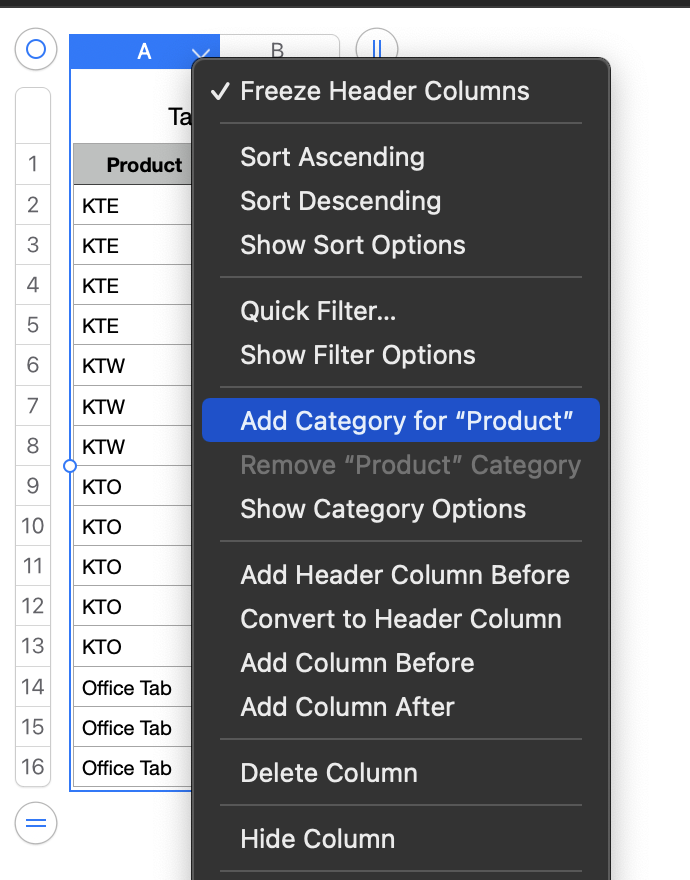


B. Using the Pivot Table functionality.


Click in table, then from menu choose Organize > Create Pivot Table > On Current Sheet, and drag from the Source Data box to the Rows and Values boxes as shown ).


Click the circled i ⓘ to see all the various options you have with Pivot Tables. And if you change or add to the data on which your Pivot Table(s) are based just "refresh" by going in the menu to Organize > Refresh Pivot Table.


SG

9 replies
Question marked as Top-ranking reply

Jan 12, 2022 8:13 PM in response to MC2016

There is no way I know of to automatically add a blank row based on a value in a cell. But why would you want to do that anyway? In general it is best to keep your data in a consistent table format.


If your goal is to calculate subtotals, averages, counts or whatever from your data then you can use the SUMIF, SUMIFS, COUNT, COUNTIFS functions, or even easier, the built-in functionalities in Numbers that do this without you having to enter a formula.


A. Using the Categories functionality:
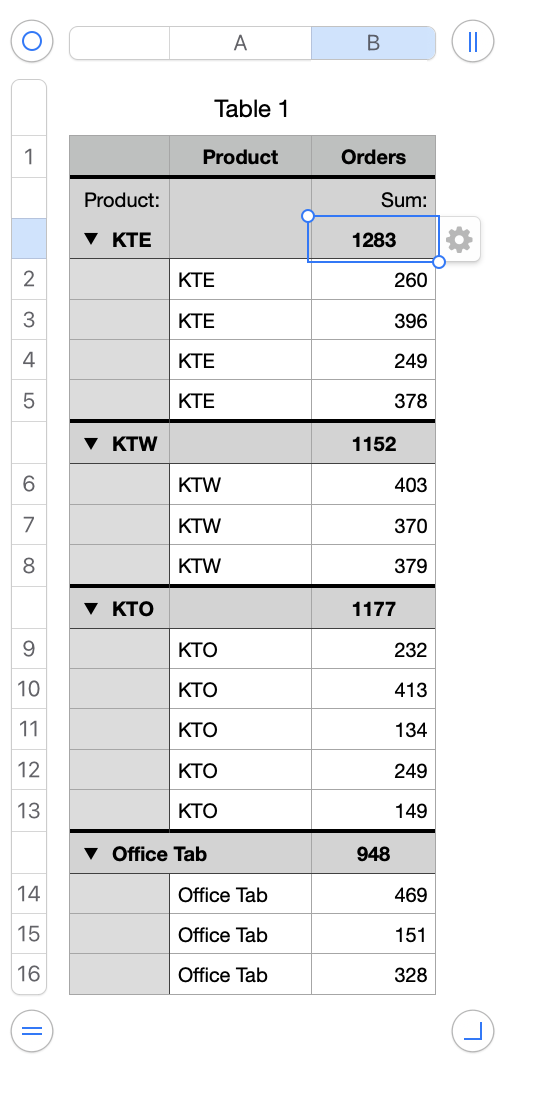


B. Using the Pivot Table functionality.


Click in table, then from menu choose Organize > Create Pivot Table > On Current Sheet, and drag from the Source Data box to the Rows and Values boxes as shown ).
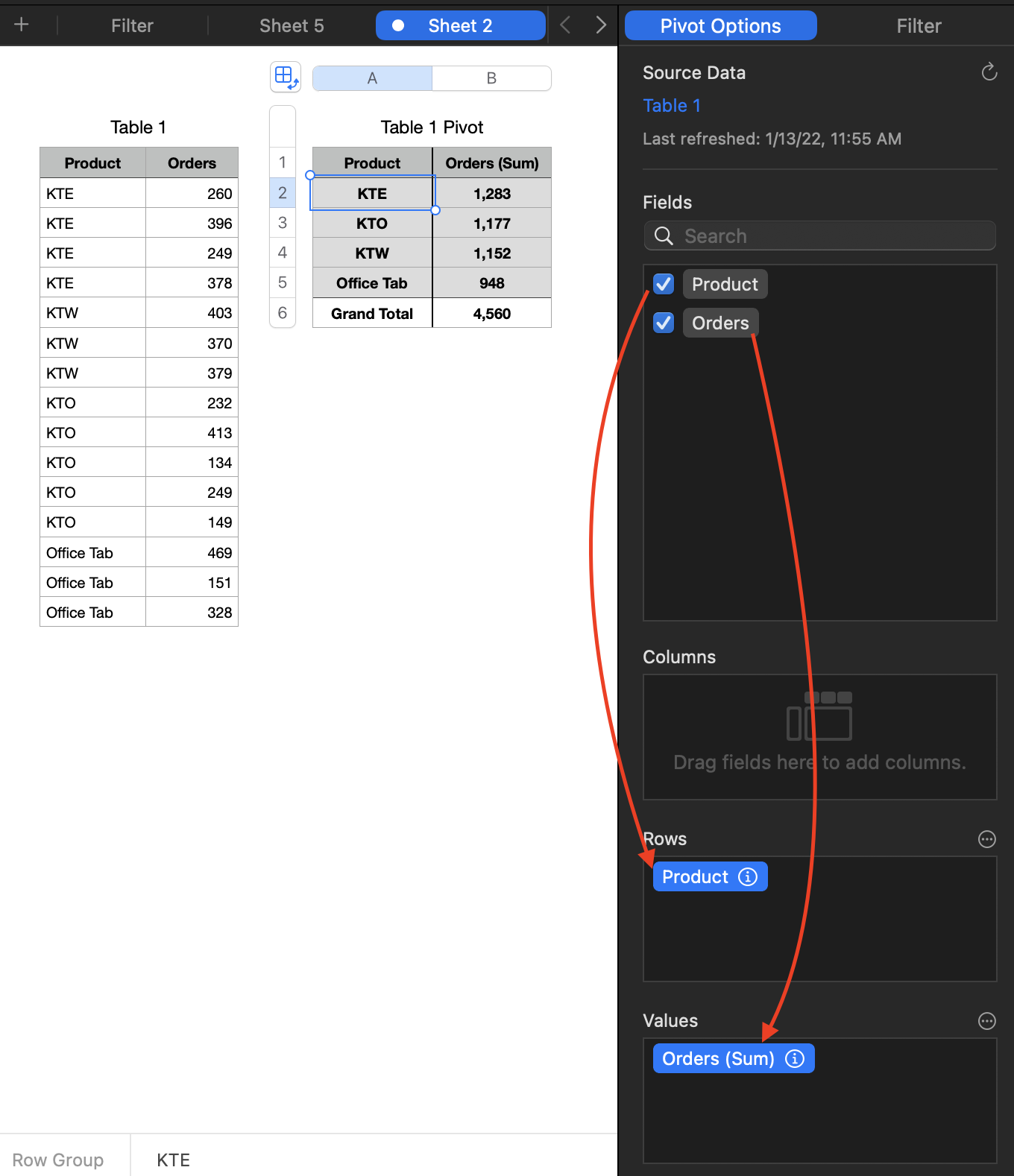


Click the circled i ⓘ to see all the various options you have with Pivot Tables. And if you change or add to the data on which your Pivot Table(s) are based just "refresh" by going in the menu to Organize > Refresh Pivot Table.


SG

Jan 13, 2022 1:51 PM in response to MC2016

Your link was missing but I found the page your example table came from.


In Excel, if you select multiple rows (click the first, command-click the others) then insert a full row, it will insert a single row above each of the rows you selected. Not in Numbers. In Numbers, it converts your selection into a single contiguous range spanning from the top of your selected rows down to the bottom one and when you add rows above, it will insert all the new rows above the topmost selected row. While there is a good purpose for that (it allows you to quickly insert multiple rows in one place) it would be nice if they kept "Add row above" and "Add row below" active when multiple rows are selected so you could also do it the way Excel does. If there is a way to do it the Excel way, I am overlooking it.


Time for a feature request? Numbers/Provide Numbers Feedback.


Or it could be done with an AppleScript.

Jan 12, 2022 7:38 PM in response to MC2016

Still not quite sure what you mean. To insert row anywhere just choose Add Row Below or Add Row Above from the contextual menu that appears when you click the "v" to the right the row number on the left of the table.


You have to do this manually. Spreadsheets don't add rows or columns automatically based on values in cells (except with perhaps a script, which would be more effort than a quick manual operation).


SG

Jan 12, 2022 7:45 PM in response to SGIII

Sorry I'm not explaining right. This is what I need to do. As the info in column A changes, I need a row added between where the change happens. I've also added a link for how it's done in Microsoft Excel. I've even got Excel for Mac and the formulas don't work right, so I definitely need the way to do it on a MAC OS. I've got a worksheet with over 9,000 rows so I really don't want to have to go through one-by-one and add.

This thread has been closed by the system or the community team. You may vote for any posts you find helpful, or search the Community for additional answers.

Adding Rows in Numbers Dependent on Column Info

Welcome to Apple Support Community
A forum where Apple customers help each other with their products. Get started with your Apple Account.

