Welcome!
If you have stability issues, history herre teaches that it is far more likely due to unneeded third-party software interfering with macOS, not the OS itself. Anti-virus and so-called "cleaning" apps are the worst. If you have this completely uninstall them using their makers' removal instructions.
If you are not sure what is or isn't installed. you can post a configuration snapshot. Fortunately there is a safe, secure way to do that.
We can quickly and within the confines of these forums help you determine what issues are at play if you use EtreCheck Pro, available here:
https://etrecheck.com/index
The free version will do nicely for this purpose, although the app is worthy of our financial support.
We can see hard data about drive performance, software issues, and RAM usage. Etrecheck is the development of a long-serving and trusted contributor here expressly for displaying information in these forums to help us help you. It will not reveal any personal or secure information.
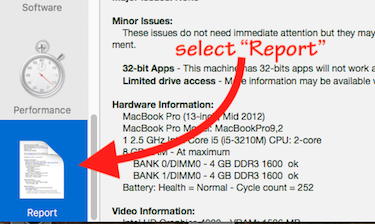
Run it, select “Report" from the left-hand pane (scroll down to the bottom of that pane to find):
When its report displays, click the "Share Report" icon from EtreCheck’s toolbar and then "Copy report” from the resulting dropdown.
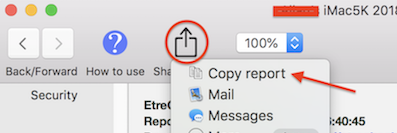
⚠️ Please DO NOT highlight the text in the report before using Etrecheck’s “Copy report” command—that will garble the formatting and make the report slower and harder to evaluate.
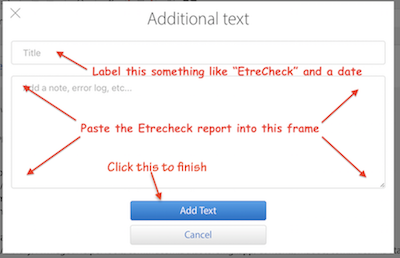
NOTE: Changes in late 2018 to the forum software require you use the “Additional Text" icon (see example below) to embed the report into a post:

Paste the report into the resulting “Additional Text” window:
This is the single-most effective tool for use in these forums to enable us to diagnose issue and recommend action without your having to play a protracted game of "20 Questions" that could go on for days. Once you post the report, dozens of experienced contributors familiar with those report can see exactly what is going on with your current installation.


