
Not getting the text tone from one of my contacts. Just receiving the text
I’m not getting the text tone when receiving a text from one of my contacts.
iPhone 7, iOS 15
I’m not getting the text tone when receiving a text from one of my contacts.
iPhone 7, iOS 15
Good afternoon BobT.47,
Welcome to the Apple Support Communities!
It sounds like you are not receiving text notifications on your iPhone 7 for one of your contacts, and we'd like to help.
Are you receiving text notifications for the rest of your contacts?
How long has this been going on?
If you have not already done so, please update your iPhone to iOS 15.2.1
Confirm that this individual has not been blocked on your iPhone 7.
Block phone numbers, contacts, and emails on your iPhone, iPad, or iPod touch
Are you using the same tone for all of the text notifications you receive?
Try changing the text tone for this individual to something more specific, restart your iPhone, and ask them to send you a message to test.
The resources below will provide some guidance:
Use tones and ringtones with your iPhone, iPad, or iPod touch
"Set a ringtone or text tone for a contact
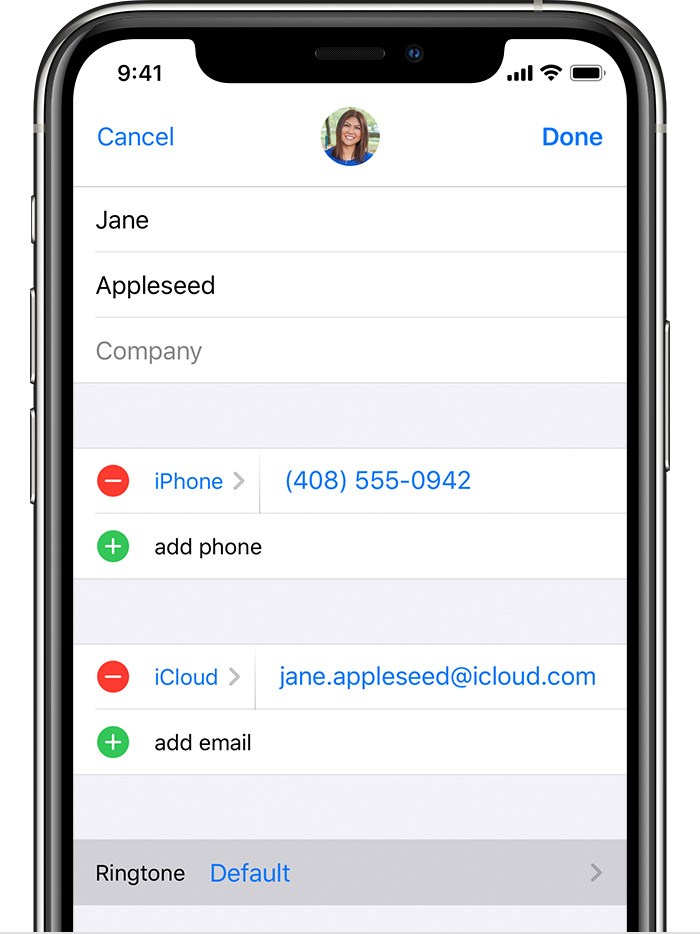
If the issue persists, please reply to this thread and we'll do our best to help you!
Take care.
Good afternoon BobT.47,
Welcome to the Apple Support Communities!
It sounds like you are not receiving text notifications on your iPhone 7 for one of your contacts, and we'd like to help.
Are you receiving text notifications for the rest of your contacts?
How long has this been going on?
If you have not already done so, please update your iPhone to iOS 15.2.1
Confirm that this individual has not been blocked on your iPhone 7.
Block phone numbers, contacts, and emails on your iPhone, iPad, or iPod touch
Are you using the same tone for all of the text notifications you receive?
Try changing the text tone for this individual to something more specific, restart your iPhone, and ask them to send you a message to test.
The resources below will provide some guidance:
Use tones and ringtones with your iPhone, iPad, or iPod touch
"Set a ringtone or text tone for a contact
If the issue persists, please reply to this thread and we'll do our best to help you!
Take care.
Hi BobT.47,
From your description, it sounds like the text notifications had been disabled for this contact. If you are still not able to receive notifications for this individual after the troubleshooting you've done, it may be time to speak with an AppleCare technical advisor. Click the link below, choose the phone number for your region from the list, and call when it is convenient.
Contact Apple for support and service
Enjoy your day!
Thank you for looking into this matter.
I am receiving notifications from all other contacts.
I believe this started after I installed the latest update on my phone ( IOS 15.2.1 )
This individual has not been blocked.
I changed the text tone, but the problem still exists.
Note: The first couple of texts I received without a tone had in the right portion or the screen a shadow image of a bell with a diagonal line through it. It no longer appears?
Thanks again,
Bob
Not getting the text tone from one of my contacts. Just receiving the text

