How do I stop Apple Music from auto shuffling every time it connects to Bluetooth in my car.

Every time I get in my car and Apple Music connects automatically to my Bluetooth, it turns on shuffle. I have to manually turn shuffle off every time. It used to work normally and pick up wherever I had left off. But the last couple months it’s auto shuffling every time and driving me crazy. Any help would be great. I’ve turned off Siri suggestions and deleted and reinstalled.

iPhone XR, iOS 15

Posted on Jan 22, 2022 6:52 PM

Reply
3 replies

Jan 24, 2022 6:36 AM in response to Millerjosh39

Hello Millerjosh39,


Welcome to Apple Support Communities!

If we understand your post correctly, you want to know how to stop Apple Music from automatically shuffling when it connects to your car. We'd like to help!


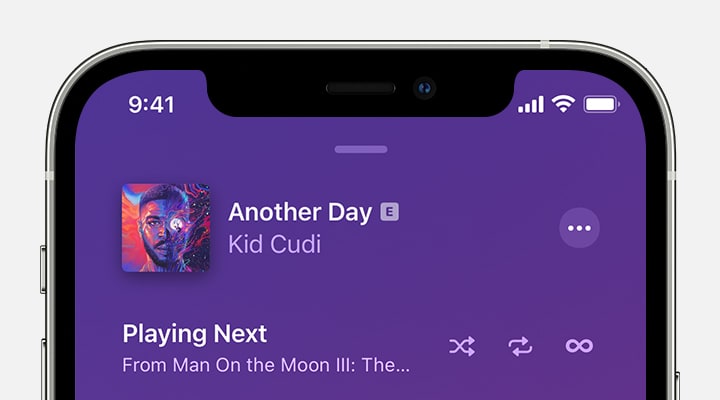
"How to turn off shuffle

  1. Tap the song that's playing at the bottom of your screen.
  2. Tap the Playing Next button  in the lower-right corner.

  3. Tap the Shuffle button  to turn Shuffle Off.

When the Shuffle button isn't highlighted, shuffle is turned off.


If you don't see the Shuffle button


How to shuffle music on your iPhone


Let us know if you have any questions.

Thank you for using Apple Support Communities.

Take care!


This thread has been closed by the system or the community team. You may vote for any posts you find helpful, or search the Community for additional answers.

How do I stop Apple Music from auto shuffling every time it connects to Bluetooth in my car.

Welcome to Apple Support Community
A forum where Apple customers help each other with their products. Get started with your Apple Account.