Resolution of screenshot is off

I recently bought a new 13-inch M1 MacBook Air, and the about my mac says the screen resolution is 2560x1600. However, when i take a screenshot the resolution is 2880x1880 (according to preview). Is there any way I can fix this? The disparity in resolution means I can't make the screenshot fit properly on my MBA. Help is appreciated

MacBook Air 13″, macOS 12.1

Posted on Feb 11, 2022 11:02 PM

Reply
Question marked as Top-ranking reply

Posted on Feb 14, 2022 8:29 AM

Eentelijent wrote:

Thanks, safe mode seems to fix it up. But i don't get why the image can just "expand" like that. It only fixes in safe mode though;

Or rather, safe mode breaks it. One of the things Safe Mode disables is much of the graphics animation. Obviously some parts are still functional, because the screen still works. But everything runs slower because animations aren't happening on the GPU in the same way.


I think this also explains the screen shot resolution discrepancies that you are seeing. The system provides resolution independence. The screen is designed to look the same way regardless of your chosen resolution or scale factor. I think it does this by internally running the GPU internally at a higher resolution. Everything gets downsampled to whatever resolution and scale factor you are running at. But when you take a screenshot, what should it do? Should it give you the downsampled version? If it does, and you scale that back up to look at details, it probably won't look right. The pixels will probably be slightly off. And if you are taking those screenshots to ensure pixel-perfection in your work, you might get really frustrated.


But if you are running in safe mode, that pixel-perfect optimization is disabled and you get the "correct" resolution.


The moral of the storey? Just take your screenshots and downsample to the resolution you need.

22 replies
Question marked as Top-ranking reply

Feb 14, 2022 8:29 AM in response to Eentelijent

Eentelijent wrote:

Thanks, safe mode seems to fix it up. But i don't get why the image can just "expand" like that. It only fixes in safe mode though;

Or rather, safe mode breaks it. One of the things Safe Mode disables is much of the graphics animation. Obviously some parts are still functional, because the screen still works. But everything runs slower because animations aren't happening on the GPU in the same way.


I think this also explains the screen shot resolution discrepancies that you are seeing. The system provides resolution independence. The screen is designed to look the same way regardless of your chosen resolution or scale factor. I think it does this by internally running the GPU internally at a higher resolution. Everything gets downsampled to whatever resolution and scale factor you are running at. But when you take a screenshot, what should it do? Should it give you the downsampled version? If it does, and you scale that back up to look at details, it probably won't look right. The pixels will probably be slightly off. And if you are taking those screenshots to ensure pixel-perfection in your work, you might get really frustrated.


But if you are running in safe mode, that pixel-perfect optimization is disabled and you get the "correct" resolution.


The moral of the storey? Just take your screenshots and downsample to the resolution you need.

Feb 14, 2022 10:15 AM in response to Eentelijent

Eentelijent wrote:

I recently bought a new 13-inch M1 MacBook Air, and the about my mac says the screen resolution is 2560x1600. However, when i take a screenshot the resolution is 2880x1880 (according to preview). Is there any way I can fix this?

FWIW, there is nothing to fix.


The bottom line is, a screen shot of a retina Mac laptop will be exactly double the resolution of the setting chosen in System Preferences > Displays. The "Default" setting is 1440 x 900 for an M1 MBA, hence the 2880 x 1800 screen shot.

Feb 14, 2022 6:43 AM in response to Eentelijent

Eentelijent wrote:

Thanks, safe mode seems to fix it up. But i don't get why the image can just "expand" like that. It only fixes in safe mode though;

FWIW, Safe Mode does not "fix it up". What happens is normal for Retina Mac laptops. Here is one explanation from 8+ years ago. There are others.

https://superuser.com/questions/612492/retina-macbook-pro-13-inch-screenshot-resolution-is-higher-than-built-in-display/612755

Feb 12, 2022 4:58 AM in response to Eentelijent

1 - Suggest restarting in Safe Mode. This will perform a Disk Repair, clear cache files and only load Apple Software, extensions and fonts. The boot up will be slow and can take some time -Normal.


2 - Does the issue present in this mode ?


3 - If not - there could be something in the main User Account playing up. To further isolate this - Set up users, guests, and groups on Mac. Then log out of the Main User account and log into the dummy account and test again if the issue persists.


4 - If the issue is present in the dummy account - then this appears to be a System Wide issue.

Feb 14, 2022 3:30 AM in response to Eentelijent

Well since the issue does Not Appear in Safe Mode which basically Eliminates Third Party Software from loading >>


2 - Does the issue present in this mode ? NO !


3 - If not - there could be something in the main User Account playing up. To further isolate this - Set up users, guests, and groups on Mac. Then log out of the Main User account and log into the dummy account and test again if the issue persists.


4 - If the issue is present in the dummy account - then this appears to be a System Wide issue.


5 - Suggest downloading the Application Etrecheck directly from a well Respected ASC Contributor. And Safe to use.


The application is free or paid from added features. 


Run the application with Full Disc Access ( Security & Privacy - Full Disc Access ).
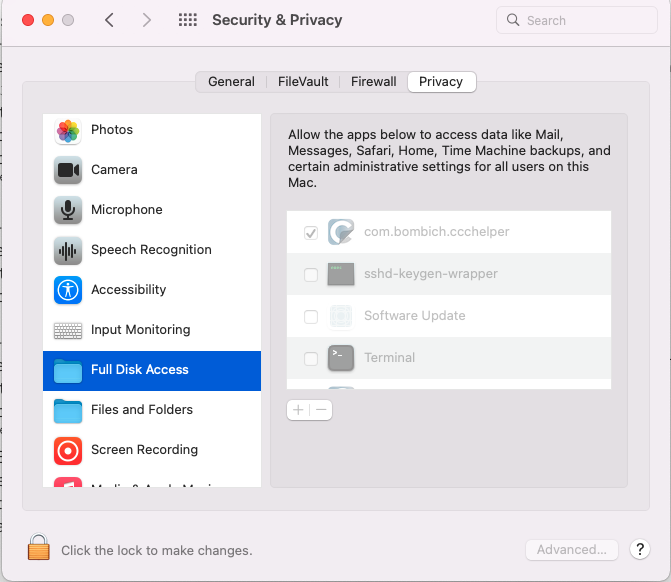


It will take a Snap Shot -  both the hardware and software.


 The Report will Not Reveal Any Personal Information. 


Post back the Full Report - copy and paste - using the Additional Text Icon ( 3rd Icon to last )


We can have a look at the report for possible issues and may have possible suggestions to resolve the issues.


Any Third Party Applications that will interfere with the normal operation of the OS, alter, modify, remove or delete or attempt to do so is an invitation for disaster and may require a Reinstallation of the OS.


This includes AntiVirus, Disk Cleaners, Disk Optimizes, UnInstaller etc.


This will include CleanMyMac 


This will include BitDefender 


This will included Norton Antivirus


Sophos Av Software


Intego AntiVirus


McAfee


MacKeeper


Avast AntiViru 


Ad Guard



Feb 14, 2022 10:57 AM in response to dialabrain

dialabrain wrote:


etresoft wrote:

But if you are running in safe mode, that pixel-perfect optimization is disabled and you get the "correct" resolution.
I forgot to mention, as I said above, Safe Mode doesn't do anything as far as the resolution goes. If you have the Default setting set in System Preferences > Displays, the resulting screen shot will be 2880 x 1800 whether in Safe Mode or not.

I was basing that on the report from the OP. I didn't actually test it, nor do I care to. If I need a screenshot to be at a specific resolution, I only need to ensure that the screenshot has the correct aspect ratio. I can then scale it down (or up) to meet my requirements.


The only time that the actual resolution of a screen shot has ever been a factor is when uploading to the Mac App Store. I hardly think my app previews are going to be so beautiful that users want to seem them at full resolution on a retina display. So I make sure my resolution has the same aspect ratio as the smallest acceptable screenshot, take my screenshot, resize as necessary, and I'm done. Had I made any assumptions about what my resolution was, or should have been, that would have only served to turn a 2-minute task into a 2-hour task.

Feb 14, 2022 10:34 AM in response to etresoft

etresoft wrote:

But if you are running in safe mode, that pixel-perfect optimization is disabled and you get the "correct" resolution.

I forgot to mention, as I said above, Safe Mode doesn't do anything as far as the resolution goes. If you have the Default setting set in System Preferences > Displays, the resulting screen shot will be 2880 x 1800 whether in Safe Mode or not.

This thread has been closed by the system or the community team. You may vote for any posts you find helpful, or search the Community for additional answers.

Resolution of screenshot is off

Welcome to Apple Support Community
A forum where Apple customers help each other with their products. Get started with your Apple Account.
