
Powerbeats Pro
My right ear bud has no sound coming from it. But the ear bud still pauses my music, and controls the volume. And it’s connecting to the charging case saying it is charged. Is my ear bud broken or does it need to be rest somehow?
My right ear bud has no sound coming from it. But the ear bud still pauses my music, and controls the volume. And it’s connecting to the charging case saying it is charged. Is my ear bud broken or does it need to be rest somehow?
Hi smoggyswift,
Thank you for using the Apple Support Communities. We saw the post about your Powerbeats Pro, and you're in the right place for help. We understand that it seems to respond and charge, but it doesn't play audio.
Try tapping Settings > Accessibility > Audio/Visual. Then, under the Balance section, make sure it's set to the middle.
If this doesn't help, resetting might be a good idea as you mentioned. Here's how to Reset your Beats earphones:
"Reset Powerbeats Pro
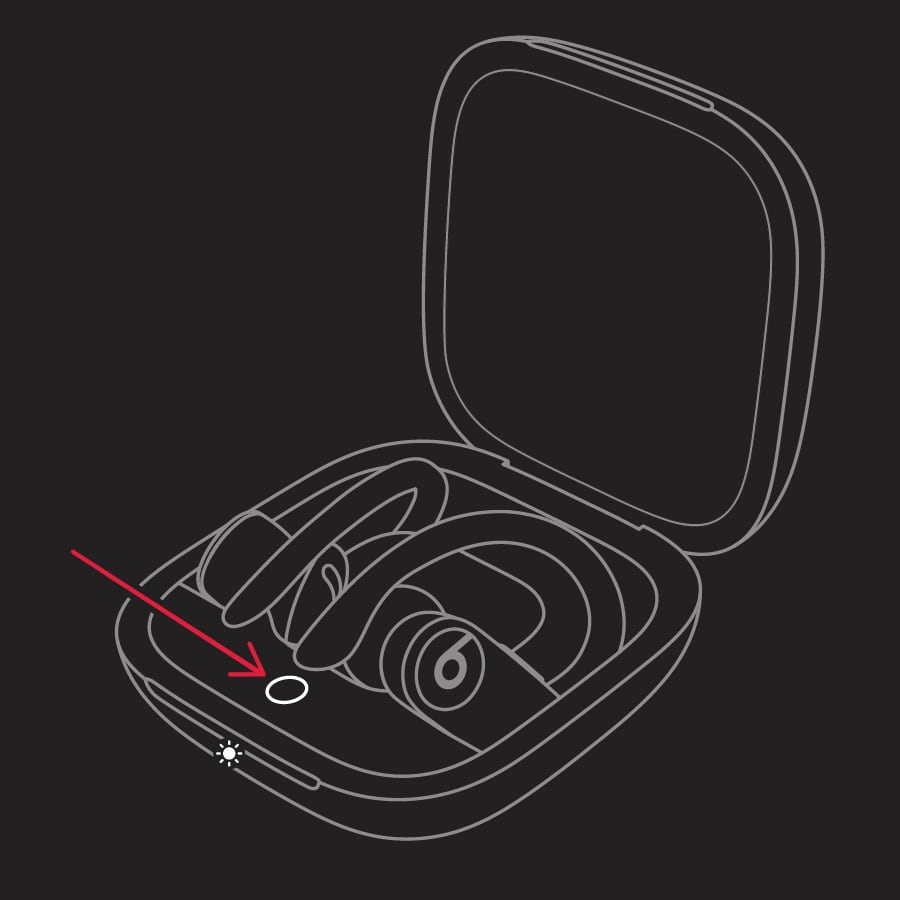
The LED indicator light will continue to flash white, which means that you can pair your Powerbeats Pro with your iPhone, Mac, Android device, or other device again."
Let us know if this helps.
Kind regards.
Hi smoggyswift,
Thank you for using the Apple Support Communities. We saw the post about your Powerbeats Pro, and you're in the right place for help. We understand that it seems to respond and charge, but it doesn't play audio.
Try tapping Settings > Accessibility > Audio/Visual. Then, under the Balance section, make sure it's set to the middle.
If this doesn't help, resetting might be a good idea as you mentioned. Here's how to Reset your Beats earphones:
"Reset Powerbeats Pro
The LED indicator light will continue to flash white, which means that you can pair your Powerbeats Pro with your iPhone, Mac, Android device, or other device again."
Let us know if this helps.
Kind regards.
Powerbeats Pro
