Titles disappear when I copy photos from Macbook Pro Photos to external drive

My external drive has been formatted for the Mac. It is an empty 2Tb drive. I have my photos in the Photo Library organised in a way that I want them to appear, in various albums.


When I copy it to my external drive, the photos re-order themselves, seemingly randomly, and the Titles do not appear at all, so it's all a mystery to me. My titling system consists of Photo No 1 being 0001, photo 42 is 0042 etc, within each it is date labelled and the description, eg 0001 01Jan14 dog


Can I get the pics to appear in my preferred order, with titles intact?


TIA.

Posted on Feb 16, 2022 12:29 AM

Reply
Question marked as Top-ranking reply

Posted on Feb 17, 2022 3:18 AM

Hi - your external drive is perfect.


Are you copying the library package to the external drive (If so, the copy should work exactly the same as the source with titles etc)


Or are you copying individual image files. If the latter, how? Drag/Drop, or file>export. Drag/drop only gives the original filename. To get the files named as your titles, then you need to use file>export, then choose:

filename - use title.


Similar questions

12 replies
Question marked as Top-ranking reply

Feb 17, 2022 3:18 AM in response to saliero

Hi - your external drive is perfect.


Are you copying the library package to the external drive (If so, the copy should work exactly the same as the source with titles etc)


Or are you copying individual image files. If the latter, how? Drag/Drop, or file>export. Drag/drop only gives the original filename. To get the files named as your titles, then you need to use file>export, then choose:

filename - use title.


Feb 16, 2022 1:37 AM in response to saliero

You copied the Photos Library to the external drive, and then opened it again in Photos?

Where are you looking for the titles? Below the thumbnails of the photos or in the title field in the info of the photo?

Or are you looking inside the library package of the Photos Library?

Which system version is installed on the Mac?


The handling of the titles of the photos is depending on the system version. Some versions of photos are using the filenames of the photos as default titles, some don't.

  • Photos 1 to Photos 3 did not use the filenames at all as titles.
  • Photos 4 on Mojave did show the filename as the default title below the thumbnails and did sort the images by the filename when sorting by title.
  • Photos 5 to 7 are also showing the filename as a default title, but do no longer sort by the filename, if the photo does not have a title.

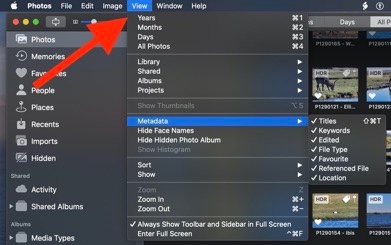
We will only see the titles below the thumbnails, if we enable the option "View > Metadata > Title" in the View menu, and if we click the "Aspect" button to the left of the zoom slider in the toolbar, see: How to view the titles or filenames below the thumbnails in Photos 5.0 - Apple Community


How to switch between the tiles and the correct aspect ratio to see the thumbnails without cropping:
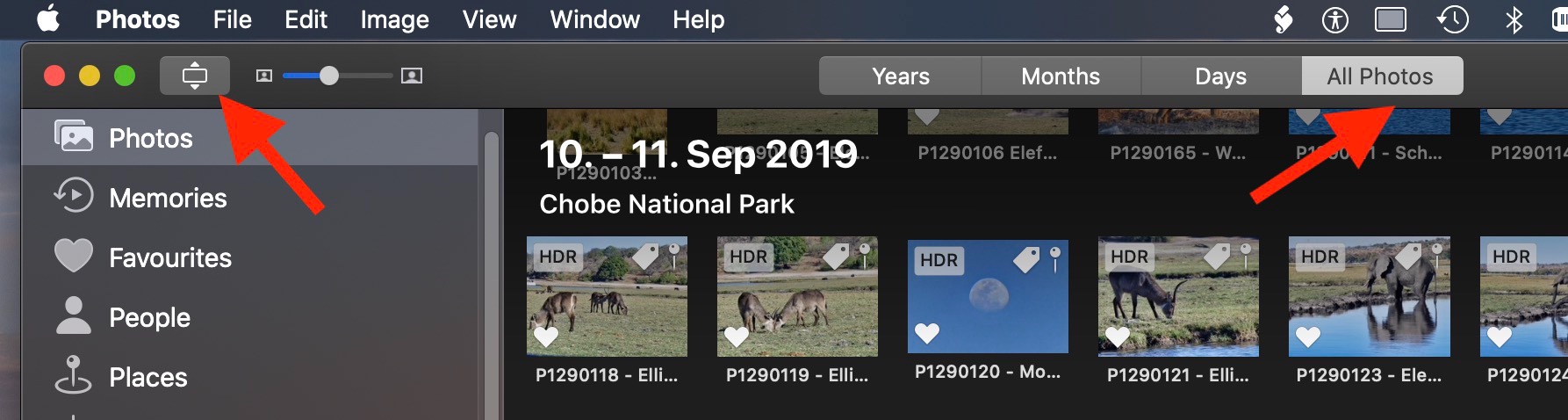

How to enable the titles below the thumbnails in the All Photos view and the albums:

Feb 16, 2022 2:32 AM in response to léonie

Thank you for your swift reply.


In answer to your questions:


I am looking for the titles below the thumbnails in the copy on the external drive. That is where they appear in the version on the Mac.


Version I am using is High Sierra v 10.13.6


I cannot see View > metadata> Title in the copy on the external drive. Or cannot find where to see it.


Sally


Feb 18, 2022 9:37 PM in response to saliero

So, that worked for SOME, but not all.


I have attached an example of where it did not transfer as per caption / title on thumbnail.


Also, what I get when I right click on the Image and bring up "Info".

So it seems it transfers the SECOND line, not the top line which is how it appears on the thumbnail - so I will get it filed as 2013 01Jan 20.jpg in the transfer. It also reorders the pics out of the order I have them in the album.


Feb 22, 2022 10:06 PM in response to saliero

I'm kind of ready to give up and resign myself to having to rename and reorder the thousands of photos.

I never had this problem when I had a PC .... they would transfer exactly as I had them.


The reason I need to get them all off my Macbook is I don't have enough space left to download the latest software upgrade (Monterey)! much less transfer from my iPhone to be able to make some new albums.

This thread has been closed by the system or the community team. You may vote for any posts you find helpful, or search the Community for additional answers.

Titles disappear when I copy photos from Macbook Pro Photos to external drive

Welcome to Apple Support Community
A forum where Apple customers help each other with their products. Get started with your Apple Account.



