I lost my phone. Lost mode pending, location has still been showing and got a seen update in the middle of the night

I lost my phone13 in an uber. Feb 20th 4am it is now 21 8pm and I can still see the lost mode pending since 9am 20th but I have had a live location this entire time updating constantly. Calling no answer either so maybe SIM card is out phone not sure phone has been off the entire time though. Im not sure if it's truly the rider after me the driver thats a whole other ordeal but I did get a "just seen iPhone" notification at 5:28am so I'm thinking defiantly someone has it right because theres no way it would still be tracking if it was lost in the snow. I have never lost a device so not sure how this works would appreciate any help.

iPhone 13

Posted on Feb 21, 2022 5:01 PM

Reply
Question marked as Top-ranking reply

Posted on Feb 22, 2022 1:52 AM

Did you enable Find My?

If you didn't turn on Find My [device] before your device was lost or stolen, it can't be used to locate your device nor you can use the IMEI number for tracking the device.


The best action would be to Change your Apple ID password and change the passwords for other internet accounts on your device. This can include email accounts, Facebook, Twitter, etc...



Don'ts


If you remove the device from your account after you erase it, Activation Lock will be turned off. This allows another person to turn on and use your device.


Find IMEI & Serial No. of the Lost Device


If your iPhone, iPad, or iPod touch is lost or stolen - Apple ...

Find the serial number or IMEI on your iPhone, iPad, or iPod ...

You may use a web browser to get the Serial Number and the IMEI Number. You cannot track using the IMEI number. but you may need it so keep it handy


Log in to https://appleid.apple.com with your Apple ID credentials. All your devices will be listed there. Click on any to get the details.


Do's


Mark As Lost.

Erase your device.



Beware of Phishing!

Be careful and be smart to --> Recognize and avoid phishing messages, phoney support calls ...

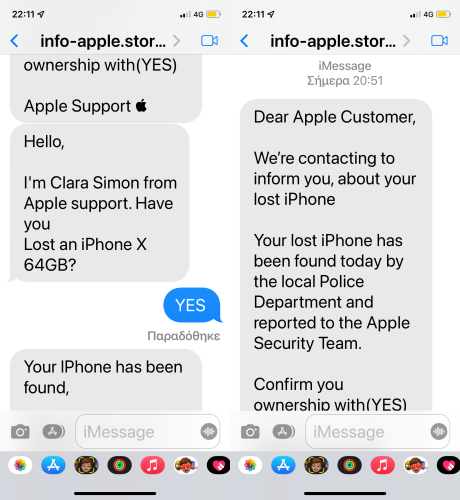
Note: Apple will never send you any info on Lost/Found iPhones. It (Phishing) may appear as the image given below.


Switched Off? Still traceable


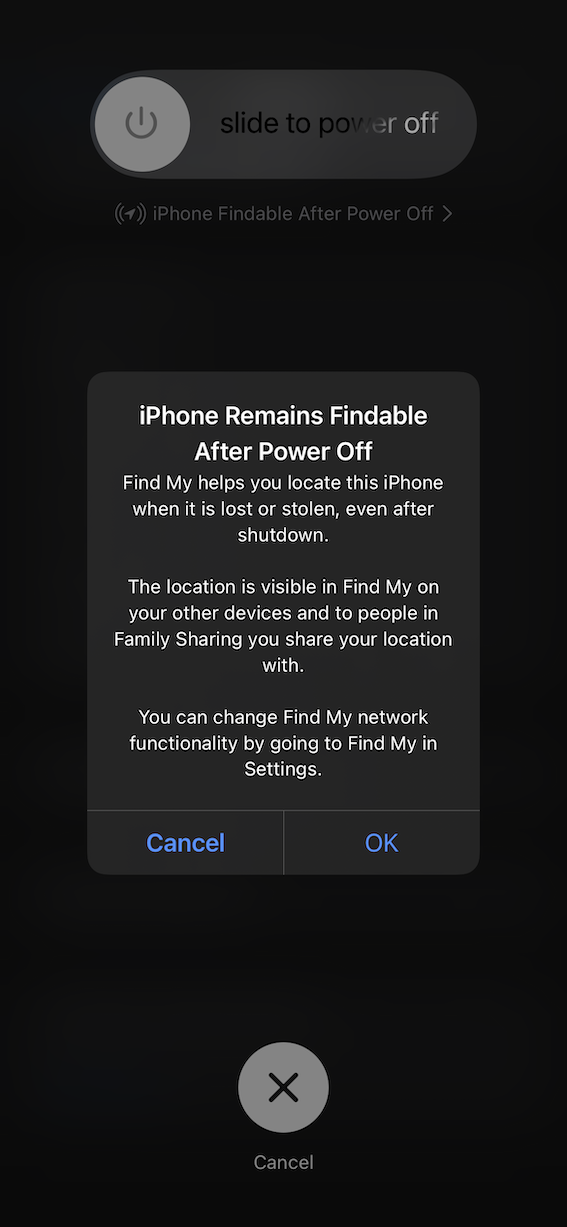
Even if the iPhone is switched off it is findable, see the pic below.


Device Offline?

I see my device in Find My, but it's offline
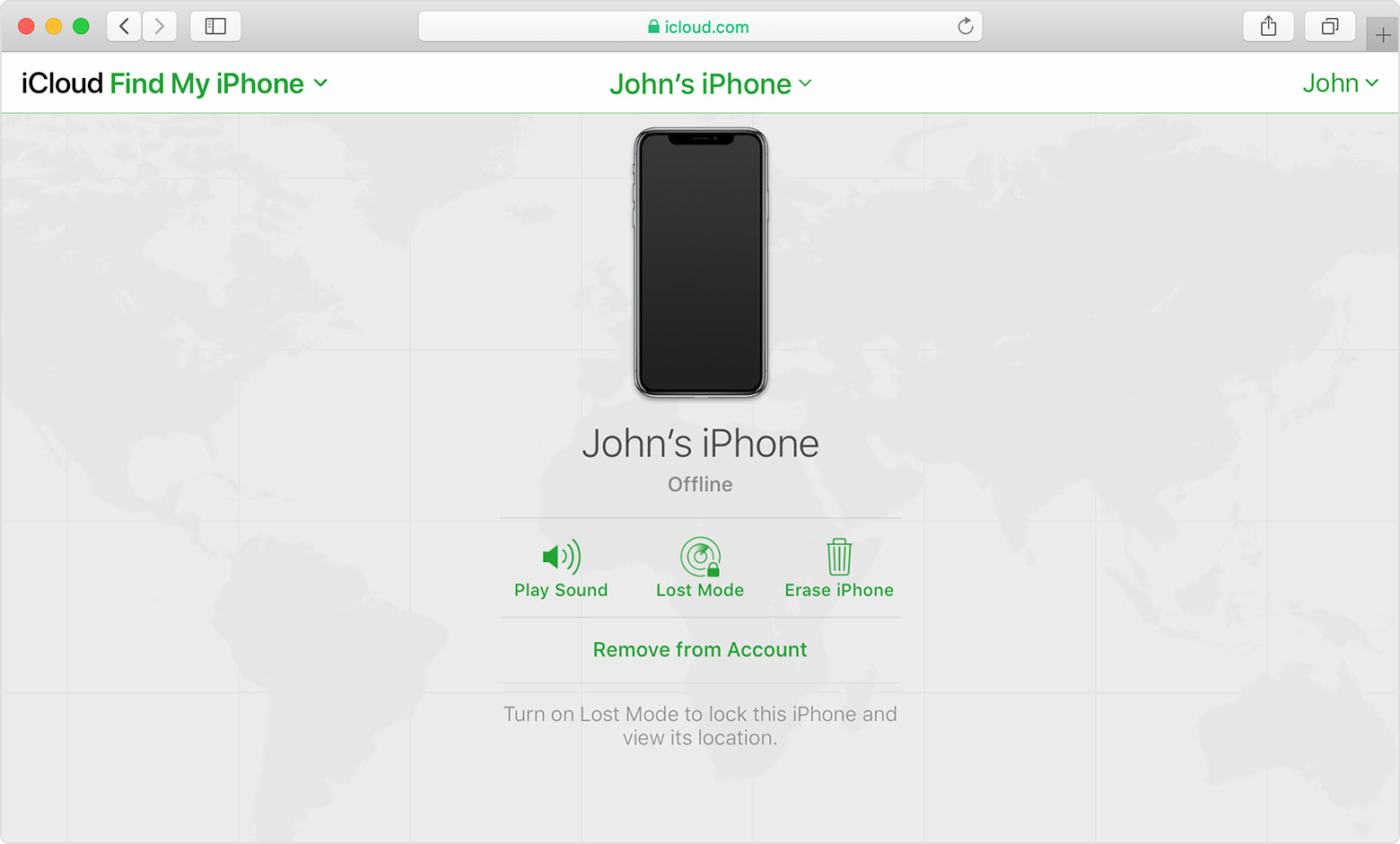
If you see "Offline," "No location available," or "Location Services Off," your device might be offline for one of these reasons:


It's powered off, the battery has run out, or more than 24 hours passed since the last location was sent to Apple (if Send Last Location is turned on). When your device is connected to the Internet, you can see the remaining battery in the upper-right corner of the information pane.

Your Find My compatible device isn't connected to a known Wi-Fi or data network. Wait a few minutes and try again.

You're in a country or region where we don't offer this feature. This feature might not be available in your country or region due to technical limitations or local law.


You can still play a sound, send a message, issue a lock request, or start an erase of your iOS device with Find My [device]. Your device receives the command after you turn on your device and connect to the Internet.


If you contact your wireless service provider to report your device lost or stolen, they might deactivate your SIM card or account. This turns off service for your iPhone and you won't be able to find, play a sound, send a message, issue a lock request, or start an erase of your iOS device with Find My [device]. However, we'll help you learn how to protect your information.


Your device's last known location is available for one day. If your device is offline or can't connect to Find My [device] for more than 24 hours, you won't be able to see the last known location.



1 reply
Question marked as Top-ranking reply

Feb 22, 2022 1:52 AM in response to JRjess1109

Did you enable Find My?

If you didn't turn on Find My [device] before your device was lost or stolen, it can't be used to locate your device nor you can use the IMEI number for tracking the device.


The best action would be to Change your Apple ID password and change the passwords for other internet accounts on your device. This can include email accounts, Facebook, Twitter, etc...


Don'ts


If you remove the device from your account after you erase it, Activation Lock will be turned off. This allows another person to turn on and use your device.


Find IMEI & Serial No. of the Lost Device


If your iPhone, iPad, or iPod touch is lost or stolen - Apple ...

Find the serial number or IMEI on your iPhone, iPad, or iPod ...

You may use a web browser to get the Serial Number and the IMEI Number. You cannot track using the IMEI number. but you may need it so keep it handy


Log in to https://appleid.apple.com with your Apple ID credentials. All your devices will be listed there. Click on any to get the details.


Do's


Mark As Lost.

Erase your device.


Beware of Phishing!

Be careful and be smart to --> Recognize and avoid phishing messages, phoney support calls ...

Note: Apple will never send you any info on Lost/Found iPhones. It (Phishing) may appear as the image given below.


Switched Off? Still traceable


Even if the iPhone is switched off it is findable, see the pic below.


Device Offline?

I see my device in Find My, but it's offline

If you see "Offline," "No location available," or "Location Services Off," your device might be offline for one of these reasons:


It's powered off, the battery has run out, or more than 24 hours passed since the last location was sent to Apple (if Send Last Location is turned on). When your device is connected to the Internet, you can see the remaining battery in the upper-right corner of the information pane.

Your Find My compatible device isn't connected to a known Wi-Fi or data network. Wait a few minutes and try again.

You're in a country or region where we don't offer this feature. This feature might not be available in your country or region due to technical limitations or local law.


You can still play a sound, send a message, issue a lock request, or start an erase of your iOS device with Find My [device]. Your device receives the command after you turn on your device and connect to the Internet.


If you contact your wireless service provider to report your device lost or stolen, they might deactivate your SIM card or account. This turns off service for your iPhone and you won't be able to find, play a sound, send a message, issue a lock request, or start an erase of your iOS device with Find My [device]. However, we'll help you learn how to protect your information.


Your device's last known location is available for one day. If your device is offline or can't connect to Find My [device] for more than 24 hours, you won't be able to see the last known location.


This thread has been closed by the system or the community team. You may vote for any posts you find helpful, or search the Community for additional answers.

I lost my phone. Lost mode pending, location has still been showing and got a seen update in the middle of the night

Welcome to Apple Support Community
A forum where Apple customers help each other with their products. Get started with your Apple Account.