Charge/Pairing Problem

One of my /beats Pro earphones wouldn't charge or connect on my iphone 11. I completed the system reset, but now I can't pair back to my iphone. The light on the case remains charging mode so it won't pair or will it

iPhone 11, iOS 15

Posted on Mar 2, 2022 11:08 AM

Reply
Question marked as Top-ranking reply

Posted on Mar 3, 2022 9:48 AM

Hi ShirleyBaby,


Are you referring to the Powerbeats Pro? If so, when you mention you completed a "system reset" was this resetting them using the steps below, found in the article here? Reset your Beats earphones


"Reset Powerbeats Pro

  1. Place both earbuds in the case. Leave the case open.
  2. Press and hold the system button on the case for 15 seconds or until the LED indicator light flashes red and white.
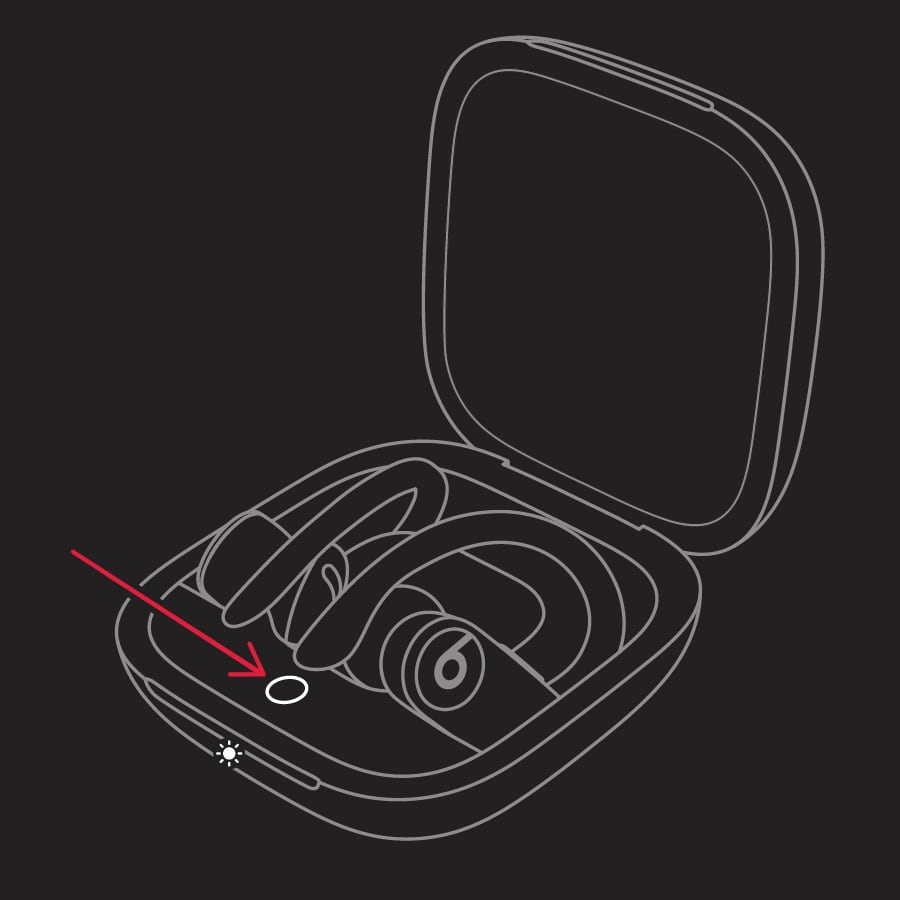
  3. Powerbeats Pro indicator light
  4. Release the system button."


If so, test the pairing to a different iOS or Android device or a computer with the steps outlined here: Set up and use your Powerbeats Pro with an iPhone, Mac, or other device


You can also test the steps while the charger is connected. Be sure to also try using another power source or a different cable to test.

Should the issue remain, service may be needed. Check on your options and contact Apple Support directly using the links below.


Beats Repair and Service


Contact Apple Support


Cheers!


1 reply
Question marked as Top-ranking reply

Mar 3, 2022 9:48 AM in response to ShirleyBaby

Hi ShirleyBaby,


Are you referring to the Powerbeats Pro? If so, when you mention you completed a "system reset" was this resetting them using the steps below, found in the article here? Reset your Beats earphones


"Reset Powerbeats Pro

  1. Place both earbuds in the case. Leave the case open.
  2. Press and hold the system button on the case for 15 seconds or until the LED indicator light flashes red and white.
  3. Powerbeats Pro indicator light
  4. Release the system button."


If so, test the pairing to a different iOS or Android device or a computer with the steps outlined here: Set up and use your Powerbeats Pro with an iPhone, Mac, or other device


You can also test the steps while the charger is connected. Be sure to also try using another power source or a different cable to test.

Should the issue remain, service may be needed. Check on your options and contact Apple Support directly using the links below.


Beats Repair and Service


Contact Apple Support


Cheers!



This thread has been closed by the system or the community team. You may vote for any posts you find helpful, or search the Community for additional answers.

Charge/Pairing Problem

Welcome to Apple Support Community
A forum where Apple customers help each other with their products. Get started with your Apple Account.