Force quit application

Force quit applications keep popping up every few seconds to remind me that my system has run out of application memory. It shuts down my tabs, or whatever im doing like music, shows, or work. I have force quitted the apps that its asked multiple times for a long time. According to my Mac storage I have a lot of space and memory left... I just got my Mac 2 months ago. How do I stop the application pop up from coming up? Its really annoying I just want to to stop popping up.

MacBook Air 13″, 12.0

Posted on Mar 6, 2022 10:04 PM

Reply
Question marked as Top-ranking reply

Posted on Mar 7, 2022 2:39 AM

Suggest downloading the Application Etrecheck directly from a well Respected ASC Contributor. And Safe to use.


The application is free or paid from added features. 


Run the application with Full Disc Access ( Security & Privacy - Full Disc Access ).
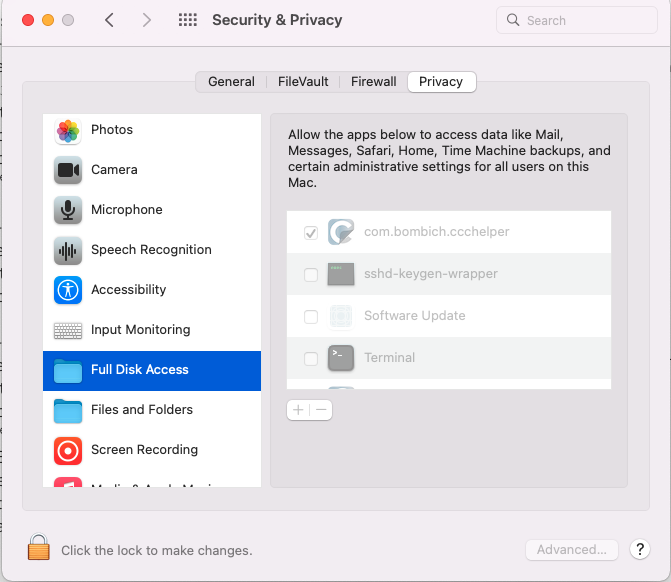


It will take a Snap Shot -  both the hardware and software.


 The Report will Not Reveal Any Personal Information. 


Post back the Full Report - copy and paste - using the Additional Text Icon ( 3rd Icon to last )


We can have a look at the report for possible issues and may have possible suggestions to resolve the issues.


Any Third Party Applications that will interfere with the normal operation of the OS, alter, modify, remove or delete or attempt to do so is an invitation for disaster and may require a Reinstallation of the OS.


This includes AntiVirus, Disk Cleaners, Disk Optimizes, UnInstaller etc.


Any of the below should be removed as per Developers Instructions 


This will include CleanMyMac , This will include BitDefender


This will included Norton Antivirus , Sophos Av Software


Intego AntiVirus, McAfee, MacKeeper, Avast AntiVirus


Ad Guard, Webroot


The The Built in Security  is all that is required.

1 reply
Question marked as Top-ranking reply

Mar 7, 2022 2:39 AM in response to 3lizaPearl

Suggest downloading the Application Etrecheck directly from a well Respected ASC Contributor. And Safe to use.


The application is free or paid from added features. 


Run the application with Full Disc Access ( Security & Privacy - Full Disc Access ).


It will take a Snap Shot -  both the hardware and software.


 The Report will Not Reveal Any Personal Information. 


Post back the Full Report - copy and paste - using the Additional Text Icon ( 3rd Icon to last )


We can have a look at the report for possible issues and may have possible suggestions to resolve the issues.


Any Third Party Applications that will interfere with the normal operation of the OS, alter, modify, remove or delete or attempt to do so is an invitation for disaster and may require a Reinstallation of the OS.


This includes AntiVirus, Disk Cleaners, Disk Optimizes, UnInstaller etc.


Any of the below should be removed as per Developers Instructions 


This will include CleanMyMac , This will include BitDefender


This will included Norton Antivirus , Sophos Av Software


Intego AntiVirus, McAfee, MacKeeper, Avast AntiVirus


Ad Guard, Webroot


The The Built in Security  is all that is required.

This thread has been closed by the system or the community team. You may vote for any posts you find helpful, or search the Community for additional answers.

Force quit application

Welcome to Apple Support Community
A forum where Apple customers help each other with their products. Get started with your Apple Account.