
beats studio buds article for bluetooth pairing did not work
Correction to my last question, it was Beats Studio Buds that I cannot pair with iphone12 pro max. In addition there is no button on the case to press as suggested.
Correction to my last question, it was Beats Studio Buds that I cannot pair with iphone12 pro max. In addition there is no button on the case to press as suggested.
Hi woodcarver145,
Thanks for posting in Apple Support Communities. We don't see your previous question but it sounds like you've tried some great troubleshooting steps to pair your Beats Studio Buds with your iPhone. We noticed that you recently reviewed Set up and use your Beats Studio Buds. What happens when you try the following steps in the iPhone section?
1.Turn on Bluetooth on your iPhone, iPad, or iPod touch.
2.With the case lid open, hold your Beats Studio Buds next to your unlocked iPhone, iPad, or iPod touch.
3.Follow the onscreen instructions. If you don't see any instructions, follow the steps to pair your Beats Studio Buds with another device.
If those steps don't help, next try to Reset your Beats Studio Buds.
1.Place both earbuds in the charging case. Leave the case open.
2.Press and hold the system button on the case for 15 seconds or until the LED indicator light flashes red and white.
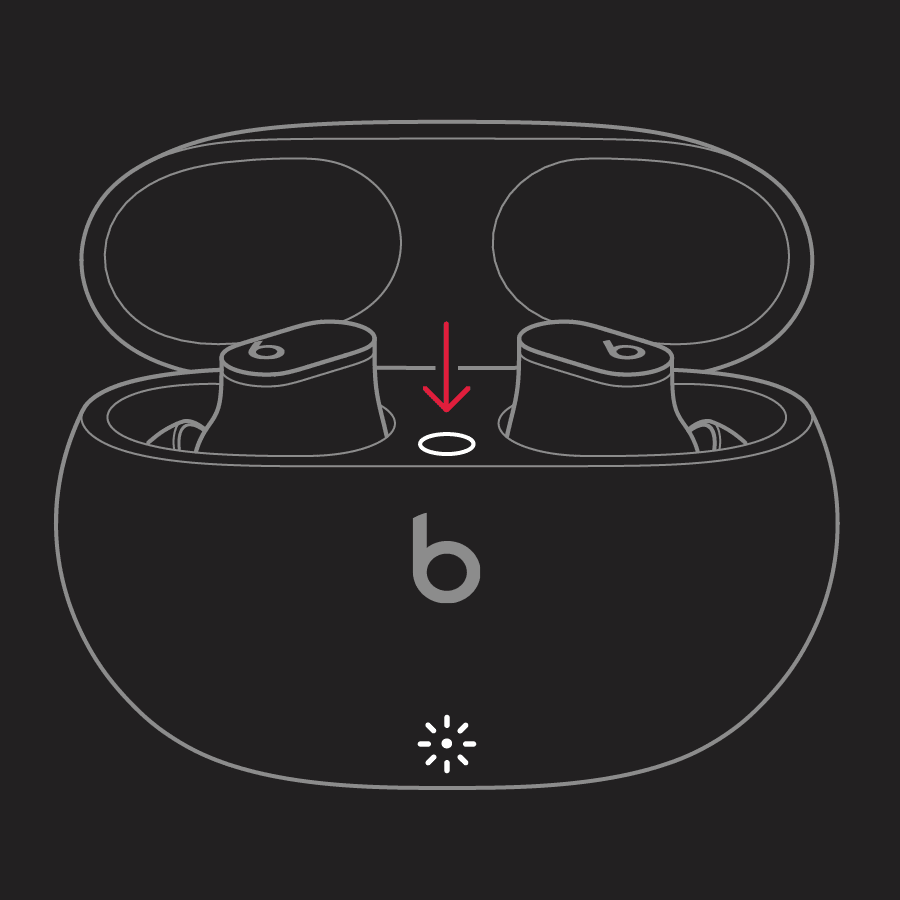
3.Release the system button.
The LED indicator light will continue to flash white, which means that you can pair your Beats Studio Buds with your iPhone, Mac, Android device, or other device again.
Have a great day!
beats studio buds article for bluetooth pairing did not work

