Welcome Farukh1503,
To make sure we're on the same page, you're having an issue with your Apple Music student subscription charges. Are you dismissing the notification to be charged for the second month?
Do you have a card on file for your Apple ID? If not, we'd recommend updating or adding a card to your account, since that is what needs to be charged for the active subscription: Change, add, or remove Apple ID payment methods
How to change your payment method on your iPhone, iPad, or iPod touch
1. Open the Settings app.
2. Tap your name.
3. Tap Payment & Shipping. You might be asked to sign in with your Apple ID.
4. From here, you can do these things:
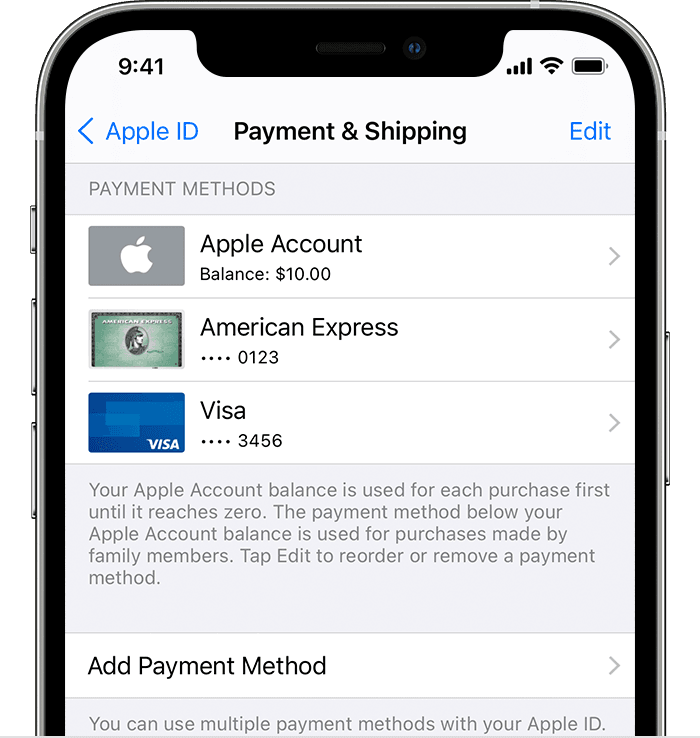
- Add a payment method — Tap Add Payment Method.
- Update a payment method — Tap the payment method, then edit your information. You might need to enter the security code that's printed on your credit or debit card. If you use the card with Apple Pay, go to the Wallet app to edit the card information.
- Remove a payment method — Tap Edit, tap the red Delete button, then tap Remove. If you have an unpaid balance, have subscriptions including an iCloud storage plan, or you use purchase sharing, you can't remove all payment methods. Learn how to remove all payment methods.
- Change the order of your payment methods — Tap Edit, then drag the move order icon  .*
.*
We'd also confirm that you've taken these steps to set up the Apple Music student subscription: Get an Apple Music student subscription
How to get a student subscription to Apple Music
1. Open the Apple Music app or iTunes.
2. Go to Listen Now or For You.
3. Tap or click the trial offer (one trial per person or family).
4. Choose Student, then tap or click Verify Eligibility.
5. You'll be taken to the UNiDAYS website where you'll need to follow the onscreen prompts to verify your enrollment. After UNiDAYS verifies that you're a student, you'll be redirected back to the Apple Music app or iTunes.
6. Sign in with the Apple ID and password that you use to make purchases. If you don’t have an Apple ID, choose Create New Apple ID, then follow the steps. If you're not sure if you have an Apple ID, we can help you find out.
7. Confirm your billing information and add a valid payment method.
8. Tap or click Join.
Are you having issues with your UNiDays account or need to reverify your student status?
Hoping to hear back, cheers.


